CAN COMMUNICATION SYSTEM (w/ VSC) HOW TO PROCEED WITH TROUBLESHOOTING
CAUTION:
Wait at least 90 seconds after disconnecting the cable from the negative (-) battery terminal to disable the SRS system.
Note
-
DTCs for the CAN communication system are as follows: U0073, U0100, U0123, U0124 and U0126.
-
Refer to the troubleshooting procedures of each system if DTCs regarding the CAN communication system are not output.
-
Before measuring the resistance, leave the vehicle for at least 1 minute and do not operate the ignition switch, any switches or any doors. If doors need to be opened in order to check connectors, open the doors and leave them open.
-
When disconnecting the cable from the negative (-) battery terminal, some systems need to be initialized after the cable is reconnected Click here.
Tech Tips
-
Operating the ignition switch, any switches or any doors triggers related ECU and sensor communication with the CAN, which causes resistance variation.
-
*: Use the intelligent tester.
-
VEHICLE BROUGHT TO WORKSHOP
NEXT 
-
INSPECT BATTERY VOLTAGE
Standard voltage 11 to 14 V If the voltage is below 11 V, recharge or replace the battery before proceeding.
NEXT
-
CHECK AND CLEAR DTC*
-
Using the intelligent tester, perform the all DTC check.
Note
-
If a CAN communication trouble code that indicates that an ECU or sensor has a power malfunction or interior malfunction which is causing a communication stop, the problem may not be in the communication line. There is a high possibility that the ECU or sensor has a signal transmission failure. Therefore, first troubleshoot any DTCs related to the ECU or sensor.
-
When CAN communication related connectors are disconnected with the ignition switch ON or ACC, the ECU related to the connector and ECUs of related systems will store a CAN communication DTC.
NEXT
-
-
-
CHECK INSTALLED SYSTEMS (ECU AND SENSOR) THAT USE CAN COMMUNICATION
-
Based on the vehicle equipment and specifications, confirm the systems that use CAN communication Click here.
NEXT
-
-
CHECK DLC3 BRANCH WIRE AND CAN BUS CIRCUIT MAIN WIRE (CANH - CANL)
-
Disconnect the cable from the negative (-) battery terminal before measuring the resistances of the main wire and the branch wire.
-
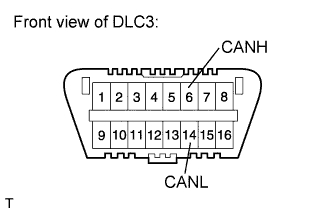
Measure the resistance according to the value(s) in the table below.
Standard Resistance Tester Connection Switch Condition Specified Condition Proceed to 6 (CANH) - 14 (CANL) Ignition switch off OK (54 to 69 Ω) A 6 (CANH) - 14 (CANL) Ignition switch off NG (70 Ω or higher) B 6 (CANH) - 14 (CANL) Ignition switch off NG (less than 54 Ω) C
B 
GO TO OPEN IN CAN MAIN BUS LINE Click here
C
GO TO CHECK CAN BUS LINES FOR SHORT CIRCUIT Click here
A
-
-
CHECK CAN BUS CIRCUIT +B (CANH, CANL - BAT)
-
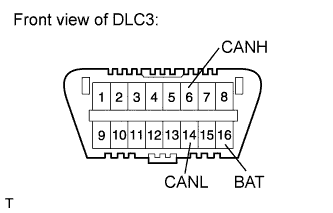
Measure the resistance according to the value(s) in the table below.
Standard Resistance Tester Connection Switch Condition Specified Condition 6 (CANH) - 16 (BAT) Ignition switch off 6 kΩ or higher 14 (CANL) - 16 (BAT) Ignition switch off 6 kΩ or higher
NG
GO TO CHECK CAN BUS LINE FOR SHORT TO +B Click here
OK
-
-
CHECK CAN BUS CIRCUIT GND (CANH, CANL - CG)
-
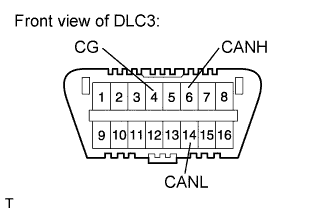
Measure the resistance according to the value(s) in the table below.
Standard Resistance Tester Connection Switch Condition Specified Condition 6 (CANH) - 4 (CG) Ignition switch off 200 Ω or higher 14 (CANL) - 4 (CG) Ignition switch off 200 Ω or higher
NG
GO TO CHECK CAN BUS LINE FOR SHORT TO GND Click here
OK
-
-
CHECK ECUS CONNECTED TO CAN BUS*
-
Connect the cable to the negative (-) battery terminal.
Note
When disconnecting the cable from the negative (-) battery terminal, some systems need to be initialized after the cable is reconnected Click here.
-
Select "Bus Check" from "System Select".
-
Wait 1 minute and then check the display of the connected ECUs and sensors.
Inspection Result Proceed to All ECUs and sensors connected to CAN communication system displayed on screen. A ECU or sensor that should be connected to CAN communication is not displayed (ECU or sensor branch wire open). B ECU or sensor that should be connected to CAN communication is not displayed or display is intermittent during check (ECU or sensor branch wire open on one side). C Note
ECUs and sensors that are not present will not be displayed. Be careful not to mistake them for communication stop malfunctions.
Tech Tips
If the display of an ECU is intermittent during the check, one side of an ECU or sensor branch wire is open. (The signal of the ECU is treated as noise, which affects the response and display of the intelligent tester.)
B
GO TO PROBLEM SYMPTOMS TABLE Click here
C
GO TO OPEN IN ONE SIDE OF CAN BRANCH WIRE FLOWCHART Click here
A
-
-
CHECK COMMUNICATION MALFUNCTION DTC (PAST DTC CHECK)*
-
Select "Bus Check" from "System Select".
-
Write down all of the DTCs stored in each ECU.
Tech Tips
-
If there are communication malfunction DTCs stored but the intelligent tester's "Bus Check - Communication Bus Check" screen displays all of the ECUs and sensors connected to the CAN system, the communication malfunction DTCs may be past malfunctions that are no longer present.
-
For CAN bus main wire malfunctions, related ECUs are also detected. Therefore, determine the malfunctioning area based on all of the DTCs that are output.
NEXT
-
-
-
CHECK DTC COMBINATION TABLE (CAN BUS CIRCUIT BRANCH WIRE OPEN PAST MALFUNCTION)
-
Based on the combination of stored CAN communication system DTCs, determine which ECUs and sensors have a communication stop malfunction Click here.
NEXT
-
-
PERFORM MALFUNCTION SIMULATION TEST (CAN BUS CIRCUIT MAIN WIRE PAST MALFUNCTION)*
-
Using the intelligent tester, clear all DTCs.
-
Perform a malfunction simulation test on all harnesses and connectors related to the CAN bus circuit main wire.
-
Check the DTCs that were stored as a result of the malfunction simulation test. Then determine the malfunctioning area.
NEXT
-
-
ADJUST, REPAIR AND REPLACE
NEXT
-
CONFIRMATION TEST
NEXT
END