SFI SYSTEM, Diagnostic DTC:P2119
| DTC Code | DTC Name |
|---|---|
| P2119 | Throttle Actuator Control Throttle Body Range / Performance |
DESCRIPTION
The electronic throttle control system is composed of the throttle actuator, throttle position sensor, accelerator pedal position sensor, and ECM. The ECM operates the throttle actuator to regulate the throttle valve in response to driver inputs. The throttle position sensor detects the opening angle of the throttle valve, and provides the ECM with feedback so that the throttle valve can be appropriately controlled by the ECM.
| DTC No. | DTC Detection Condition | Trouble Area |
|---|---|---|
| P2119 | The throttle valve opening angle continues to vary greatly from the target opening angle (1 trip detection logic). |
|
MONITOR DESCRIPTION
The ECM determines the actual opening angle of the throttle valve from the throttle position sensor signal. The actual opening angle is compared to the target opening angle commanded by the ECM. If the difference between these two values is outside the standard range, the ECM interprets this as a malfunction in the electronic throttle control system. The ECM then illuminates the MIL and stores this DTC.
MONITOR STRATEGY
| Required Sensors/Components | Throttle actuator (throttle body assembly) |
| Frequency of Operation | Continuous |
TYPICAL ENABLING CONDITIONS
| Throttle actuator | On |
| Throttle actuator duty calculation | Executing |
| Throttle position sensor fail | Not detected |
| Throttle actuator current-cut operation | Not executing |
| Throttle actuator power supply | 4 V or higher |
| Throttle actuator fail | Not detected |
TYPICAL MALFUNCTION THRESHOLDS
| Either of the following conditions is met | 1 or 2 |
| 1. Difference between commanded closed throttle position and current closed throttle position | 0.3 V or higher |
| 2. Difference between commanded open throttle position and current open throttle position | 0.3 V or higher |
CONFIRMATION DRIVING PATTERN
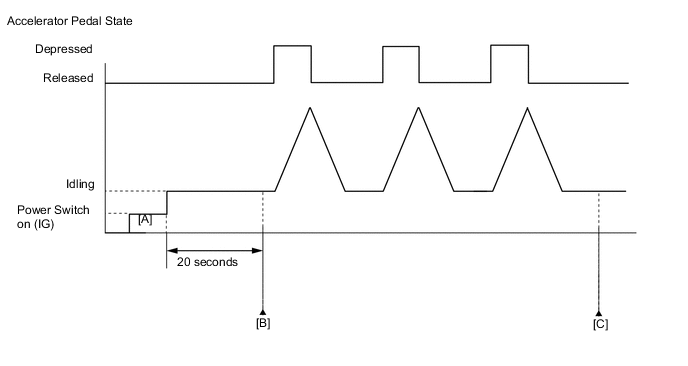
-
Connect the GTS to the DLC3.
-
Turn the power switch on (IG) and turn the GTS on.
-
Clear the DTCs (even if no DTCs are stored, perform the clear DTC procedure).
-
Turn the power switch off and wait for at least 30 seconds.
-
Turn the power switch on (IG) and turn the GTS on [A].
-
Put the engine in inspection mode (maintenance mode) Click here.
-
Start the engine.
-
Idle the engine for 20 seconds.
-
Enter the following menus: Powertrain / Engine and ECT / Trouble Codes [B].
-
Read the pending DTCs.
Tech Tips
-
If a pending DTC is output, the system is malfunctioning.
-
If a pending DTC is not output, perform the following procedure.
-
-
Enter the following menus: Powertrain / Engine and ECT / Utility / All Readiness.
-
Input the DTC: P2119.
-
Check the DTC judgment result.
GTS Display Description NORMAL
-
DTC judgment completed
-
System normal
ABNORMAL
-
DTC judgment completed
-
System abnormal
INCOMPLETE
-
DTC judgment not completed
-
Perform driving pattern after confirming DTC enabling conditions
N/A
-
Unable to perform DTC judgment
-
Number of DTCs which do not fulfill DTC preconditions has reached ECU memory limit
Tech Tips
-
If the judgment result shows NORMAL, the system is normal.
-
If the judgment result shows ABNORMAL, the system has a malfunction.
-
If the judgment result shows INCOMPLETE or N/A, fully depress and release the accelerator pedal 3 times, and then check the DTC judgment result [C].
-
FAIL-SAFE
When this DTC, as well as other DTCs relating to electronic throttle control system malfunctions is stored, the ECM enters fail-safe mode. During fail-safe mode, the ECM cuts the current to the throttle actuator, and the throttle valve is returned to a 5.5° throttle angle by the return spring. The ECM stops the engine and the vehicle can be driven using solely the hybrid system. If the accelerator pedal is depressed firmly and gently, the vehicle can be driven slowly. Fail-safe mode continues until a pass condition is detected, and the power switch is then turned off.
WIRING DIAGRAM
Refer to DTC P2102 Click here.
CAUTION / NOTICE / HINT
Note
Inspect the fuses for circuits related to this system before performing the following inspection procedure.
Tech Tips
-
Refer to "Data List / Active Test" [Throttle Position Commanded, Throttle Position No. 1, Throttle Motor Current, Throttle Motor Duty (Open) and Throttle Motor Duty (Close)] Click here.
-
Read freeze frame data using the GTS. The ECM records vehicle and driving condition information as freeze frame data the moment a DTC is stored. When troubleshooting, freeze frame data can help determine if the vehicle was moving or stationary, if the engine was warmed up or not, if the air fuel ratio was lean or rich, and other data from the time the malfunction occurred.
PROCEDURE
-
CHECK ANY OTHER DTCS OUTPUT (IN ADDITION TO DTC P2119)
-
Connect the GTS to the DLC3.
-
Turn the power switch on (IG).
-
Turn the GTS on.
-
Enter the following menus: Powertrain / Engine and ECT / Trouble Codes.
-
Read the DTCs.
Result Result Proceed to DTC P2119 is output A DTC P2119 and other DTCs are output B Tech Tips
If any DTCs other than P2119 are output, troubleshoot those DTCs first.
B 
GO TO DTC CHART Click here
A 
-
-
READ VALUE USING GTS (THROTTLE POSITION)
-
Connect the GTS to the DLC3.
-
Turn the power switch on (IG).
-
Turn the GTS on.
-
Clear the DTCs Click here.
-
Turn the power switch off and wait for at least 30 seconds.
-
Turn the power switch on (IG).
-
Turn the GTS on.
-
Put the engine in inspection mode (maintenance mode) Click here.
-
Start the engine.
-
Enter the following menus: Powertrain / Engine and ECT / Data List / All Data / Throttle Position No. 1 and Throttle Position Command.
-
Read the values displayed on the GTS while fully depressing and releasing the accelerator pedal quickly.
Result Result Proceed to Throttle Position No. 1 does not change A Throttle Position No. 1 changes even a little B Tech Tips
When a DTC is output, the system changes to fail-safe mode. Therefore, only use the data up until the time the DTC is stored for confirmation.
B 
INSPECT THROTTLE BODY ASSEMBLY (VISUALLY CHECK THROTTLE VALVE) Click here
A
-
-
INSPECT THROTTLE BODY ASSEMBLY (RESISTANCE OF THROTTLE ACTUATOR)
-
Inspect the throttle body assembly Click here.
NG
REPLACE THROTTLE BODY ASSEMBLY Click here
OK
-
-
INSPECT THROTTLE BODY ASSEMBLY (VISUALLY CHECK THROTTLE VALVE)
-
Check for contamination between the throttle valve and housing. If necessary, clean the throttle body assembly. Also, check that the throttle valve moves smoothly.
OK Throttle valve is not contaminated with foreign matter and moves smoothly.
NG
REPLACE THROTTLE BODY ASSEMBLY Click here
OK
-
-
READ VALUE USING GTS (THROTTLE POSITION)
-
Connect the GTS to the DLC3.
-
Turn the power switch on (IG).
-
Turn the GTS on.
-
Clear the DTCs Click here.
-
Turn the power switch off and wait for at least 30 seconds.
-
Turn the power switch on (IG) and turn the GTS on.
-
Enter the following menus: Powertrain / Engine and ECT / Data List / All Data / Throttle Position No. 1, Throttle Position No. 2 and Throttle Position Command.
-
Check the values displayed on the GTS while wiggling the ECM wire harness.
-
Enter the following menus: Powertrain / Engine and ECT / Trouble Codes.
-
Read the DTCs.
Result Result Proceed to Value in Data List changes when wire harness is wiggled, or DTC is output A Other than above B
B
CHECK WHETHER DTC OUTPUT RECURS (DTC P2119) Click here
A
-
-
REPAIR OR REPLACE HARNESS OR CONNECTOR (ECM - THROTTLE BODY ASSEMBLY)
-
As the DTC was stored due to a change in the contact resistance of the connector, repair or replace the wire harness or connector Click here.
NEXT
END
-
-
REPLACE THROTTLE BODY ASSEMBLY
-
Replace the throttle body assembly Click here.
NEXT
-
-
CHECK WHETHER DTC OUTPUT RECURS (DTC P2119)
-
Connect the GTS to the DLC3.
-
Turn the power switch on (IG).
-
Turn the GTS on.
-
Clear the DTCs Click here.
-
Turn the power switch off and wait for at least 30 seconds.
-
Turn the power switch on (IG) and turn the GTS on.
-
Drive the vehicle in accordance with the driving pattern described in the Confirmation Driving Pattern.
-
Enter the following menus: Powertrain / Engine and ECT / Trouble Codes.
-
Read the DTCs.
Result Result Proceed to DTC is not output A DTC P2119 is output B
A
END
B
REPLACE ECM Click here
-