MAIN BODY ECU INSTALLATION
CAUTION / NOTICE / HINT
A bolt without a torque specification is shown in the standard bolt chart (Click here).
PROCEDURE
INSTALL MULTIPLEX NETWORK BODY ECU
Note:Make sure that no foreign objects contact the connecting surfaces.
Do not touch the ECU connector.
-
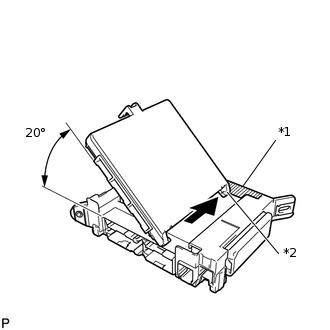
*1
Housing Sidewall
*2
Guide Part
Insert the multiplex network body ECU until it contacts the housing sidewall of the guide part as shown in the illustration.
Tip:Be sure to maintain an angle of 20° or more as shown in the illustration.
-
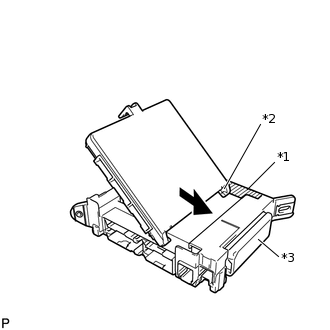
*1
Housing Sidewall
*2
Guide Part
*3
Junction Block Fuse
Slide the guide of the multiplex network body ECU along the housing sidewall toward the junction block fuses as shown in the illustration.
-
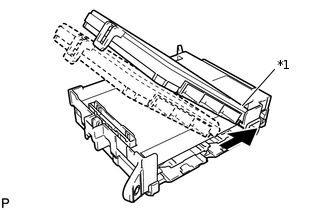
*1
Side A
Slide the multiplex network body ECU so that it contacts side A as shown in the illustration.
Note:Do not apply excessive force to the multiplex network body ECU.
-
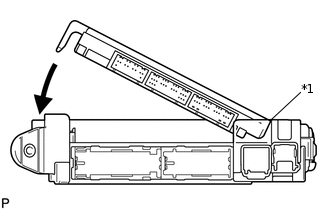
*1
Side A Contact Portion
With the multiplex network body ECU to side A of the junction block (point of rotation), rotate it downward as shown in the illustration.
-
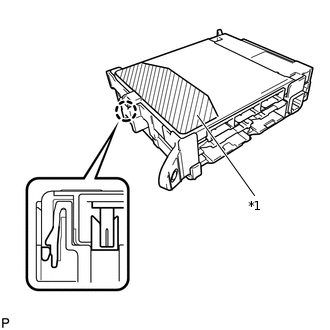
*1
Pushing Area
Press the pushing area until the claw attaches to install the multiplex network body ECU.
Note:Make sure to press only the pushing area.
Confirm the engagement of the multiplex network body ECU and junction block by listening for a lock sound.
Do not apply excessive force to the multiplex network body ECU.
Tip:If a lock sound cannot be heard, visually check the engagement of the lock part. The engagement can also be confirmed if the multiplex network body ECU and junction block are flush.
INSTALL DRIVER SIDE JUNCTION BLOCK ASSEMBLY
-
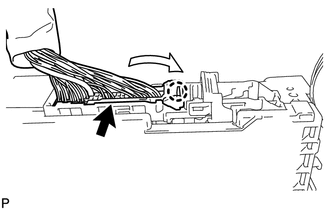
Attach the claw to install the connector as shown in the illustration.
Note:Be sure to connect each connector securely.
-
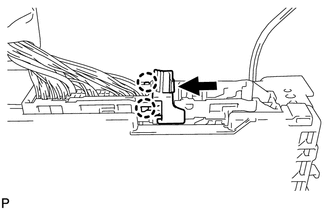
Attach the 2 claws to lock the connector lock as shown in the illustration.
-
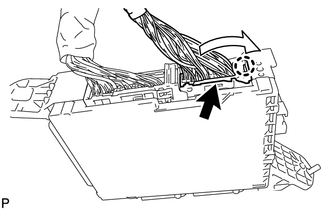
Attach the claw to connect the connector as shown in the illustration.
Note:Be sure to connect the connector securely.
Install the driver side junction block assembly with the bolt and 2 nuts.
8.0 N*m
82 kgf*cm
71 in.*lbf
-
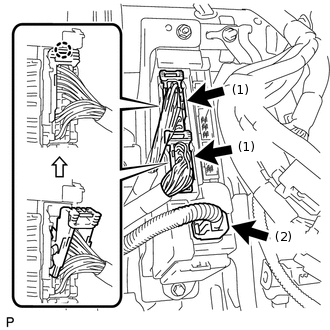
Connect the connector labeled (1).
Note:Be sure to connect each connector securely.
Attach the 2 claws to connect the 2 connectors labeled (2) as shown in the illustration.
Note:Be sure to connect each connector securely.
Connect the 3 connectors.
Note:Be sure to connect each connector securely.
-
INSTALL LOWER NO. 1 INSTRUMENT PANEL AIRBAG ASSEMBLY
INSTALL LOWER INSTRUMENT PANEL FINISH PANEL SUB-ASSEMBLY
INSTALL NO. 1 INSTRUMENT PANEL REGISTER ASSEMBLY
INSTALL LOWER INSTRUMENT PANEL FINISH PANEL ASSEMBLY
INSTALL NO. 1 INSTRUMENT PANEL FINISH CUSHION
INSTALL NO. 2 SWITCH HOLE BASE
INSTALL INSTRUMENT SIDE PANEL LH
INSTALL INSTRUMENT PANEL FINISH PANEL END LH
INSTALL FRONT NO. 1 CONSOLE BOX INSERT
INSTALL NO. 1 INSTRUMENT PANEL UNDER COVER SUB-ASSEMBLY
INSTALL COWL SIDE TRIM BOARD LH
INSTALL DOOR SCUFF PLATE ASSEMBLY LH
CONNECT CABLE TO NEGATIVE BATTERY TERMINAL
Note:When disconnecting the cable, some systems need to be initialized after the cable is reconnected (Click here).
CHECK SRS WARNING LIGHT
Check the SRS warning light (Click hereClick here).