METER / GAUGE SYSTEM CUSTOMIZE PARAMETERS
-
CUSTOMIZE METER / GAUGE SYSTEM
Tech Tips
The following items can be customized.
Note
-
When the customer requests a change in a function, first make sure that the function can be customized.
-
Record the current settings before customizing.
-
Customizing seat belt warning buzzer (w/ Seat Belt Warning Buzzer)
Tech Tips
-
To accommodate users who cannot use a seat belt due to special circumstances, the seat belt warning buzzer can be disabled at the dealer.
-
Even if the seat belt warning buzzer is disabled, the seat belt warning light blinks when the seat belt is not fastened.
-
Turn the ignition switch to ON and press the ODO/TRIP switch to change the ODO/TRIP meter to the ODO display.
-
Turn the ignition switch off.
-
Turn the ignition switch to ON, and then, within 6 seconds, press and hold the ODO/TRIP switch for 10 seconds or more.
-
Fasten the driver side seat belt or front passenger side seat belt to enter buzzer cancel mode.
Tech Tips
The settings for the side with the fastened seat belt can be changed. However, when the status of both the driver side and front passenger side is on, changing the driver side setting to off also causes the front passenger side setting to change to off. Similarly, when the status of both the driver seat and front passenger seat is off, changing the driver side setting to on also causes the front passenger side setting to change to on.
-
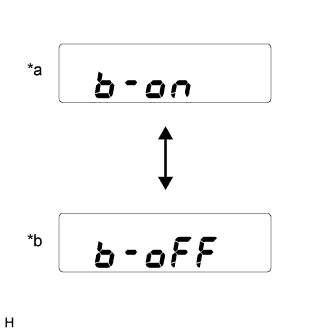
Text in Illustration *a Seat belt warning buzzer is enabled *b Seat belt warning buzzer is disabled Press the ODO/TRIP switch to switch between on and off.
-
Wait 10 seconds without pressing the ODO/TRIP switch, or turn the ignition switch off to end buzzer cancel mode.
Tech Tips
When a cable is disconnected from the battery, the buzzer setting is reset and the buzzer becomes enabled again.
-
-
Customizing fuel consumption (w/ Accessory Meter Assembly)
Tech Tips
The units for the average fuel consumption and current fuel consumption can be switched between "L/100km" and "km/l".
-
Press the INFO switch to display the average fuel consumption or current fuel consumption display.
-
Press and hold the INFO switch for 2.3 seconds or more.
-
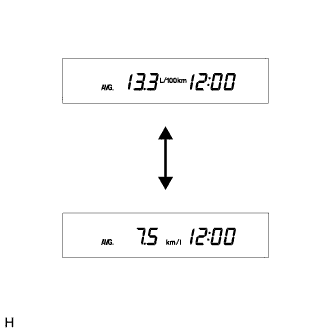
Press the RESET switch and select "L/100km" or "km/l".
Tech Tips
The initial setting is "km/l".
-
Press the INFO switch to end fuel consumption customize mode.
-
-