PARKING ASSIST ECU REMOVAL
CAUTION / NOTICE / HINT
The necessary procedures (adjustment, calibration, initialization, or registration) that must be performed after parts are removed and installed, or replaced during television camera controller removal/installation are shown below.
| Replaced Part or Performed Procedure | Necessary Procedures | Effect/Inoperative Function When Necessary Procedures are not Performed | Link |
|---|---|---|---|
| Disconnect cable from negative battery terminal | Perform steering sensor zero point calibration | Lane Departure Alert System (w/ Steering Control) | |
| Pre-collision System | |||
| Memorize steering angle neutral point | Parking Assist Monitor System | ||
| Panoramic View Monitor System | |||
| Replacement of television camera controller |
|
Panoramic View Monitor System |
CAUTION:
Some of these service operations affect the SRS airbag system. Read the precautionary notices concerning the SRS airbag system before servicing.
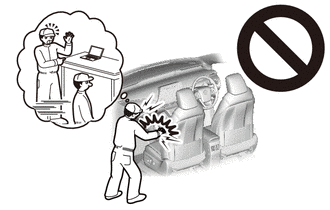
PROCEDURE
-
REMOVE FRONT SEAT ASSEMBLY RH
-
REMOVE PARKING ASSIST ECU COVER
-
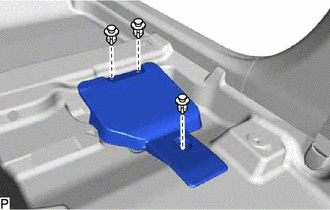
Remove the 3 clips and parking assist ECU cover.
-
-
REMOVE TELEVISION CAMERA CONTROLLER
-
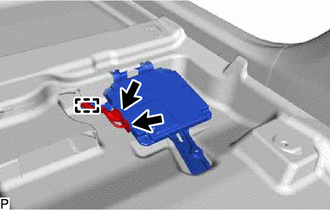
Disconnect each connector.
-
Disengage the clamp.
-
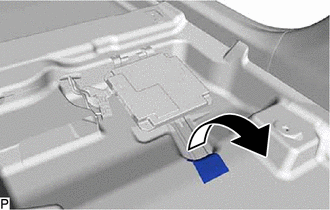
Turn back the front floor carpet assembly and front floor mat as shown in the illustration.
-
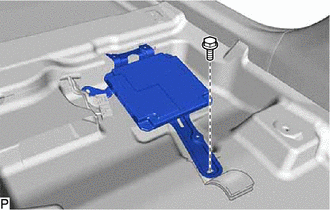
Remove the bolt.
-
Disengage the 2 guides and remove the television camera controller as shown in the illustration.
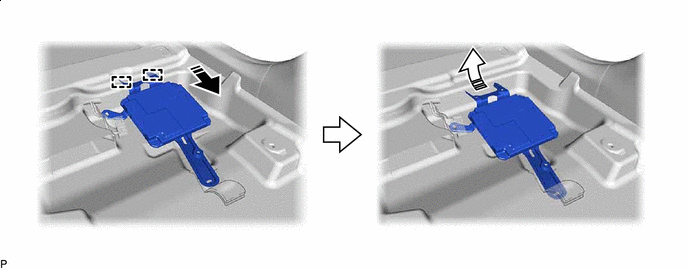

Remove in this Direction (1) 
Remove in this Direction (2)
-