REAR BRAKE REMOVAL
CAUTION / NOTICE / HINT
Note
-
When the brake pedal is first depressed after replacing the brake pads or pushing back the disc brake piston, DTC C1341, C1342, C1343 and/or C1344 may be stored. As there is no malfunction, clear the DTCs.
-
While the auxiliary battery is connected, even if the power switch is off, the brake control system activates when the brake pedal is depressed or the door courtesy switch is turned on. Therefore, even if only brake pads are to be removed and installed, be sure to remove the ABS motor relays before beginning work.
Tech Tips
-
Use the same procedure for the RH side and LH side.
-
The following procedure is for the LH side.
PROCEDURE
-
REMOVE ABS MOTOR RELAY
for LHD: Click here
for RHD: Click here
-
REMOVE REAR WHEEL
-
DRAIN BRAKE FLUID
Note
If brake fluid leaks onto any painted surface, immediately wash it off.
-
DISCONNECT REAR FLEXIBLE HOSE
-
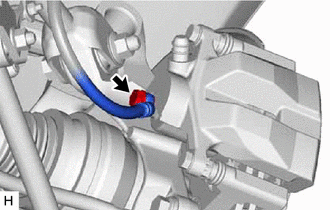
Remove the union bolt and gasket, and disconnect the rear flexible hose from the rear disc brake cylinder assembly.
-
-
REMOVE REAR DISC BRAKE CYLINDER ASSEMBLY
-
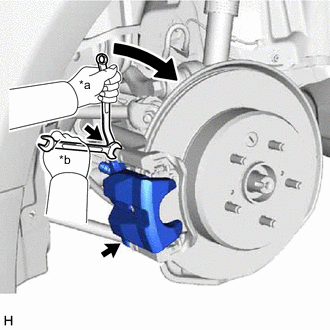
*a Turn *b Hold Hold the 2 rear disc brake cylinder slide pins and remove the 2 bolts and rear disc brake cylinder assembly.
-
-
REMOVE REAR DISC BRAKE PAD
-
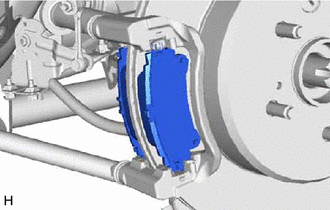
Remove the 2 rear disc brake pads from the rear disc brake cylinder mounting.
-
-
REMOVE REAR DISC BRAKE ANTI-SQUEAL SHIM KIT
-
for Type A:
-
Remove the rear No. 2 disc brake anti-squeal shim from the rear disc brake pad (inside).
-
Remove the rear No. 1 disc brake anti-squeal shim from each rear disc brake pad.
-
Remove the rear disc brake pad wear indicator plate from each rear disc brake pad.
-
-
for Type B:
-
Remove the rear No. 1 disc brake anti-squeal shim and rear No. 2 disc brake anti-squeal shim from each rear disc brake pad.
-
Remove the rear disc brake pad wear indicator plate from each rear disc brake pad.
-
-
-
REMOVE REAR DISC BRAKE PAD SUPPORT PLATE
Note
Each rear disc brake pad support plate has a different shape. Be sure to put an identification mark on each rear disc brake pad support plate so that it can be reinstalled to its original position.
-
Remove the 2 rear No. 1 disc brake pad support plates and 2 rear No. 2 disc brake pad support plates from the rear disc brake cylinder mounting.
-
-
REMOVE REAR NO. 1 DISC BRAKE CYLINDER SLIDE PIN
-
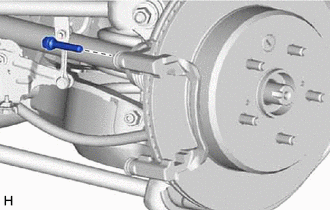
Remove the rear No. 1 disc brake cylinder slide pin from the rear disc brake cylinder mounting.
-
-
REMOVE REAR NO. 2 DISC BRAKE CYLINDER SLIDE PIN
-
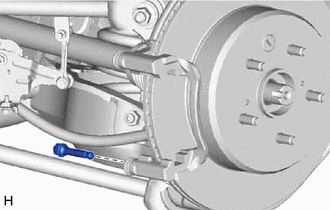
Remove the rear No. 2 disc brake cylinder slide pin from the rear disc brake cylinder mounting.
-
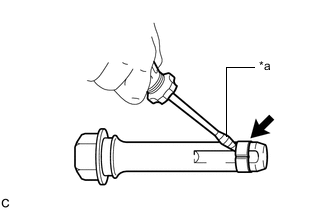
*a Protective Tape Using a screwdriver with its tip wrapped with protective tape, remove the rear disc brake cylinder slide bushing from the rear No. 2 disc brake cylinder slide pin.
Note
Do not damage the rear No. 2 disc brake cylinder slide pin.
-
-
REMOVE REAR DISC BRAKE BUSHING DUST BOOT
-
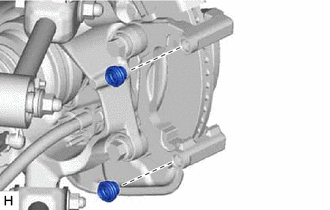
Remove the 2 rear disc brake bushing dust boots from the rear disc brake cylinder mounting.
-
-
REMOVE REAR DISC BRAKE CYLINDER MOUNTING
-
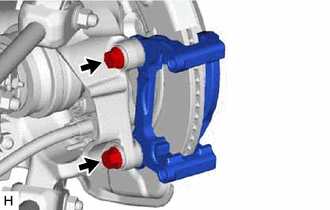
Remove the 2 bolts and rear disc brake cylinder mounting.
-
Remove the 2 rear No. 1 disc brake caliper plates from the rear disc brake cylinder mounting.
-
-
REMOVE PARKING BRAKE SHOE ADJUSTING HOLE PLUG
-
Remove the parking brake shoe adjusting hole plug.
-
-
REMOVE REAR DISC
-
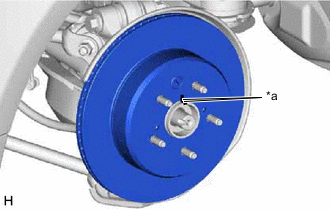
*a Matchmark Put matchmarks on the rear disc and the rear axle hub and bearing assembly.
-
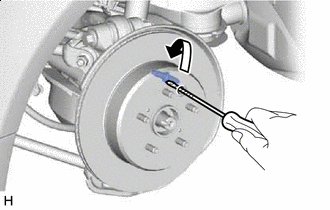

Contract Release the parking brake and remove the rear disc.
Tech Tips
If the rear disc cannot be removed easily, use a screwdriver to turn the shoe adjuster as shown in the illustration in order to contract the parking brake shoes.
-