REAR VIEW MONITOR SYSTEM(w/ Side Monitor System) CALIBRATION
ADJUST REAR VIEW MONITOR SYSTEM
This rear view monitor system can be set from the diagnostic screen of the accessory meter assembly.
If the following operations are performed, it is necessary to perform adjustments and checks on the diagnostic screen.
Part Name
Operation
Adjustment Item
Proceed to
Parking assist ECU
Replacement
Parking assist ECU initialization
Signal Check
Rear television camera assembly
Replacement
Removal and installation of the rear television camera, etc. resulting in rear television camera installation angle change
Rear television camera position setting
Camera Setting (w/o Multi-terrain Monitor)
Camera Setting (w/ Multi-terrain Monitor)
Tip:The adjustment values stored while performing rear view monitor system calibration are stored in the parking assist ECU.
SIGNAL CHECK
Start diagnostic mode.
Note:Be sure to perform this procedure while the engine is running. Apply the parking brake, depress the brake pedal, move the shift lever to P and make sure that the vehicle is not moving.
Tip:The displayed items may differ depending on vehicle specifications.
Turn on the screen of the accessory meter assembly.
Press the retract switch to move the mirrors to the retracted position.
Operate the light control switch:
Off → Turn on → Turn off → Turn on → Turn off → Turn on → Turn off.
Tip:If this operation is not completed within 10 seconds of the first time the light control switch is turned on, the mode does not change.
-
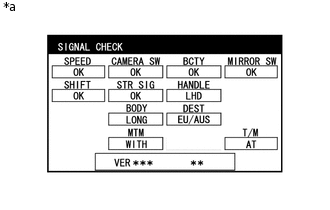
*a
Example
The SIGNAL CHECK screen is displayed.
Note:When "CHK" (red) is displayed for any items on the SIGNAL CHECK screen, the screen does not change to the next screen.
When "CHK" (red) is displayed for any items on the SIGNAL CHECK screen, perform inspections using the SIGNAL CHECK screen (Click here).
CAMERA SETTING (w/o Multi-terrain Monitor)
-
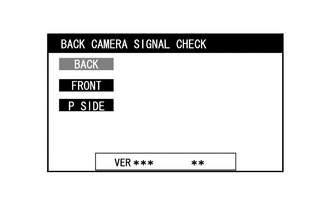
BACK CAMERA SIGNAL CHECK
Press the wide view front and side monitor switch on the steering pad switch assembly.
Tip:If there is a camera malfunction, a black screen is displayed.
-
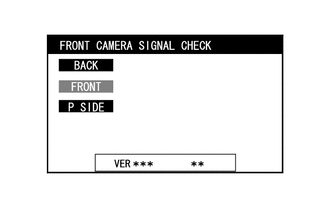
FRONT CAMERA SIGNAL CHECK
Press the wide view front and side monitor switch on the steering pad switch assembly.
Tip:If there is a camera malfunction, a black screen is displayed.
-
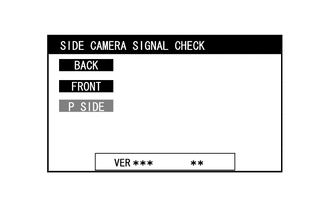
SIDE CAMERA SIGNAL CHECK
Press the wide view front and side monitor switch on steering pad switch assembly.
Tip:If there is a camera malfunction, a black screen is displayed.
Finish diagnostic mode.
Tip:There are 2 methods to finish diagnostic mode. Finish the mode by using either of them.
Method 1
-
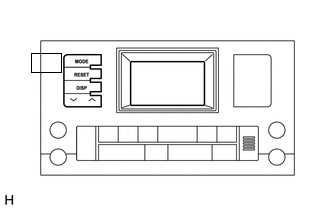
Press the MODE switch of the accessory meter assembly.
-
Method 2
Turn the engine switch off.
-
CAMERA SETTING (w/ Multi-terrain Monitor)
-
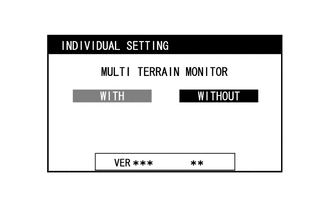
INDIVIDUAL SETTING
Check that the multi-terrain monitor has "WITH" selected.
Tip:The setting can be changed by pressing and holding the wide view front and side monitor switch while "WITHOUT" is displayed in light blue.
If "WITHOUT" is selected, the "MULTI TERRAIN MONITOR" function is disabled.
Press the wide view front and side monitor switch on the steering pad switch assembly to proceed to the next signal check.
-
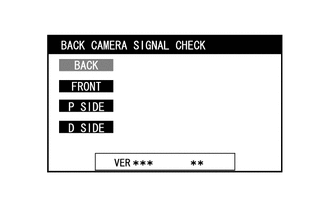
BACK CAMERA SIGNAL CHECK
Press the wide view front and side monitor switch on the steering pad switch assembly.
Tip:If there is a camera malfunction, a black screen is displayed.
-
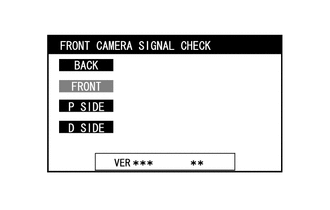
FRONT CAMERA SIGNAL CHECK
Press the wide view front and side monitor switch on the steering pad switch assembly.
Tip:If there is a camera malfunction, a black screen is displayed.
-
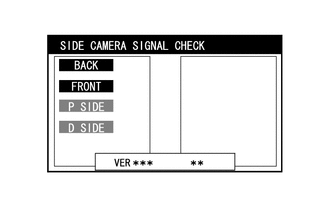
SIDE CAMERA SIGNAL CHECK
Press the wide view front and side monitor switch on the steering pad switch assembly.
Tip:If there is a camera malfunction, only the side of the screen with the malfunctioning camera is black.
Finish diagnostic mode.
Tip:There are 2 methods to finish diagnostic mode. Finish the mode by using either of them.
Method 1
-
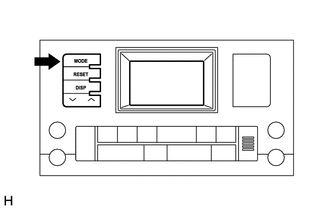
Press the MODE switch of the accessory meter assembly.
-
Method 2
Turn the engine switch off.
-