COOLING FAN MOTOR REMOVAL
PROCEDURE
DRAIN ENGINE COOLANT
SUPPORT ENGINE ASSEMBLY
for C550:Click hereClick hereClick here
for C551:Click hereClick hereClick here
for C553A:Click hereClick here
REMOVE ENGINE MOVING CONTROL ROD
for C550:Click hereClick hereClick here
for C551:Click hereClick hereClick here
for C553A:Click hereClick here
DISCONNECT NO. 2 RADIATOR HOSE
-
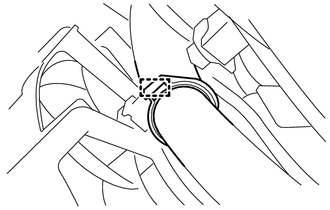
Disengage the radiator hose clamp and disconnect the No. 2 radiator hose from the radiator hose clamp.
-
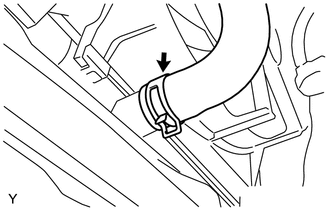
Slide the clip and disconnect the No. 2 radiator hose.
-
REMOVE FAN SHROUD ASSEMBLY
-
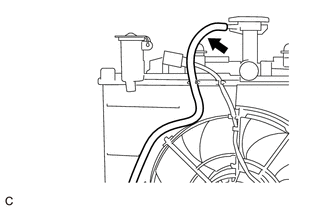
Disconnect the radiator reserve tank hose from the radiator assembly.
-
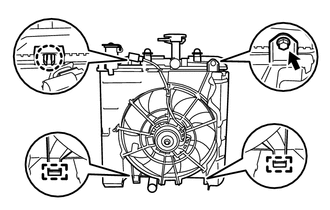
Remove the bolt.
Disengage the claw.
Disengage the 2 guides to remove the fan shroud assembly from the radiator assembly.
Note:Do not damage the radiator assembly when removing the fan shroud assembly.
-
REMOVE FAN
-
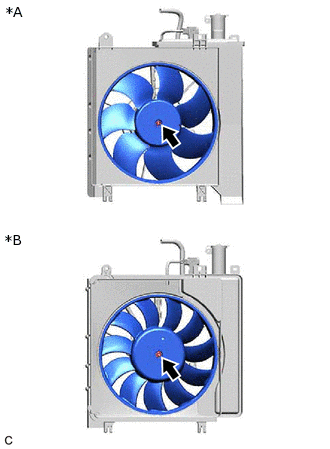
*A
except Tropic Spec
*B
for Tropic Spec
Remove the nut and fan.
-
REMOVE COOLING FAN MOTOR
-
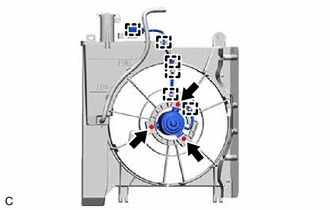
Remove the cooling fan motor. (except Tropic Spec)
Disengage the 6 clamps.
Remove the 3 screws and cooling fan motor.
-
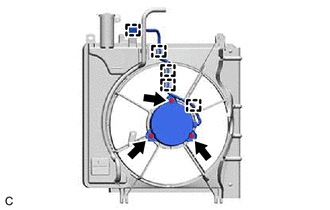
Remove the cooling fan motor. (for Tropic Spec)
Disengage the 5 clamps.
Remove the 3 screws and cooling fan motor.
-