REAR SEAT OUTER BELT ASSEMBLY INSTALLATION
-
INSTALL REAR NO. 1 SEAT BELT ASSEMBLY OUTER LH
-
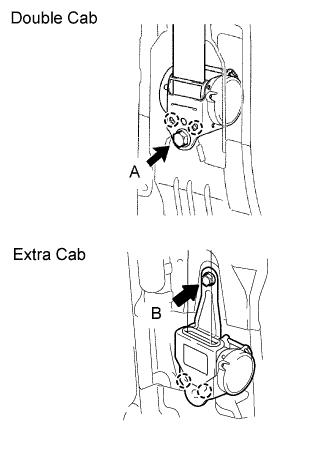
Align the claws with the seat belt positioning holes and install the ELR of the seat belt with the bolt as shown in the illustration.
- Torque:
- 42 N*m { 428 kgf*cm, 31 ft.*lbf, for bolt A }
- Torque:
- 4.8 N*m { 49 kgf*cm, 42 in.*lbf, for bolt B }
-
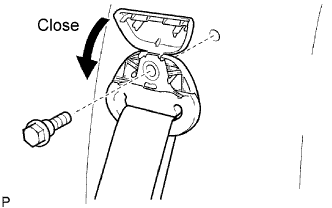
Install the bolt and close the cover as shown in the illustration.
- Torque:
- 42 N*m { 428 kgf*cm, 31 ft.*lbf }
-
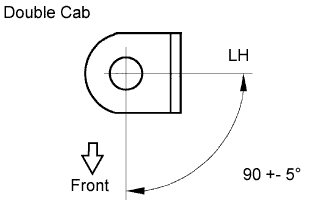
Install the floor anchor with the bolt, as shown in the illustration.
- Torque:
- 42 N*m { 428 kgf*cm, 31 ft.*lbf }
-
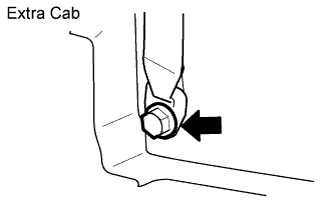
Install the floor anchor with the bolt, as shown in the illustration.
- Torque:
- 42 N*m { 428 kgf*cm, 31 ft.*lbf }
-
-
INSTALL QUARTER TRIM PANEL LOWER LH (for Double Cab)
-
Attach the 3 clips and claw to install the lower quarter trim panel.
-
-
INSTALL REAR DOOR OPENING TRIM LH (for Double Cab)
-
INSTALL REAR DOOR SCUFF PLATE LH (for Double Cab)
-
Attach the 2 clips and 7 claws to install the rear door scuff plate.
-
-
INSTALL REAR SEAT ASSEMBLY (for Extra Cab)
-
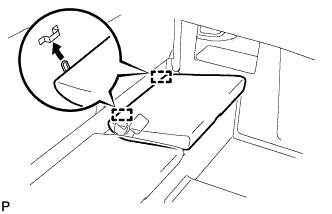
Attach the 2 hooks.
-
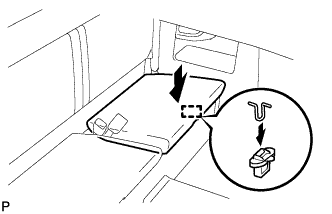
Attach the hook to install the rear seat cushion assembly LH.
-
-
INSTALL QUARTER INSIDE TRIM BOARD LH (for Extra Cab)
-
Attach the 7 clips, 3 guides and 4 claws to install the quarter inside trim board.
-
Connect the front seat outer belt floor anchor with the bolt.
- Torque:
- 42 N*m { 428 kgf*cm, 31 ft.*lbf }
-
-
INSTALL REAR SEAT CUSHION ASSEMBLY RH (for Extra Cab)
-
Attach the 2 hooks.
-
Attach the hook to install the rear seat cushion assembly LH.
-
-
INSTALL REAR SEAT CUSHION ASSEMBLY LH (for Extra Cab)
Tech Tips
Use the same procedures described for the LH side.
-
INSTALL REAR SEAT ASSEMBLY (for Double Cab)
-
Install the rear seat assembly Click here.
-
-
CONNECT CABLE TO NEGATIVE BATTERY TERMINAL
-
PERFORM INITIALIZATION
-
Perform initialization Click here.
Note
Certain systems need to be initialized after disconnecting and reconnecting the cable from the negative (-) battery terminal.
-