POWER BACK DOOR SYSTEM OPERATION CHECK
-
Note:
This check is possible only when the "System Settings" customize setting is set to "On" on the multi-information display in the combination meter assembly. (The default setting is "On".)
Before performing an operation check, make sure that the customize settings of the power back door system are set to their default setting.
Tip:When the ambient temperature is very low, a clicking sound may be heard from the multiplex network door ECU. This is not a malfunction.
CHECK BASIC OPERATION
Conditions necessary for the power back door to open:
The back door main switch in the combination meter assembly is on.
The back door is unlocked (except wireless one motion function).
The vehicle speed is 3 km/h (2 mph) or less (only when the power switch is on (IG)).
The shift lever is in P, depressing the brake pedal or pulled up parking brake lever (this can be determined only when the power switch is on (IG)).
Conditions necessary for the power back door to close:
The back door main switch in the combination meter assembly is on.
The power back door sensor assembly circuit is not open.
Check the opening operation.
With the back door fully closed, push the back door control switch and check that the wireless door lock buzzer (for Front Side) and wireless door lock buzzer (for Rear Side) sounds for 0.8 seconds, the hazard warning lights flash twice and the back door starts opening.
With the back door fully closed, push the transmitter switch and check that the wireless door lock buzzer (for Front Side) and wireless door lock buzzer (for Rear Side) sounds for 0.8 seconds, the hazard warning lights flash twice and the back door starts opening.
With the back door fully closed, push the back door opener switch assembly and check that the wireless door lock buzzer (for Rear Side) sounds for 0.8 seconds, the hazard warning lights flash twice and the back door starts opening.
Check the close operation.
With the back door fully open, push the back door control switch and check that the wireless door lock buzzer (for Front Side) and wireless door lock buzzer (for Rear Side) sounds for 0.8 seconds, the hazard warning lights flash twice and the back door starts closing.
With the back door fully open, push the transmitter switch and check that the wireless door lock buzzer (for Front Side) and wireless door lock buzzer (for Rear Side) sounds for 0.8 seconds, the hazard warning lights flash twice and the back door starts closing.
With the back door fully open, push the door control switch assembly and check that the wireless door lock buzzer (for Rear Side) sounds for 0.8 seconds, the hazard warning lights flash twice and the back door starts closing.
Check the operation when another input is detected during the opening or closing operation.
During a power back door opening or closing operation, push the back door control switch again, and check that the wireless door lock buzzer (for Front Side) and wireless door lock buzzer (for Rear Side) sounds for 0.2 seconds, the back door stops.
During a power back door opening or closing operation, push the transmitter switch again, and check that the wireless door lock buzzer (for Front Side) and wireless door lock buzzer (for Rear Side) sounds for 0.2 seconds, the back door stops.
During a power back door closing operation via the door control switch, push the door control switch again, and check that the wireless door lock buzzer (for Rear Side) sounds for 0.2 seconds and the power back door closing operation stops. After the closing operation stops, press the door control switch and check that the power back door operates until it reaches the fully open position or the automatic opening operation stop position.
During a power back door opening or closing operation, push the back door opener switch assembly, and check that the wireless door lock buzzer (for Rear Side) sounds for 0.2 seconds and the back door operation switches to manual operation mode.
During a power back door opening or closing operation, kick your leg, and check that the wireless door lock buzzer (for Rear Side) sounds for approximately 0.2 seconds and the power back door stops.
CHECK WIRELESS ONE MOTION FUNCTION (w/ Wireless One Motion Function)
Note:This check is possible only when the "System Settings" customize setting is set to "On" on the multi-information display in the combination meter assembly. (The default setting is "On".)
This check is possible only when the "Wireless Power Back Door Open" customize setting is set to "Lock:Twice/Unlock:Twice" or "Lock:0.8s/Unlock:0.8s" on the GTS. (The default setting is differs depending on the country.)
Check the wireless one motion operation.
With all of the doors locked, push the transmitter switch (electrical key transmitter sub-assembly) and check that the power back door warning buzzer sounds for 0.8 seconds, the hazard warning lights flash twice* and the back door starts opening.
*: w/ Power Back Door Hazard Warning Light
CHECK JAM PROTECTION FUNCTION
Tip:The power back door unit assembly set detects changes in the operating speed of the back door while the power back door is operating. If a change in the operating speed is out of the normal range, it will be judged that foreign objects are in the path of the power back door and the operation will stop if the door is operating in the opening direction or move a certain amount in the reverse direction if the door is operating in the closing direction.
When the power back door sensor assemblies built into both sides of the back door are compressed, it is judged that foreign objects are in the path of the power back door and the operation will reverse a little in the opposite direction and then stop.
The power back door sensor assemblies operate only while the back door is closing. They do not operate while the back door is opening.
Check the jam protection function (the back door sensor assembly) while the power back door is closing.
Note:Do not check this function using a part of your body such as your hand. Also, pay thorough attention that nothing gets caught by accident in this process.
Fully open the back door.
Press a switch to close the power back door.
While the back door is closing, press a power back door sensor assembly using the handle of a hammer or equivalent.
Check that the buzzer sounds twice for 0.1 seconds, the jam protection function is immediately activated and the power back door reverses a certain amount and stops.
Check the jam protection function (the pulse sensor in the power back door unit assembly set) while the power back door is closing.
Note:Do not check this function using a part of your body such as your hand. Also, pay thorough attention that nothing gets caught by accident in this process.
Fully open the back door.
Press a switch to close the power back door.
While the back door is closing, insert a tire or equivalent between the door panel and vehicle body, in order to interrupt the closing operation.
Check that the buzzer sounds twice for 0.1 seconds, the jam protection function is immediately activated and the power back door reverses a certain amount and stops.
Check the jam protection function while the power back door is opening.
Note:Pay thorough attention that your body or your clothes, etc. do not get caught in the door by accident in this process.
Fully close the back door.
Press a switch to open the power back door.
While the back door is opening, use your hands to press on the outside surface of the back door panel so that the operating speed decreases.
Check that the buzzer sounds twice for 0.1 seconds and the jam protection function is immediately activated and the power back door stops.
CHECK ASSIST OPERATION
Check that the door automatically starts to fully close when the door is manually moved in the closing direction with the back door at a rest.
CHECK AUTOMATIC OPENING OPERATION STOPPED POSITION MEMORIZATION FUNCTION (When not using GTS)
Register open operation automatic stopped position in memory
Open the back door by operating each switch.
Operate each switch to stop the open operation when the back door reaches the desired automatic stopped position.
When the door control switch assembly is pressed and held for 2 seconds or more with the back door at the stopped position, the buzzer sounds 4 times and the system memorizes the automatic stopped position for the open operation.
Check that the back door stops at the memorized position when an open operation is performed with each switch.
Clear open operation automatic stopped position memory
Open the back door by operating each switch.
Stop the back door by operating each switch.
When the door control switch assembly is pressed and held for 7 seconds or more with the back door at the stopped position, the buzzer sounds 2 times and the system clears the automatic stopped position for the open operation.
CHECK AUTOMATIC OPENING OPERATION STOPPED POSITION MEMORIZATION FUNCTION (When using GTS)
Register open operation automatic stopped position in memory
Using the GTS, select the "Power Back Door Opening Adjust" customize setting.
According to the GTS display, set the customize setting.
Check that the back door stops at the position set with the customize function when an open operation is performed with each switch.
Clear open operation automatic stopped position memory
Open the back door by operating each switch.
Stop the back door by operating each switch.
When the door control switch assembly is pressed and held for 7 seconds or more with the back door at the stopped position, the buzzer sounds 2 times and the system clears the automatic stopped position for the open operation.
CHECK AUTOMATIC OPENING OPERATION STOPPED POSITION MEMORIZATION FUNCTION (When using Multi-information display)
Register open operation automatic stopped position in memory
Using the multi-information display, select the "Power back door opening adjust" customize setting.
According to the screen display, set the customize setting.
Check that the back door stops at the position set with the customize function when an open operation is performed with each switch.
Clear open operation automatic stopped position memory
Open the back door by operating each switch.
Stop the back door by operating each switch.
When the door control switch assembly is pressed and held for 7 seconds or more with the back door at the stopped position, the buzzer sounds 2 times and the system clears the automatic stopped position for the open operation.
CHECK TOUCHLESS POWER BACK DOOR OPERATION (w/ Touchless Power Back Door)
Note:This check is possible only when the "Kick Sensor Function" customize setting is set to "ON" on the GTS.
This check is possible only when the "Kick Sensor Function" customize setting is set to "ON" on the multi-information display.
When "System Settings" on the multi-information display is set to "Off", the touchless power back door function also does not operate, but the "Kick Sensor Function" customize setting is not set to "OFF" on the GTS.
Before performing an operation check, make sure that the customize settings of the power back door system are set to their default setting.
The back door main switch in the combination meter assembly is on and carrying the transmitter switch (electrical key transmitter sub-assembly).
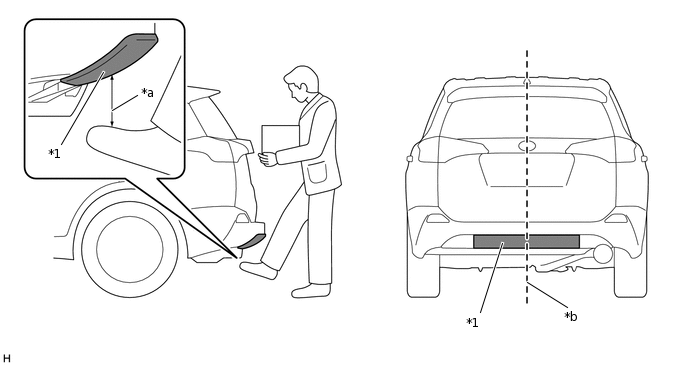
*1
Kick Door Control Sensor
-
-
*a
100 mm (3.94 in.)
*b
Center of the rear bumper
Tip:Touchless power back door operation: A foot is approximated within 100 mm (3.94 in.) from the surface of the rear bumper and then moved away by users carrying a transmitter switch (electrical key transmitter sub-assembly).
The touchless power back door operation detects a change in electrostatic capacitance (operation trigger) in the detection area of the kick door control sensor. Placing your leg or a metallic object within 100 mm (3.94 in.) of the bumper surface and then moving it away from the detection area results in the touchless power back door operating through the change in electrostatic capacitance with your skin.
The kick door control sensor detects touchless power back door operations performed towards the center of the rear bumper by users carrying a transmitter switch (electrical key transmitter sub-assembly). When a touchless power back door operation is detected, a signal is output to the power back door ECU and the power back door system operates.