LKA/LDA SYSTEM Steering Pad Switch Circuit
DESCRIPTION
The driving support ECU assembly receives a LKA/LDA main switch signal from the steering pad switch assembly and sends the signal to the forward recognition camera via CAN communication.
WIRING DIAGRAM
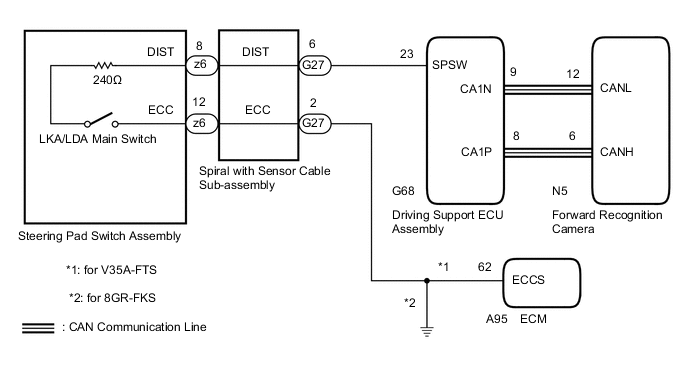
PROCEDURE
-
READ VALUE USING GTS (CAN BUS CHECK)
-
Connect the GTS to the DLC3.
-
Turn the engine switch on (IG).
-
Turn the GTS on.
-
Enter the following menus: System Select / Can Bus Check.
CAN Bus CheckResult Result Proceed to All of the ECUs and sensors that are currently connected to the CAN communication system are displayed A None of the ECUs and sensors that are currently connected to the CAN communication system are displayed, or some of them are not displayed B
B 
GO TO CAN COMMUNICATION SYSTEM Click here
A 
-
-
CHECK FOR DTCs (HEALTH CHECK)
-
Connect the GTS to the DLC3.
-
Turn the engine switch on (IG).
-
Turn the GTS on.
-
Enter the following menus: System Select / Health Check.
-
Check DTCs.
-
Turn the engine switch off.
Result Result Proceed to No DTCs are output. A DTCs are output. B
B
GO TO DTC CHART
A
-
-
INSPECT STEERING PAD SWITCH ASSEMBLY
-
Remove the steering pad switch assembly.
-
Inspect the steering pad switch assembly.
Result Proceed to OK NG
NG
REPLACE STEERING PAD SWITCH ASSEMBLY Click here
OK
-
-
INSPECT SPIRAL WITH SENSOR CABLE SUB-ASSEMBLY
-
Remove the spiral with sensor cable sub-assembly.
-
Inspect the spiral with sensor cable sub-assembly.
Result Proceed to OK NG
NG
REPLACE SPIRAL WITH SENSOR CABLE SUB-ASSEMBLY Click here
OK
-
-
CHECK HARNESS AND CONNECTOR (SPIRAL WITH SENSOR CABLE SUB-ASSEMBLY - DRIVING SUPPORT ECU ASSEMBLY)
-
Disconnect the G27 spiral with sensor cable sub-assembly connector.
-
Disconnect the G68 driving support ECU assembly connector.
-
Measure the resistance according to the value(s) in the table below.
Standard Resistance (Check for Open) Tester Connection Condition Specified Condition G27-6 (DIST) - G68-23 (SPSW) Always Below 1 Ω Standard Resistance (Check for Short) Tester Connection Condition Specified Condition G27-6 (DIST) or G68-23 (SPSW) - Body ground Always 10 kΩ or higher -
Connect the G68 driving support ECU assembly connector.
-
Connect the G27 spiral with sensor cable sub-assembly connector.
Result Proceed to OK (for V35A-FTS) OK (for 8GR-FKS) NG
OK (for 8GR-FKS) 
CHECK HARNESS AND CONNECTOR (SPIRAL WITH SENSOR CABLE SUB-ASSEMBLY - BODY GROUND) Click here
NG
REPAIR OR REPLACE HARNESS OR CONNECTOR (SPIRAL WITH SENSOR CABLE SUB-ASSEMBLY - DRIVING SUPPORT ECU ASSEMBLY)
OK (for V35A-FTS)
-
-
CHECK HARNESS AND CONNECTOR (SPIRAL WITH SENSOR CABLE SUB-ASSEMBLY - ECM)
-
Turn the engine switch off.
-
Disconnect the G27 spiral cable with sensor sub-assembly connector.
-
Disconnect the A95 ECM connector.
-
Measure the resistance according to the value(s) in the table below.
Standard Resistance (Check for Open) Tester Connection Condition Specified Condition G27-2 (ECC) - A95-62 (ECCS) Always Below 1 Ω -
Connect the A95 ECM connector.
-
Connect the G27 spiral cable with sensor sub-assembly connector.
Result Proceed to OK NG
OK
PROCEED TO NEXT SUSPECTED AREA SHOWN IN PROBLEM SYMPTOMS TABLE Click here
NG
REPAIR OR REPLACE HARNESS OR CONNECTOR (SPIRAL WITH SENSOR CABLE SUB-ASSEMBLY - ECM)
-
-
CHECK HARNESS AND CONNECTOR (SPIRAL WITH SENSOR CABLE SUB-ASSEMBLY - BODY GROUND)
-
Disconnect the G27 spiral cable with sensor sub-assembly connector.
-
Measure the resistance according to the value(s) in the table below.
Standard Resistance (Check for Open) Tester Connection Condition Specified Condition G27-2 (ECC) - Body ground Always Below 1 Ω -
Connect the G27 spiral cable with sensor sub-assembly connector.
Result Proceed to OK NG
OK
PROCEED TO NEXT SUSPECTED AREA SHOWN IN PROBLEM SYMPTOMS TABLE Click here
NG
REPAIR OR REPLACE HARNESS OR CONNECTOR (SPIRAL WITH SENSOR CABLE SUB-ASSEMBLY - BODY GROUND)
-