TELEMATICS TRANSCEIVER REMOVAL
CAUTION / NOTICE / HINT
The necessary procedures (adjustment, calibration, initialization, or registration) that must be performed after parts are removed and installed, or replaced during telematics transceiver removal/installation are shown below.
| Replaced Part or Performed Procedure | Necessary Procedure | Effect/Inoperative Function when Necessary Procedure not Performed | Link |
|---|---|---|---|
| Replacement of telematics transceiver*1 | Vehicle contract setting |
|
|
| Replacement of telematics transceiver*2 | Register vehicle information | Emergency call service |
-
*1: w/ Telematics Transceiver for G-BOOK
-
*2: w/ Telematics Transceiver except G-BOOK
PROCEDURE
-
REMOVE CONSOLE BOX ASSEMBLY
-
REMOVE FRONT NO. 2 CONSOLE BOX INSERT
-
REMOVE TELEMATICS TRANSCEIVER WITH BRACKET (w/ Telematics Transceiver for G-BOOK)
-
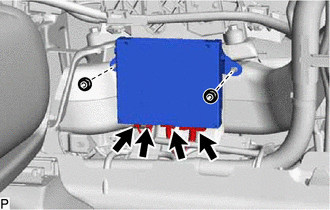
Disconnect each connector.
-
Remove the 2 nuts and telematics transceiver with bracket.
-
-
REMOVE NO. 3 TELEPHONE BRACKET (w/ Telematics Transceiver for G-BOOK)
-
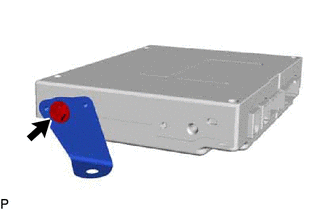
Remove the screw and No. 3 telephone bracket.
-
-
REMOVE NO. 4 TELEPHONE BRACKET (w/ Telematics Transceiver for G-BOOK)
-
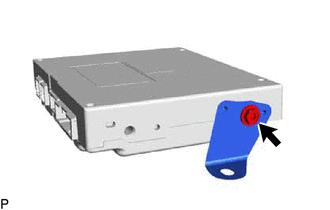
Remove the screw and No. 4 telephone bracket.
-
-
REMOVE TELEMATICS TRANSCEIVER (w/ Telematics Transceiver for G-BOOK)
-
REMOVE TELEMATICS TRANSCEIVER (w/ Telematics Transceiver except G-BOOK)
-
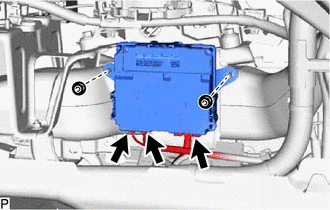
Disconnect each connector.
-
Remove the 2 nuts and telematics transceiver.
-