GENERATOR DISASSEMBLY
-
INSPECT GENERATOR WITH VACUUM PUMP ASSEMBLY
-
Mount the generator in a vise.
-
Insert a screwdriver to hold the generator rotor.
-
Hold the bolt and nut to the pulley.
-
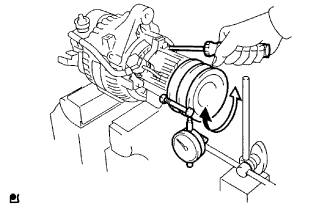
Set a dial indicator as shown in the illustration.
-
Turn the pulley and measure the backlash between the generator rotor and vacuum pump shaft.
Maximum backlash 1.6 mm (0.063 in.) If the backlash is greater than the maximum, replace the generator rotor and vacuum pump shaft.
-
-
REMOVE VACUUM PUMP ASSEMBLY
-
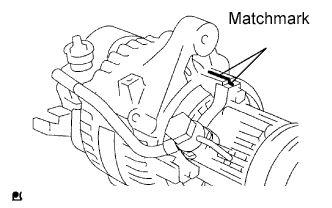
Place the matchmarks as shown in the illustration.
-
Remove the 4 bolts and vacuum pump.
-
-
REMOVE GENERATOR REAR END COVER
-
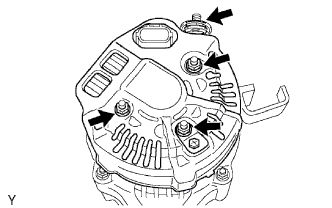
Remove the nut and terminal insulator.
-
Remove the bolt, 3 nuts, plate terminal and rear end cover.
-
-
REMOVE BRUSH HOLDER AND REGULATOR
-
Remove the brush holder cover.
-
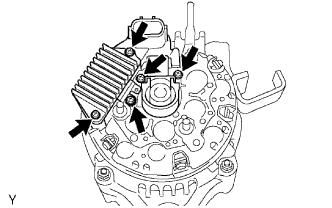
Remove the 2 screws and brush holder.
-
Remove the seal plate.
-
Remove the 3 screws and regulator.
-
-
REMOVE GENERATOR HOLDER WITH RECTIFIER
-
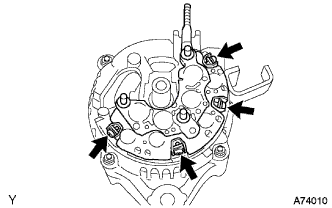
Remove the 4 screws and generator holder with rectifier.
-
Remove the 4 rubber insulators.
-
-
REMOVE GENERATOR RECTIFIER END FRAME
-
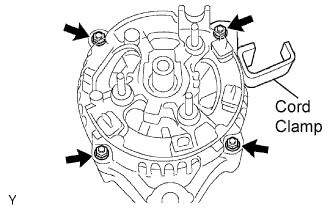
Remove the 4 nuts and cord clamp.
-
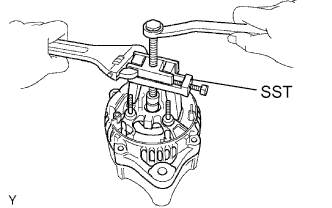
Using SST, remove the rectifier end frame.
- SST
- 09286-46011
-
Remove the washer from the rotor.
-
-
REMOVE GENERATOR ROTOR ASSEMBLY
-
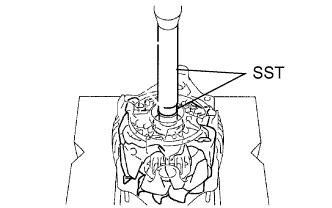
Using SST and a press, press out the rotor.
- SST
- 09950-60010 ( 09951-00180 )
- 09950-70010 ( 09951-07100 )
-