AIR CONDITIONING UNIT REMOVAL
CAUTION / NOTICE / HINT
Use the same procedure for RHD and LHD vehicles.
The procedure listed below is for LHD vehicles.
PROCEDURE
RECOVER REFRIGERANT FROM REFRIGERATION SYSTEM
for HFC-134a(R134a):
for HFO-1234yf(R1234yf):
DRAIN ENGINE COOLANT
REMOVE DECK BOARD ASSEMBLY
PRECAUTION
Note:After turning the power switch off, waiting time may be required before disconnecting the cable from the negative (-) auxiliary battery terminal. Therefore, make sure to read the disconnecting the cable from the negative (-) auxiliary battery terminal notices before proceeding with work.
Make sure to select FACE mode before disconnecting the cable from the negative (-) auxiliary battery terminal.
DISCONNECT CABLE FROM NEGATIVE AUXILIARY BATTERY TERMINAL
CAUTION:Wait at least 90 seconds after disconnecting the cable from the negative (-) auxiliary battery terminal to disable the SRS system.
Note:When disconnecting the cable, some systems need to be initialized after the cable is reconnected.
DISCONNECT AIR CONDITIONING TUBE
-
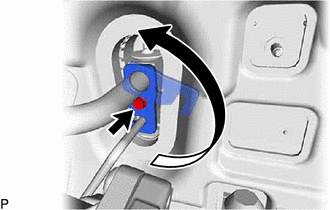
Remove the bolt and rotate the hook connector.
Disconnect the suction tube sub-assembly.
Remove the O-ring from the suction tube sub-assembly.
Note:Seal the openings of the disconnected parts using vinyl tape to prevent the entry of moisture and foreign matter.
Disconnect the liquid tube sub-assembly.
Remove the O-ring from the liquid tube sub-assembly.
Note:Seal the openings of the disconnected parts using vinyl tape to prevent the entry of moisture and foreign matter.
-
DISCONNECT HEATER WATER HOSE
-
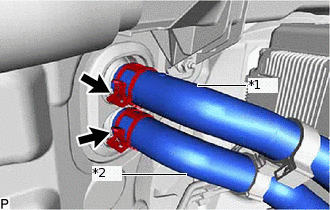
*1
Heater Water Outlet Hose A
*2
Heater Water Inlet Hose A
Using pliers, grip the claws of the clip and slide the clip to disconnect the heater water outlet hose A.
Using pliers, grip the claws of the clip and slide the clip to disconnect the heater water inlet hose A.
Note:Do not apply excessive force to the heater water outlet hose A and heater water inlet hose A.
Prepare a drain pan or cloth in case the coolant leaks.
-
REMOVE LOWER INSTRUMENT PANEL SUB-ASSEMBLY
REMOVE STEERING COLUMN ASSEMBLY
REMOVE REAR NO. 1 AIR DUCT
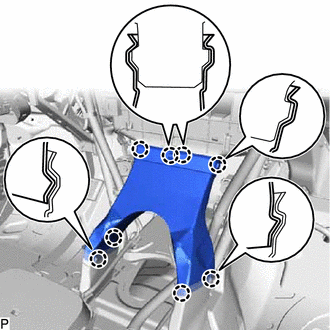
Detach the 8 claws and remove the rear No. 1 air duct.
REMOVE AIR DUCT ASSEMBLY
-
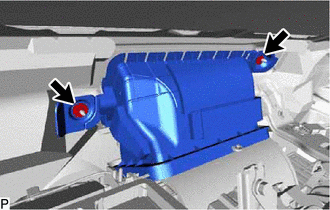
Remove the 2 nuts and air duct assembly.
-
REMOVE DEFROSTER NOZZLE ASSEMBLY
Disconnect the automatic light control sensor (solar sensor) connector and detach the 2 harness clamps.
-
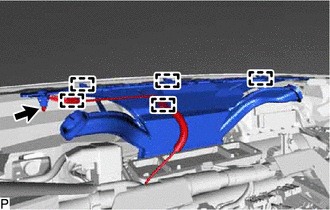
Detach the 3 hooks and remove the defroster nozzle assembly.
DISCONNECT INSTRUMENT PANEL WIRE
-
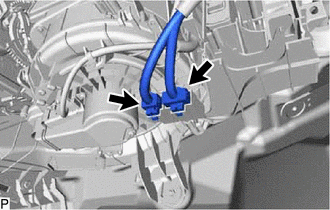
Disconnect the 2 PTC heater connectors.
Remove the 2 bolts and disconnect the instrument panel junction block assembly.
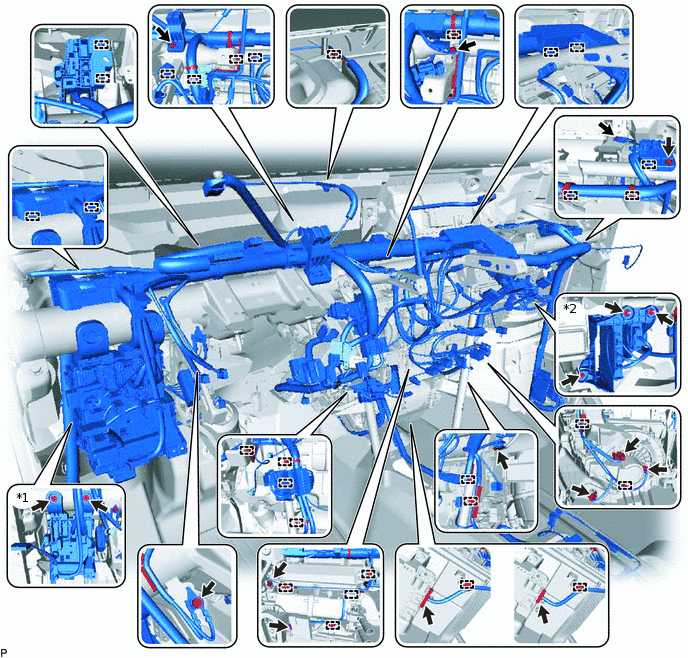
*1
Instrument Panel Junction Block Assembly
*2
ECU Integration Box RH
Remove the bolt and 2 nuts and disconnect the ECU integration box RH.
Disconnect each connector.
Remove the 3 bolts and disconnect each ground wire.
Detach each clamp and remove the 2 bolts to disconnect the instrument panel wire.
-
REMOVE NO. 1 INSTRUMENT PANEL BRACE SUB-ASSEMBLY
Using a clip remover, remove the clip and then fold back the front floor carpet assembly.
-
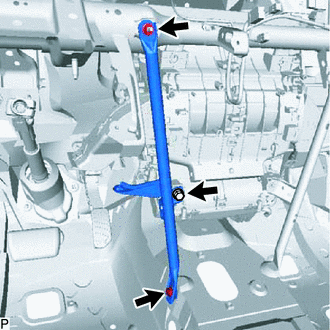
Remove the bolt, screw, nut and No. 1 instrument panel brace sub-assembly.
REMOVE NO. 2 INSTRUMENT PANEL BRACE SUB-ASSEMBLY
Using a clip remover, remove the clip and then fold back the front floor carpet assembly.
-
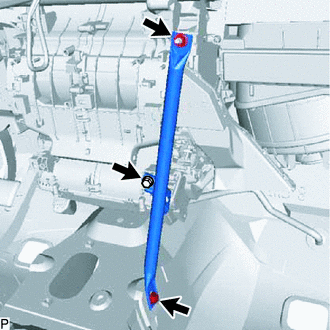
Remove the bolt, screw, nut and No. 2 instrument panel brace sub-assembly.
REMOVE INSTRUMENT PANEL REINFORCEMENT ASSEMBLY
Remove the 9 bolts and instrument panel reinforcement assembly.
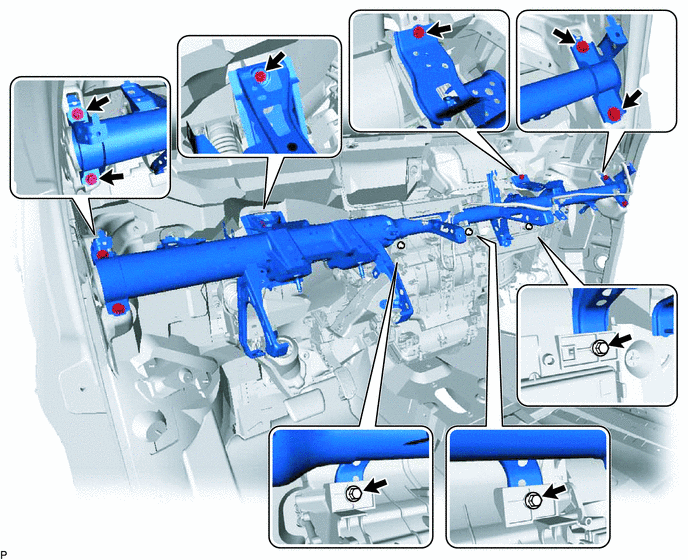
REMOVE NO. 2 AIR DUCT SUB-ASSEMBLY
-
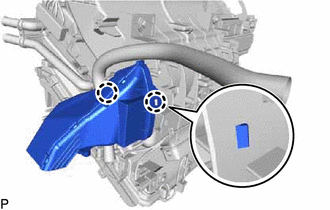
Detach the 2 claws and remove the No. 2 air duct sub-assembly.
Note:If any of the claws of the No. 2 air duct sub-assembly have been cracked or deformed during removal, make sure to replace the air duct with a new one. Failure to do so may cause the No. 2 air duct sub-assembly to fall off or noise to occur.
-
REMOVE NO. 1 AIR DUCT SUB-ASSEMBLY
-
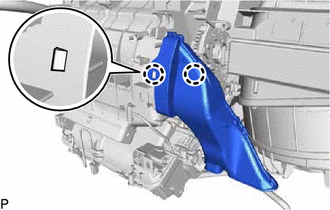
Detach the 2 claws and remove the No. 1 air duct sub-assembly.
Note:If any of the claws of the No. 1 air duct sub-assembly have been cracked or deformed during removal, make sure to replace the air duct with a new one. Failure to do so may cause the No. 1 air duct sub-assembly to fall off or noise to occur.
-
REMOVE AIR CONDITIONER UNIT ASSEMBLY
Disconnect the drain cooler hose.
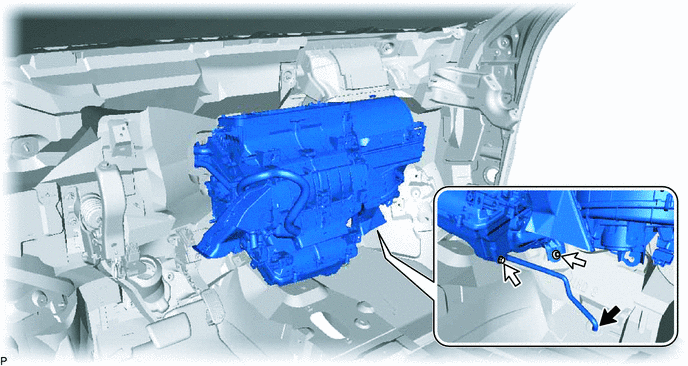
Remove the bolt, nut and air conditioner unit assembly.
REMOVE BLOWER ASSEMBLY
REMOVE AIR CONDITIONING DUCT SUB-ASSEMBLY
-
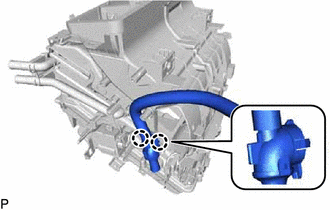
Dtach the 2 claws and remove the air conditioning duct sub-assembly.
-
REMOVE CONSOLE MOUNTING BRACKET LH
-
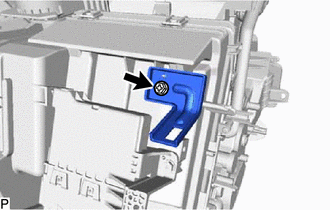
Remove the screw and console mounting bracket LH.
-
REMOVE CONSOLE MOUNTING BRACKET RH
-
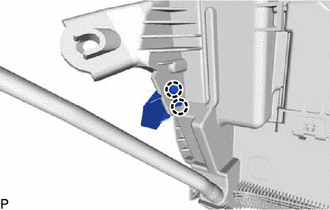
Disengage the 2 claws to remove the console mounting bracket RH.
-
REMOVE AIR CONDITIONING AMPLIFIER ASSEMBLY
REMOVE DRAIN COOLER HOSE
-
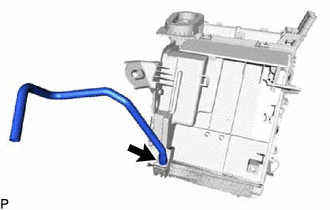
Remove the drain cooler hose.
-
REMOVE AIR CONDITIONING HARNESS ASSEMBLY
Detach each clamp.
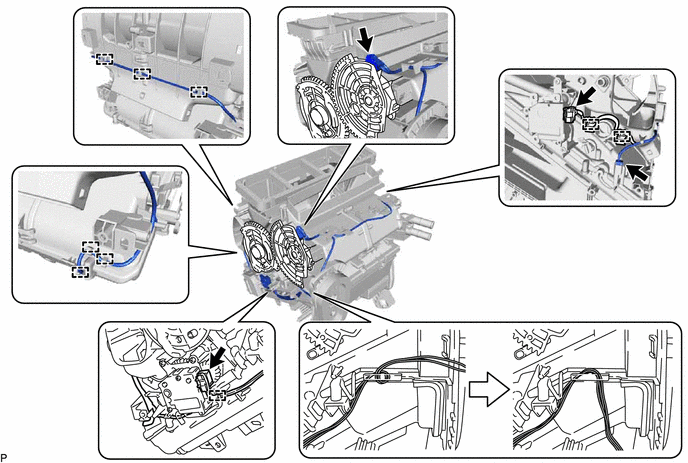
Disconnect each connector.
Remove the air conditioning harness assembly as shown in the illustration.