ENTRY AND START SYSTEM(for Entry Function) SYSTEM DESCRIPTION
-
VEHICLE AUXILIARY BATTERY SAVING FUNCTION
-
When the entry and start system (for Entry Function) is operating, the vehicle performs key detection operations every 0.25 seconds. Therefore, if the vehicle left as is for a long period of time, the auxiliary battery may become fully discharged. The following controls help reduce the rate at which the auxiliary battery is depleted.
-
If the hybrid system is not started for 5 days or more, periodic signal transmission from the electrical key antennas stops. However, the doors can still be unlocked by touching the unlock sensor of a front door outside handle assembly.
-
If the hybrid system is not started for 14 days or more, the lock and unlock sensors of the front passenger door outside handle assembly are disabled. Therefore, only the unlock sensor of the front door outside handle assembly of the driver door can be used to unlock the doors.*
-
*: Except Driver's Door Only Entry and Start System
-
-
If 10 minutes or more elapse while the electrical key transmitter sub-assembly is in the detection area (including the vehicle interior), entry and start system (for Entry Function) automatically deactivates the exterior detection area that the electrical key transmitter sub-assembly is in.
-
-
To restore operation of the entry and start system, perform any of the following operations.
-
While carrying the electrical key transmitter sub-assembly, touch the lock or unlock sensor of the front door outside handle assembly of the driver side door and perform a door lock or unlock operation.
-
Lock or unlock the doors with the wireless operation.
-
Insert the mechanical key into the door key cylinder of the driver door and lock or unlock the doors.
-
-
-
WIRELESS BUZZER VOLUME ADJUSTMENT FUNCTION (w/ WIRELESS BUZZER ANSWER BACK FUNCTION)
-
The volume of the wireless buzzer can be changed through the customize function.
Tech Tips
The volume of the following wireless buzzer operations cannot be adjusted.
-
Warning function buzzer operations
-
Customize function buzzer operations
-
Buzzer operations for key diagnostic mode using the GTS
-
Key registration buzzer operations
-
-
-
SEQUENCE OF ACTIONS FOR ENTRY AND START SYSTEM
-
This lists a sequence of actions pertaining to the entry and start system (unlocking the doors, turning the power source mode to on (ACC) and on (IG), starting and stopping the hybrid control system, and locking the doors). The system can be inspected easily by confirming that the operations listed for each step occur.
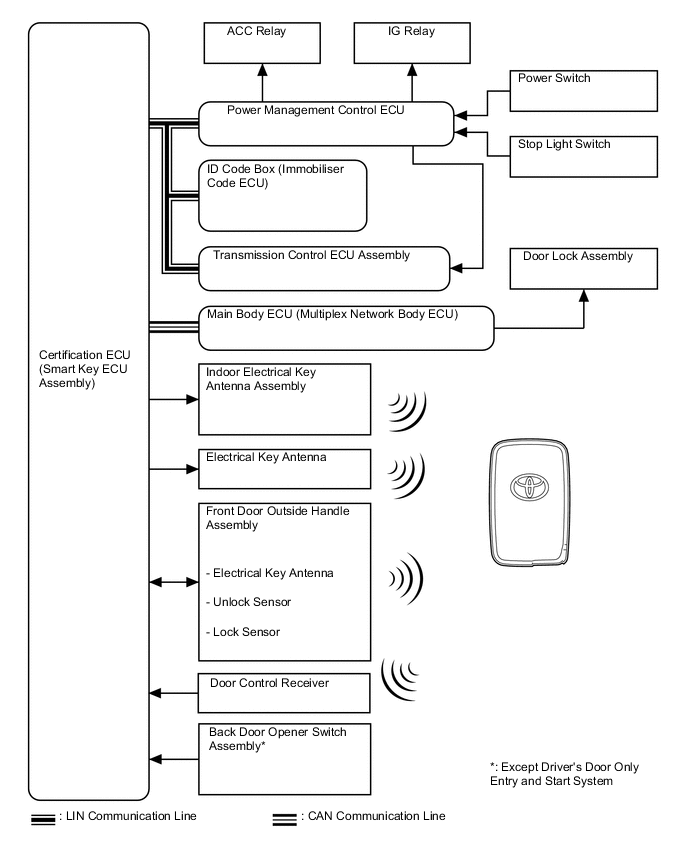
-
The following example shows how the information in this section is organized. The "Action" item indicates actions the user performs related to the entry and start system, and the "Expected Vehicle Response" item indicates the normal vehicle behavior in response to those actions. The suspected problem areas when the vehicle does not behave as expected and troubleshooting hints for each area are listed under "Suspected Area when Expected Vehicle Response Fails and Troubleshooting Information".
-
-
Action
-
-
Expected Vehicle Response
-
-
Suspected Area when Expected Vehicle Response Fails and Troubleshooting Information
-
Troubleshooting Information
Suspected Area when Expected Vehicle Response Fails
-
Troubleshooting Information
Suspected Area when Expected Vehicle Response Fails
-
See waveform
-
See table
Reference Waveform or Table
Tech Tips
-
Entry and start system DTCs and Data List information can be confirmed with the GTS.
-
Check for DTCs using the following method. If any DTCs are output, perform troubleshooting for those DTCs first.
-
Connect the GTS to the DLC3.
-
Turn the power switch on (IG).
-
Turn the GTS on.
-
Enter the following menus: Body Electrical / Entry&Start, Power Source Control and Main Body / Trouble Codes.
-
Check for DTCs.
Note
-
When the power switch cannot be turned on (other than IG ON), try to establish communication between the vehicle and the GTS by using either of the following methods: 1) Connect the GTS to the DLC3 and turn a courtesy light switch on and off at intervals of 1.5 seconds or less until communication between the GTS and vehicle begins (the GTS screen changes when communication begins), or 2) connect the GTS to the DLC3 and select "Manual" from the initial screen on the GTS. Then select "Key Code Registration" under model code.
-
If the entry and start system functions have been canceled through the customize function due to a customer request, "Auto Entry Cancel SW" in the Data List displays "ON".
-
ACTION 1
-
All the doors are locked while an electrical key transmitter sub-assembly is carried and the user brings the electrical key transmitter sub-assembly 3 m (9.84 ft.) or more away from the vehicle.
Action
Tech Tips
The request signal is emitted from each door every 0.25 seconds at 134.2 kHz to form a key detection area of approximately 0.7 m (2.30 ft.).
-
Pulse generation* Click here
Reference Waveform or Table
-
*: Tester Connection; "L62-3 (CLG1) - L62-15 (E)"
-
-
ACTION 2
-
An electrical key transmitter sub-assembly is brought within 0.7 m (2.30 ft.) of the driver side door.
Action
-
The red LED of the electrical key transmitter sub-assembly starts blinking.
Expected Vehicle Response
Tech Tips
When the electrical key transmitter sub-assembly is detected and the certification ECU (smart key ECU assembly) confirms that the key ID code of the electrical key transmitter sub-assembly and the key ID code stored in the certification ECU (smart key ECU assembly) match, it puts the touch sensor of the outside door handle in standby mode (the mode in which detection is possible when the sensor is touched by hand) and allows the door to be unlocked.
-
If the LED of the electrical key transmitter sub-assembly does not blink, the following parts may be malfunctioning.
Suspected Area when Expected Vehicle Response Fails and Troubleshooting Information
-
The electrical key transmitter sub-assembly is not one that is registered to the vehicle.
-
Confirm that the system operates normally with another electrical key transmitter sub-assembly that the customer possesses.
-
If the electrical key transmitter sub-assembly is malfunctioning, the power source mode cannot be changed to on (ACC) and the hybrid control system cannot be started (under normal conditions, when the electrical key transmitter sub-assembly is brought into the vehicle and the power switch is pressed without depressing the brake pedal, the power source mode changes to on (ACC) and the indicator illuminates in orange).
ELECTRICAL KEY TRANSMITTER SUB-ASSEMBLY
-
If the door cannot be opened, use the mechanical key built into the electrical key transmitter sub-assembly.
Tech Tips
Before replacing the electrical key transmitter sub-assembly, check if the transmitter battery is depleted.
-
If the problem only occurs in certain areas or times of day, wave interference may be the problem.
-
If a tool for checking electric waves, such as a signal strength meter, is available, move around the vehicle and check the tool display. A detection area is formed around the driver side door [within 0.7 m (2.30 ft.)]. Therefore, the tool will detect signals in the LF band (134 kHz). When the lock or unlock button of the electrical key transmitter sub-assembly is pressed, a signal strength meter will detect signals in the RF band (between 300 to 400 MHz). If signals are detected in the LF or RF band even after moving away from the vehicle, wave interference may be present.
-
If there are problems with the signals sent from the electrical key transmitter sub-assembly due to an electrical key transmitter sub-assembly malfunction (including when an electrical key transmitter sub-assembly from another vehicle is used), transmitter battery depletion, or wave interference, one of the following Data List items may display "Yes":
-
"Unmatched Vehicle-ID"
-
"No Response"
-
"Unmatched Code or Form"
-
"ID Code Difference"
WAVE INTERFERENCE
-
-
CERTIFICATION ECU (SMART KEY ECU ASSEMBLY)
-
The vehicle exterior detection area cannot be formed properly.
-
If the electrical key transmitter sub-assembly LED does not blink within 0.7 m (2.30 ft.) of the driver door outside door handle, but blinks within 0.7 m (2.30 ft.) of the front passenger side door outside door handle, the driver door outside door handle is malfunctioning.*
-
When there are problems with the vehicle exterior detection area, the power source mode can still be changed to on (ACC) and the hybrid control system can still be started.
-
Using the GTS, proper formation of the vehicle exterior detection area can be confirmed using "Overhead + Driver Side" in Key Diagnostic Mode Click here.
-
Even if there are problems with the detection area, door unlock operations can be performed by pressing the unlock button on the electrical key transmitter sub-assembly.
*: Except Driver's Door Only Entry and Start System
DOOR OUTSIDE HANDLE
-
When the door control receiver fails, the passenger side door cannot be unlocked.
-
When the door control receiver fails, wireless door unlock operations cannot be performed.
-
When the door control receiver fails, the power source mode cannot be changed to on (ACC) and the engine cannot be started.
-
Using the GTS, the door control receiver function can be checked using "Overhead + Driver Side" in Key Diagnostic Mode Click here.
DOOR CONTROL RECEIVER
-
A simple method to determine whether the battery is depleted is to operate the horn.
VEHICLE BATTERY DEPLETED
-
Pulse generation*1 Click here
-
Pulse generation*2 Click here
-
Pulse generation*3 Click here
-
Pulse generation*4 Click here
Reference Waveform or Table
-
*1: Tester Connection; "L62-3 (CLG1) - L62-15 (E)"
-
*2: Tester Connection; "L63-15 (RDA) - L62-15 (E)"
-
*3: Tester Connection; "L63-5 (RCO) - L62-15 (E)"
-
*4: Tester Connection; "L63-16 (RSSI) - L62-15 (E)"
-
-
ACTION 3
-
The unlock sensor of the driver door outside handle is touched while the electrical key transmitter sub-assembly is carried.
Action
-
The doors unlock and an answer-back is performed (the hazard warning lights illuminate and the buzzer sounds*).
-
*: w/ Wireless Buzzer Answer Back Function
Expected Vehicle Response
Tech Tips
When the door outside handle (unlock sensor) is touched, an unlock sensor "ON" signal is sent to the certification ECU (smart key ECU assembly), and the main body ECU supplies power to the door unlock relay in each door based on a command from the certification ECU (smart key ECU assembly) via CAN communication.
-
When the doors do not unlock even though the unlock sensor is touched, the following parts may be malfunctioning.
Suspected Area when Expected Vehicle Response Fails and Troubleshooting Information
-
The same part is malfunctioning as when the electrical key transmitter sub-assembly LED does not blink.
-
If the doors unlock when the passenger door unlock sensor is touched while an electrical key transmitter sub-assembly is carried, the driver door unlock sensor may be malfunctioning.*
-
Under normal conditions, "D-Door Touch Sensor" in the Data List displays "ON" when the unlock sensor is touched.
*: Except Driver's Door Only Entry and Start System
DOOR OUTSIDE HANDLE UNLOCK SENSOR
-
When a lock/unlock operation cannot be performed by operating the door control switch inside the vehicle, the door lock mechanism itself may be malfunctioning.
DOOR LOCK/UNLOCK MECHANISM
-
Pulse generation* Click here
-
See table "Check Instrument Panel Junction Block Assembly and Main Body ECU (Multiplex Network Body ECU)" (ACT-) Click here
Reference Waveform or Table
-
*: Tester Connection; "L62-20 (SEN1) - L62-15 (E)"
-
-
ACTION 4
-
The driver door is opened, the user sits in the driver seat and then closes the driver door while carrying an electrical key transmitter sub-assembly. With park (P) selected, the power switch is pressed once without depressing the brake pedal.
Action
-
The power switch illuminates in orange [the power source mode changes to on (ACC)].
-
The security indicator light stops blinking and turns off. The immobiliser changes from set to unset and hybrid control system start is permitted.
-
The gearshift control unlocks.
Expected Vehicle Response
Tech Tips
-
When the power switch is pressed, the indoor electrical key antenna forms the vehicle interior detection area (134.2 KHz) in order to detect the electrical key transmitter sub-assembly inside the vehicle. Upon receiving the request signal, the electrical key transmitter sub-assembly transmits an ID code at 300 to 400 MHz (at this time the red LED of the electrical key transmitter sub-assembly illuminates briefly). When the ID code from the electrical key transmitter sub-assembly and the ID code stored in the certification ECU (smart key ECU assembly) match, the ACC relay turns on when the power switch is pressed, and the power switch indicator illuminates in orange. After the power source mode changes, S code verification*1 and L code verification*2 is completed.
-
"Immobiliser" in the Data List changes from "Set" to "Unset".
When any of the following conditions are met, the vehicle interior detection area is formed.
-
A door is closed.
-
For approximately 30 seconds after a door is closed.
-
The brake pedal is depressed.
-
For approximately 30 seconds after the brake pedal is depressed once.
-
Immediately after the power switch is pressed.
-
*1: Confirms the codes match between the certification ECU (smart key ECU assembly) and ID code box (immobiliser code ECU).
-
*2: Confirms the codes match between the transmission control ECU assembly and ID code box (immobiliser code ECU).
-
If the power source mode does not change to on (ACC), the following parts may be malfunctioning.
Suspected Area when Expected Vehicle Response Fails and Troubleshooting Information
-
The electrical key transmitter sub-assembly, transmitter battery and vehicle battery are possible causes. However, they have already been confirmed using the previous procedures.
-
-
CERTIFICATION ECU (SMART KEY ECU ASSEMBLY)
-
If the problem only occurs in certain areas or times of day, wave interference may be the problem.
-
If a tool for checking electric waves, such as a signal strength meter, is available, move around the vehicle and check the tool display. A detection area is formed around the driver side door [within 0.7 m (2.30 ft.)]. Therefore, the tool will detect signals in the LF band (134 kHz). When the lock or unlock button of the electrical key transmitter sub-assembly is pressed, a signal strength meter will detect signals in the RF band (between 300 to 400 MHz). If signals are detected in the LF or RF band even after moving away from the vehicle, wave interference may be present.
-
If there are problems with the signals sent from the electrical key transmitter sub-assembly due to an electrical key transmitter sub-assembly malfunction (including when an electrical key transmitter sub-assembly from another vehicle is used), transmitter battery depletion, or wave interference, one of the following Data List items may display "Yes":
-
"Unmatched Vehicle-ID"
-
"No Response"
-
"Unmatched Code or Form"
-
"ID Code Difference"
WAVE INTERFERENCE
-
Using the GTS, formation of the vehicle interior detection area can be confirmed using "Overhead + Front Room" in Key Diagnostic Mode Click here.
-
When there are problems with the vehicle interior detection area, the power source mode cannot be changed to on (ACC) and the hybrid control system cannot be started. However, if the electrical key transmitter sub-assembly is held near the power switch, the hybrid control system can be started.
INDOOR ELECTRICAL KEY ANTENNA (VEHICLE INTERIOR DETECTION AREA IS FORMED)
-
Under normal conditions, "Start Switch" in the Data List changes from "OFF" to "ON" when the power switch is pressed.
POWER SWITCH
-
It is necessary for "S Code Check" in the Data List to display "OK". If "S Code Check" displays "OK", the certification ECU (smart key ECU assembly) code and ID code box (immobiliser code ECU) code match.
ID CODE BOX (IMMOBILISER CODE ECU)
-
It is necessary for "L Code Check" in the Data List to display "OK". If "L Code Check" displays "OK", the transmission control ECU assembly L code and ID code box (immobiliser code ECU) L code match.
-
When the power source mode changes to on (ACC) and "S Code Check" and "L Code Check" are both "OK", power is supplied to the unlock circuit of the gearshift control. At this time, "Unlock Request Receive" in the Data List changes from "NG" to "OK" momentarily.
GEARSHIFT CONTROL
-
Pulse generation*1 Click here
-
Pulse generation*2 Click here
-
Pulse generation*3 Click here
Reference Waveform or Table
-
*1: Tester Connection; "L63-15 (RDA) - L62-15 (E)"
-
*2: Tester Connection; "L62-7 (CLG5) - L62-15 (E)"
-
-
ACTION 5
-
An electrical key transmitter sub-assembly is carried and the brake pedal is depressed with park (P) selected.
Action
-
The power switch indicator illuminates in green.
Expected Vehicle Response
-
If the power switch indicator does not illuminate in green, the following part may be malfunctioning.
Suspected Area when Expected Vehicle Response Fails and Troubleshooting Information
-
When the brake pedal is depressed, "Stop Light Switch" in the Data List changes from "OFF" to "ON".
STOP LIGHT SWITCH
-
-
ACTION 6
-
An electrical key transmitter sub-assembly is carried and the power switch is pushed while depressing the brake pedal with park (P) selected.
Action
-
The hybrid control system starts.
Expected Vehicle Response
-
If the starter does not operate, the following parts may be malfunctioning.
Suspected Area when Expected Vehicle Response Fails and Troubleshooting Information
-
-
CERTIFICATION ECU
-
A simple method to determine whether the battery is depleted is to operate the horn.
VEHICLE BATTERY DEPLETED
-
When the hybrid control system starts, the power management control ECU and ID code box (immobiliser code ECU) certify each other and "EFI Code Receive" in the Data List changes from "NG" to "OK". After that, fuel injection continues to be performed.
ECM
-
-
ACTION 7
-
The power switch is pressed.
Action
-
The hybrid control system stops and the power switch stops illuminating in green and turns off (all power is turned off). The security indicator light starts blinking.
Expected Vehicle Response
-
-
ACTION 8
-
The lock sensor of the driver door outside door handle is touched while an electrical key transmitter sub-assembly is carried.
Action
-
The doors are locked. At the same time, answer-back is performed (the hazard warning lights illuminate and the buzzer sounds*).
-
*: w/ Wireless Buzzer Answer Back Function
Expected Vehicle Response
-
-
-
WARNING FUNCTION
-
Warning
-
When any of the situations below occur, the entry and start system causes the certification ECU (smart key ECU assembly) to sound the wireless door lock buzzer and a buzzer in the combination meter sub-assembly, a message to appear on the multi-information display, and the power switch to illuminate in order to alert the driver.
-
Situation: The key reminder sounds.
-
When the driver door is open, the driver turns the power switch on (ACC) and attempts to leave the vehicle.
Reason for warning Vehicle theft Warning Start Condition
(Either condition is met)
-
The power switch is on (ACC).
-
The driver door is opened.
Warning description
-
Buzzer in combination meter sub-assembly sounds continuously
Warning Stop Condition
(One of conditions is met)
The warning is stopped when one of the following conditions is met:
-
The power switch is turned on (IG).
-
The driver door is closed.
-
The power switch is turned off and the shift control is locked.
-
-
-
Situation: The hybrid control system is left running and park (P) has been selected when the driver gets out of the vehicle.
-
There are 2 patterns for this situation.
-
Pattern 1:
When the hybrid control system is left running and park (P) has been selected, the driver closes the driver door and attempts to leave the vehicle while holding the electrical key transmitter sub-assembly.
In this situation, the following control is performed:
Reason for warning Vehicle theft, hybrid control system cannot be restarted, discharged auxiliary battery Warning Start Condition
(All conditions are met)
-
Park (P) has been selected.
-
The power switch is not off.
-
The electrical key transmitter sub-assembly is not in the vehicle.
-
The driver door is opened → closed.
-
The vehicle speed is 0 km/h (0 mph).
Warning description
-
Buzzer in combination meter sub-assembly sounds once.
-
Wireless buzzer sounds 3 times.
-
Smart warning light in combination meter sub-assembly comes on.*1

-
"KEY NOT DETECTED" is displayed on multi-information display in combination meter sub-assembly.*2
Warning Stop Condition
(Either condition is met)
-
The power switch is turned off.
-
The electrical key transmitter sub-assembly is returned to the vehicle.
-
-
*1: w/o Multi-information Display
-
*2: w/ Multi-information Display
-
Pattern 2:
Under the situation of pattern 1, the driver touches the lock sensor on the door outside handle assembly.
In this situation, the following control is performed:
Reason for warning Vehicle theft, discharged auxiliary battery Warning Start Condition
(All conditions are met)
-
The power switch is not off.
-
Park (P) has been selected.
-
All doors are closed.
-
The electrical key transmitter sub-assembly is in the outside detection areas.
-
The lock sensor is on.
-
The vehicle speed is 0 km/h (0 mph).
Warning description
-
Buzzer in combination meter sub-assembly sounds once.
-
Wireless buzzer sounds continuously.
-
Smart warning light in combination meter sub-assembly comes on.*1
-
"KEY NOT DETECTED" is displayed on multi-information display in combination meter sub-assembly.*2
Warning Stop Condition
(One of conditions is met)
-
The power switch is turned off.
-
With park (P) selected, the shift lever is moved to select another shift state.
-
The vehicle speed is above 0 km/h (0 mph).
-
Wireless door lock buzzer is stopped.
-
Any door is opened (only buzzer stops).
-
Electrical key transmitter sub-assembly is returned to the vehicle.
-
60 seconds have elapsed after the wireless door lock buzzer is activated.
-
-
*1: w/o Multi-information Display
-
*2: w/ Multi-information Display
-
-
Situation: Door is ajar.
-
The lock sensor on the door outside handle assembly is touched to perform entry lock with a door open.
In this situation, the following control is performed:
Reason for warning Vehicle theft Warning Start Condition
(All conditions are met)
-
The power switch is off.
-
Any door other than the door that performed the entry lock operation is open.
-
The lock sensor on a door outside handle assembly is on (touched).
-
The electrical key transmitter sub-assembly is in the outside detection areas.
Warning description
-
Wireless buzzer sounds.
Warning Stop Condition
(One of conditions is met)
-
The power switch is turned to a mode other than off.
-
All doors are closed.
-
An unlock operation is performed using the wireless door lock remote function.
-
The touch sensor on the inner side of a door outside handle assembly is used to perform entry unlock.
-
Wireless door lock buzzer is stopped.
-
-
-
Situation: The hybrid control system is left running when a passenger gets out of the vehicle while carrying the electrical key transmitter sub-assembly.
-
When the hybrid control system is left running, a passenger leaves the vehicle while carrying the electrical key transmitter sub-assembly.
In this situation, the following control is performed:
Reason for warning Hybrid control system cannot be restarted Warning Start Condition
(All conditions are met)
-
The power switch is not off.
-
A door other than the driver door is opened → closed.
-
The vehicle speed is 0 km/h (0 mph).
-
The electrical key transmitter sub-assembly is not in the vehicle.
Warning description
-
Buzzer in combination meter sub-assembly sounds once.
-
Wireless buzzer sounds 3 times.
-
Smart warning light in combination meter sub-assembly comes on.*1
-
"KEY NOT DETECTED" is displayed on multi-information display in combination meter sub-assembly.*2
Warning Stop Condition
(Either condition is met)
-
The power switch is turned off.
-
The electrical key transmitter sub-assembly is returned to the vehicle.
-
-
*1: w/o Multi-information Display
-
*2: w/ Multi-information Display
-
-
Situation: The electrical key transmitter sub-assembly is not in the detection areas.
-
When the electrical key transmitter sub-assembly is not in the vehicle or the transmitter battery is depleted, the driver attempts to start the hybrid control system or turn the power switch on (IG).
In this situation, the following control is performed:
Reason for warning Confuses the user Warning Start Condition
(All conditions are met)
-
The immobiliser system is set.
-
The power switch is pushed.
-
The electrical key transmitter sub-assembly is not in the vehicle or the transmitter battery is depleted.
Warning description
-
Buzzer in combination meter sub-assembly sounds once.
-
Smart warning light in combination meter sub-assembly comes on.*1
-
"KEY NOT DETECTED" is displayed on multi-information display in combination meter sub-assembly.*2
Warning Stop Condition
(One of conditions is met)
-
The power switch is turned off.
-
The electrical key transmitter sub-assembly is returned to the vehicle.
-
15 seconds have elapsed after the smart warning light in combination meter sub-assembly comes on.
-
-
*1: w/o Multi-information Display
-
*2: w/ Multi-information Display
-
-
Situation: The electrical key transmitter sub-assembly is left in the vehicle.
-
There are two patterns for this situation.
-
Pattern 1:
The lock sensor on a door outside handle assembly is touched to perform entry lock with the electrical key transmitter sub-assembly left in the vehicle.
In this situation, the following control is performed:
Reason for warning Vehicle theft Warning Start Condition
(All conditions are met)
-
The power switch is off.
-
All doors are closed.
-
The electrical key transmitter sub-assembly is in the vehicle.
-
The lock sensor on a door outside handle assembly is on (touched).
Warning description
-
Buzzer in combination meter sub-assembly sounds once.
-
"KEY DETECTED IN VEHICLE" is displayed on multi-information display in combination meter sub-assembly for 60 seconds.*
-
Wireless buzzer sounds.
Warning Stop Condition
(One of conditions is met)
-
The power switch is turned to a mode other than off.
-
Lock operation is detected.
-
Wireless door lock buzzer is stopped.
-
Any door is opened (only buzzer stops).
-
-
*: w/ Multi-information Display
-
Pattern 2:
With a door open and the electrical key transmitter sub-assembly in the vehicle, the lock knob is locked and then the door is closed with the door handle being pulled.
In this situation, the following control is performed:
Reason for warning Vehicle theft Warning Start Condition
(All conditions are met)
-
With a door open, the lock knob is locked and then the door is closed with the door handle being pulled.
-
The electrical key transmitter sub-assembly is in the vehicle.
Warning description
-
Buzzer in combination meter sub-assembly sounds once.
-
Wireless buzzer sounds.
-
"KEY DETECTED IN VEHICLE" is displayed on multi-information display in combination meter sub-assembly for 60 seconds.*
Warning Stop Condition
(One of conditions is met)
-
The power switch is turned to a mode other than off.
-
The vehicle speed is above 0 km/h (0 mph).
-
Lock operation is detected.
-
Wireless door lock buzzer is stopped.
-
Any door is opened (only buzzer stops).
-
The vehicle speed is above 0 km/h (0 mph).
-
-
*: w/ Multi-information Display
-
-
Situation: The transmitter battery is weak.
-
The vehicle is driven using an electrical key transmitter sub-assembly that has a low battery.
In this situation, the following control is performed:
Reason for warning Entry and start system does not function Warning Start Condition
(Both conditions are met)
-
The power switch is turned off after being left on (IG) for more than 20 minutes.
-
The transmitter battery voltage is low.
Warning description
-
Buzzer in combination meter sub-assembly sounds once.
-
"KEY BATTERY LOW" is displayed on multi-information display in combination meter sub-assembly for 15 seconds.*
Warning Stop Condition
-
The transmitter battery is replaced with a new one.
-
-
*: w/ Multi-information Display
-
-
Situation: The power management ECU is malfunctioning.
-
A malfunction of the power management control ECU is detected.
In this situation, the following control is performed:
Reason for warning Malfunction detection Warning Start Condition
-
A malfunction of the power management ECU is detected.
Warning description
-
Power switch indicator blinks orange at 2-second intervals for 15 seconds.
Warning Stop Condition
-
The power management control ECU returns to normal.
-
-
-
Situation: The hybrid control system does not start. (Situation A)
-
There are two patterns for this situation.
-
Pattern 1:
A warning message appears on the multi-information display when the driver does not follow the proper procedure to start the vehicle.
In this situation, the following control is performed:
Reason for warning Usability function Warning Start Condition
(All conditions are met)
-
The power switch is turned off.
-
Driver door is closed → opened.
-
The power switch is turned from off to on (ACC) more than twice with the hybrid control system off and the brake pedal not depressed.
Warning description
-
Buzzer in combination meter sub-assembly sounds once.
-
"DEPRESS BRAKE PEDAL AND PUSH POWER SWITCH TO START" is displayed on multi-information display in combination meter sub-assembly for 5 seconds.*
Warning Stop Condition
(One of conditions is met)
-
The power switch is turned off.
-
The power switch is turned on (IG).
-
-
*: w/ Multi-information Display
-
Pattern 2:
A message indicating how to start the hybrid control system appears on the multi-information display when a shift state in which the hybrid control system cannot be started.
In this situation, the following control is performed:
Reason for warning Usability function Warning Start Condition
(All conditions are met)
-
The hybrid control system is stopped.
-
The vehicle speed is 0 km/h (0 mph).
-
More than 0.5 seconds have elapsed after the power switch is turned on (IG).
-
The shift state other than park (P).
Warning description
-
Buzzer in combination meter sub-assembly sounds once.
-
P position request indicator light in combination meter sub-assembly comes on.

-
"SHIFT TO P POSITION TO START" is displayed on multi-information display in combination meter sub-assembly.*
Warning Stop Condition
(One of conditions is met)
-
The P position switch (transmission shift main switch) is pushed.
-
The vehicle speed is above 0 km/h (0 mph).
-
The power switch is turned off or on (ACC).
-
The hybrid control system is started.
-
-
*: w/ Multi-information Display
-
-
Situation: The hybrid control system does not start. (Situation B)
When the power switch is pushed, the electrical key transmitter sub-assembly cannot be detected in the vehicle two times in a row.
In this situation, the following control is performed:
-
Reason for warning Usability function Warning Start Condition
(All conditions are met)
-
The immobiliser system is set.
-
The electrical key transmitter sub-assembly is not in the vehicle.
-
Key code verification error occurs when the power switch is pushed twice.
Warning description
-
Buzzer in combination meter sub-assembly sounds once.
-
"DEPRESS BRAKE PEDAL, TOUCH POWER SWITCH WITH KEY" is displayed on multi-information display in combination meter sub-assembly.*
-
-
*: w/ Multi-information Display
-
-
Situation: Immobiliser system certification completion occurs.
-
A warning message appears on the multi-information display when an electrical key transmitter sub-assembly with a depleted battery is held near the power switch while depressing the brake.
In this situation, the following control is performed:
Reason for warning Malfunction detection Warning Start Condition
-
Electrical key transmitter sub-assembly certification result is OK.
Warning description
-
Buzzer in combination meter sub-assembly sounds once.
-
"DEPRESS BRAKE PEDAL AND PUSH POWER SWITCH TO START" is displayed on multi-information display in combination meter sub-assembly.*
-
-
*: w/ Multi-information Display
-
-
Situation: The vehicle is driven without an electrical key transmitter sub-assembly.
-
A warning message appears on the multi-information display when the vehicle starts moving without a registered electrical key transmitter sub-assembly in the vehicle.
In this situation, the following control is performed:
Reason for warning Hybrid control system cannot be restarted Warning Start Condition
-
When vehicle speed is detected after the electrical key transmitter sub-assembly is removed from the vehicle, the warning is activated (only for first time).
Warning description
-
Buzzer in combination meter sub-assembly sounds once.
-
Smart warning light in combination meter sub-assembly comes on.
-
"KEY NOT DETECTED" is displayed on multi-information display in combination meter sub-assembly for 5 seconds.*
Warning Stop Condition
(Either condition is met)
-
The power switch is turned off.
-
The electrical key transmitter sub-assembly is returned to the vehicle.
-
-
*: w/ Multi-information Display
-
-
-