SPEED LIMITER SYSTEM ROAD TEST
-
INSPECT SET FUNCTION
-
Turn the speed limiter system on using the speed limiter switch.
-
Drive the vehicle at 30 km/h or 20 mph or more.
-
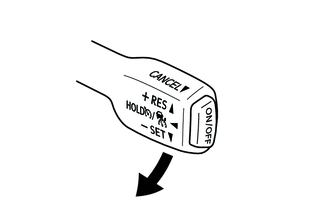
Press the cruise control main switch to -SET.
-
Check that the vehicle speed is limited to the set speed.
-
-
INSPECT ACCELERATION FUNCTION
-
Turn the speed limiter system on using the speed limiter switch.
-
Drive the vehicle at 30 km/h or 20 mph or more.
-
Press the cruise control main switch to -SET.
-
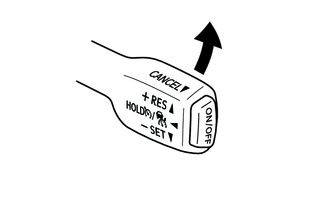
Check that the vehicle limit speed increases by an interval of 5 km/h or 5 mph while the cruise control main switch is pressed to +RES, and that the vehicle maintains the newly set speed when the switch is released.
-
Tap the cruise control main switch to +RES. Check that the vehicle limit speed increases by about 1 km/h or 1 mph each time the switch is tapped (tap-up control).
Tech Tips
The highest possible set speed is approximately 200 km/h or 125 mph.
-
-
INSPECT COAST FUNCTION
-
Turn the speed limiter system on using the speed limiter switch.
-
Drive the vehicle at 30 km/h or 20 mph or more.
-
Press the cruise control main switch to -SET.
-
Check that vehicle limit speed decreases by an interval of 5 km/h or 5 mph while the cruise control main switch is pressed to -SET, and that the vehicle maintains the newly set speed when the switch is released.
-
Tap the cruise control main switch to -SET. Check that the vehicle limit speed decreases by about 1 km/h or 1 mph each time the switch is tapped (tap-down control).
Tech Tips
The lowest possible set speed is approximately 30 km/h or 20 mph. The speed limiter system cannot be set below the lowest possible set speed.
-
-
INSPECT CANCEL FUNCTION
-
Turn the speed limiter system on using the speed limiter switch.
-
Drive the vehicle at 30 km/h or 20 mph or more.
-
Press the cruise control main switch to -SET.
-
When performing one of the following, check that the speed limiter system control of vehicle speed is canceled.
-
Pulling the cruise control main switch to CANCEL*1
-
VSC is turned off.*1
-
Turning the speed limiter system off using the speed limiter switch*2
-
Pushing the cruise control main switch on*2
-
*1: The stored vehicle limit speed in the ECM is maintained
-
*2: The stored vehicle limit speed in the ECM is not maintained
-
-
-
INSPECT RESUME FUNCTION
-
Turn the speed limiter system on using the speed limiter switch.
-
Drive the vehicle at 30 km/h or 20 mph or more.
-
Press the cruise control main switch to -SET.
-
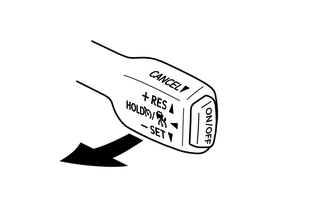
Pull the cruise control main switch to CANCEL.
-
After pressing the cruise control main switch to +RES while driving the vehicle at 30 km/h or 20 mph or more, check that the vehicle limit speed set at the time of cancellation is resumed.
-
-
INSPECT OVERRIDE FUNCTION
-
Turn the speed limiter system on using the speed limiter switch.
-
Drive the vehicle at 30 km/h or 20 mph or more.
-
Press the cruise control main switch to -SET.
-
Fully depress the accelerator pedal and check that the vehicle accelerates beyond the set speed.
-