FRONT PILLAR UPPER COVER REASSEMBLY
CAUTION / NOTICE / HINT
Tech Tips
-
Use the same procedure for the RH side and LH side.
-
The following procedure is for the LH side.
PROCEDURE
-
INSTALL FRONT PILLAR COVER PROTECTOR
Tech Tips
When installing the front pillar cover protector, heat the front pillar upper cover sub-assembly using a heat light.
Heating Temperature Item Temperature Front Pillar Upper Cover Sub-assembly 20 to 30°C (68 to 86°F) Note
Do not heat the front pillar upper cover sub-assembly excessively.
-
Clean the front pillar upper cover sub-assembly surface.
-
Using a heat light, heat the front pillar upper cover sub-assembly surface.
-
Remove the double-sided tape from the front pillar upper cover sub-assembly.
-
Wipe off any tape adhesive residue with cleaner.
-
-
Using a heat light, heat the front pillar upper cover sub-assembly.
-
Remove the release paper from a new front pillar cover protector.
Tech Tips
After removing the release paper, keep the exposed adhesive free from foreign matter.
-
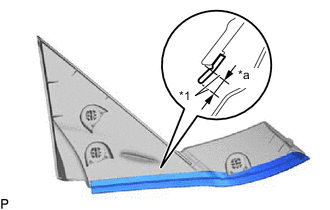
*1 Mark-off Line *a 3.0 mm (0.118 in.) Install the front pillar cover protector as shown in the illustration.
Tech Tips
Align the front pillar cover protector with the mark-off line of the front pillar upper cover sub-assembly.
-