POWER OUTLET SOCKET REMOVAL
PROCEDURE
-
REMOVE NO. 2 CONSOLE BOX CUP HOLDER
-
REMOVE NO. 1 POWER OUTLET SOCKET ASSEMBLY
-
Disconnect the connector.
-
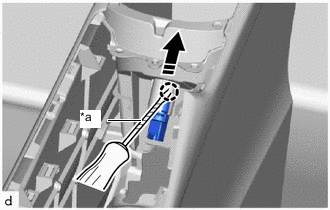
*a Protective Tape 
Remove in this Direction Using a screwdriver with its tip wrapped in protective tape, disengage the claw to remove the No. 1 power outlet socket assembly as shown in the illustration.
-
-
REMOVE NO. 1 POWER OUTLET SOCKET COVER
-
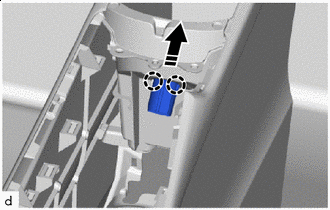
Remove in this Direction Disengage the claws to remove the No. 1 power outlet socket cover as shown in the illustration.
-