POWER OUTLET SOCKET REMOVAL
-
REMOVE INSTRUMENT CLUSTER FINISH PANEL SUB-ASSEMBLY LOWER CENTER (AIR CONDITIONING CONTROL ASSEMBLY)
-
REMOVE NO. 2 POWER OUTLET SOCKET ASSEMBLY
-
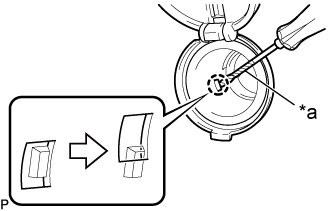
Text in Illustration *a Protective Tape Using a screwdriver with its tip wrapped in protective tape, detach the claw, then turn the No. 2 power outlet socket assembly.
-
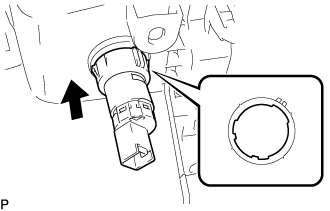
Align the protrusion of the No. 2 power outlet socket assembly with the cutout of the No. 2 power outlet socket cover and then pull the No. 2 power outlet socket assembly out.
-
-
REMOVE NO. 2 POWER OUTLET SOCKET COVER
-
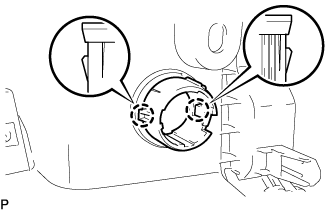
Detach the 2 claws to remove the No. 2 power outlet socket cover.
-