SFI SYSTEM(w/ GPF), Diagnostic DTC:P244B00
| DTC Code | DTC Name |
|---|---|
| P244B00 | Particulate Filter Differential Pressure Too High Bank 1 |
DESCRIPTION
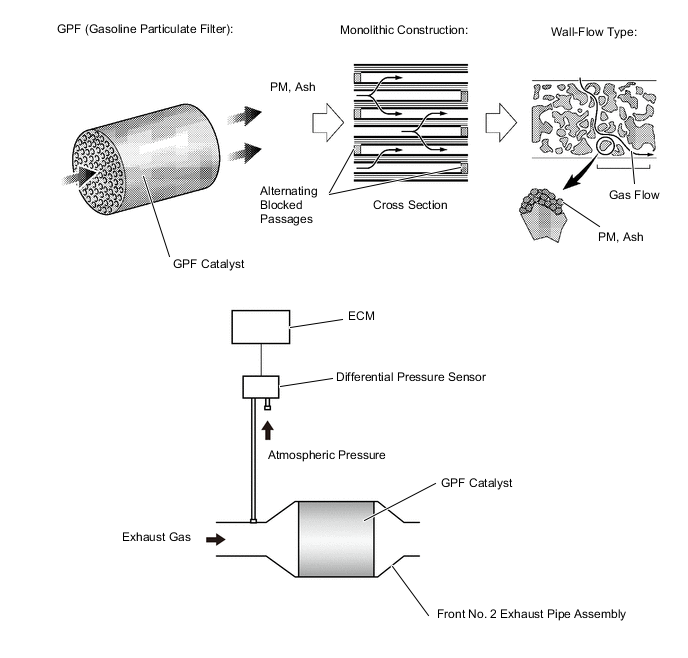
The GPF (Gasoline Particulate Filter) system is an exhaust purification system for processing the PM (Particulate Matter) discharged from the engine. The GPF catalyst has a porous ceramic structure that collects PM, and the collected PM is oxidized as it bonds with oxygen molecules under high temperature. When the fuel cut operation is performed after the GPF rises to a high temperature under high load operation, PM is oxidized, but under low temperature conditions, PM oxidation is insufficient and deposits accumulate.
A differential pressure sensor is installed to monitor the pressure before the GPF catalyst converter. The sensor is a semiconductor type that is not affected by the exhaust gas. The differential pressure sensor outputs the difference between the atmospheric pressure and the pressure before the GPF catalyst. The differential pressure sensor outputs the difference between the atmospheric pressure and the pressure before the GPF catalyst.
| DTC No. | Detection Item | DTC Detection Condition | Trouble Area | MIL | Memory | Note |
|---|---|---|---|---|---|---|
| P244B00 | Particulate Filter Differential Pressure Too High Bank 1 | Differential pressure sensor output value at intake air flow of 30 gm/sec or higher is at the threshold* or higher (1 trip detection logic). |
|
Comes on*/- *: The MIL is illuminated when PM or ash accumulation has progressed and protection of parts has become necessary. |
DTC stored | SAE: P244B |
*: Threshold differs according to intake air flow
MONITOR DESCRIPTION
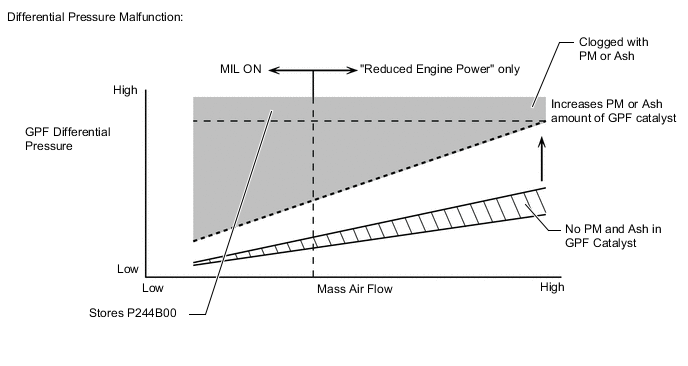
The differential pressure sensor outputs the difference between the atmospheric pressure and the pressure before the GPF catalyst. When the GPF differential pressure is at the threshold or higher due to PM or ash accumulation in the GPF catalyst, output is limited during high load operation. At this time, the ECM illuminates the MIL* and stores a DTC.
*: The MIL is illuminated when PM or ash accumulation has progressed and protection of parts has become necessary.
MONITOR STRATEGY
| Frequency of Operation | Once per driving cycle |
CONFIRMATION DRIVING PATTERN
-
Connect the GTS to the DLC3.
-
Turn the engine switch on (IG).
-
Turn the GTS on.
-
Clear the DTCs (even if no DTCs are stored, perform the clear DTC procedure).
-
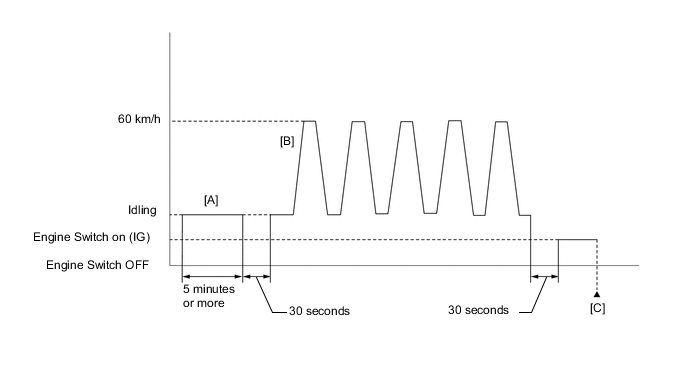
Idle the engine for 5 minutes or more [A].
-
Turn the engine switch off and wait for at least 30 seconds.
-
Start the engine.
-
Repeat the pattern of accelerating the vehicle from rest to approximately 60 km/h (37 mph) [depress the accelerator pedal by a large amount at 2nd shift position] and then decelerating the vehicle 5 times [B].
CAUTION:
When performing the confirmation driving pattern, obey all speed limits and traffic laws.
-
Turn the engine switch off and wait for at least 30 seconds.
-
Turn the engine switch on (IG).
-
Turn the GTS on.
-
Enter the following menus: Powertrain / Engine / Trouble Codes [C].
-
Read the pending DTCs.
Tech Tips
-
If a pending DTC is output, the system is malfunctioning.
-
If a pending DTC is not output, perform the following procedure.
-
-
Enter the following menus: Powertrain / Engine / Utility / All Readiness.
-
Input the DTC: P244B00.
-
Check the DTC judgment result.
GTS Display Description NORMAL
-
DTC judgment completed
-
System normal
ABNORMAL
-
DTC judgment completed
-
System abnormal
INCOMPLETE
-
DTC judgment not completed
-
Perform driving pattern after confirming DTC enabling conditions
Tech Tips
-
If the judgment result is NORMAL, the system is normal.
-
If the judgment result is ABNORMAL, the system has a malfunction.
-
If the judgment result is INCOMPLETE, perform steps [A] through [C].
-
WIRING DIAGRAM
Refer to DTC P245211 for the differential pressure sensor circuit.
Refer to DTC P010012 for the mass air flow meter sub-assembly circuit.
CAUTION / NOTICE / HINT
Tech Tips
-
Read freeze frame data using the GTS. The ECM records vehicle and driving condition information as freeze frame data the moment a DTC is stored. When troubleshooting, freeze frame data can help determine if the vehicle was moving or stationary, if the engine was warmed up or not, if the air fuel ratio was lean or rich, and other data from the time the malfunction occurred.
-
Clear the Vehicle Control History after completing repairs.
PROCEDURE
-
CHECK ANY OTHER DTCS OUTPUT (IN ADDITION TO DTC P244B00)
-
Connect the GTS to the DLC3.
-
Turn the engine switch on (IG).
-
Turn the GTS on.
-
Enter the following menus: Powertrain / Engine / Utility / Vehicle Control History (RoB).
Powertrain > Engine > UtilityTester Display Vehicle Control History (RoB) -
Record the vehicle control history.
-
Enter the following menus: Powertrain / Engine / Trouble Codes.
-
Read the DTCs.
Powertrain > Engine > Trouble CodesResult Result Proceed to DTC P244B00 is output A DTC P244B00 and other DTCs are output B Tech Tips
If any DTCs other than P244B00 are output, troubleshoot those DTCs first.
B 
GO TO DTC CHART Click here
A 
-
-
READ VALUE USING GTS (ASH DEPOSITION RATIO)
-
Connect the GTS to the DLC3.
-
Turn the engine switch on (IG).
-
Turn the GTS on.
-
Enter the following menus: Powertrain / Engine / Data List / Ash Deposition Ratio Bank1.
Powertrain > Engine > Data ListTester Display Ash Deposition Ratio Bank1 -
Read the value displayed on the GTS.
Standard GTS Display Specified Condition Ash Deposition Ratio Bank1 Less than 100% Result Proceed to OK NG Tech Tips
Clear the GPF deterioration record using the GTS after replacing the front No. 2 exhaust pipe assembly (GPF).
NG
REPLACE FRONT NO. 2 EXHAUST PIPE SUB-ASSEMBLY (GPF) Click here
OK
-
-
READ VALUE USING GTS (PM DEPOSITION RATIO)
-
Connect the GTS to the DLC3.
-
Turn the engine switch on (IG).
-
Turn the GTS on.
-
Enter the following menus: Powertrain / Engine / Data List / PM Deposition Ratio Bank 1.
Powertrain > Engine > Data ListTester Display PM Deposition Ratio Bank1 -
Read the values displayed on the GTS.
Standard GTS Display Specified Condition PM Deposition Ratio Bank1 Less than 100% Result Proceed to OK NG Tech Tips
Clear the GPF deterioration record using the GTS after replacing the front No. 2 exhaust pipe assembly (GPF).
NG
REPLACE FRONT NO. 2 EXHAUST PIPE SUB-ASSEMBLY (GPF) Click here
OK
-
-
INSPECT DIFFERENTIAL PRESSURE SENSOR
-
Inspect the differential pressure sensor.
Result Proceed to OK NG
NG 
CHECK HARNESS AND CONNECTOR (DIFFERENTIAL PRESSURE SENSOR - ECM) Click here
OK
-
-
READ VALUE USING GTS (MAF SENSOR)
-
Connect the GTS to the DLC3.
-
Start the engine.
-
Turn the GTS on.
-
Allow the engine to idle until Coolant Temperature reaches 75°C (167°F) or higher.
-
Enter the following menus: Powertrain / Engine / Data List / MAF Air Flow Sensor
Powertrain > Engine > Data ListTester Display Mass Air Flow Sensor -
Read Mass Air Flow Sensor with the engine speed at 3000 rpm.
Standard GTS Display Condition Specified Condition MAF Air Flow Sensor Engine warmed up
Park (P) selected
A/C: Off
Engine Speed: 3000 rpm
Between 6.0 gm/sec and 18.0 gm/sec Result Proceed to OK NG Tech Tips
Clear the GPF deterioration record using the GTS after replacing the front No. 2 exhaust pipe assembly (GPF).
OK
REPLACE FRONT NO. 2 EXHAUST PIPE SUB-ASSEMBLY (GPF) Click here
NG
CHECK TERMINAL VOLTAGE (POWER SOURCE OF MASS AIR FLOW METER SUB-ASSEMBLY) Click here
-
-
CHECK HARNESS AND CONNECTOR (DIFFERENTIAL PRESSURE SENSOR - ECM)
-
Disconnect the differential pressure sensor connector.
-
Disconnect the ECM connector.
-
Measure the resistance according to the value(s) in the table below.
Standard Resistance Tester Connection Condition Specified Condition C70-3 (VC) - C20-80 (VCPX) Always Below 1 Ω C70-2 (PEX) - C20-78 (PEX) Always Below 1 Ω C70-1 (E2) - C20-79 (EPEX) Always Below 1 Ω C70-3 (VC) or C20-80 (VCPX) - Body ground and other terminals Always 10 kΩ or higher C70-2 (PEX) or C20-78 (PEX) - Body ground and other terminals Always 10 kΩ or higher Result Proceed to OK NG
NG
REPAIR OR REPLACE HARNESS OR CONNECTOR
OK
-
-
REPLACE DIFFERENTIAL PRESSURE SENSOR
-
Replace the differential pressure sensor.
-
Start the engine and allow it to idle until the engine coolant temperature reaches 75°C (167°F) or higher (A).
-
Turn the engine switch off and wait for 30 seconds or more (B).
-
Repeat the above procedures (A) and (B) 3 times.
Tech Tips
Procedures (A) and (B) must be repeated 3 times to complete the differential pressure sensor learning process.
Result Proceed to NEXT
NEXT
END
-
-
CHECK TERMINAL VOLTAGE (POWER SOURCE OF MASS AIR FLOW METER SUB-ASSEMBLY)
-
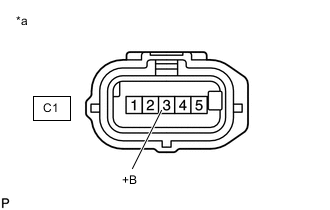
*a Front view of wire harness connector
(to Mass Air Flow Meter Sub-assembly)
Disconnect the mass air flow meter sub-assembly connector.
-
Turn the engine switch on (IG).
-
Measure the voltage according to the value(s) in the table below.
Standard Voltage Tester Connection Switch Condition Specified Condition C1-3 (+B) - Body ground Engine switch on (IG) 11 to 14 V Result Proceed to OK NG
NG
GO TO ECM POWER SOURCE CIRCUIT
OK
-
-
CHECK HARNESS AND CONNECTOR (MASS AIR FLOW METER SUB-ASSEMBLY - ECM)
-
Disconnect the mass air flow meter sub-assembly connector.
-
Disconnect the ECM connector.
-
Measure the resistance according to the value(s) in the table below.
Standard Resistance Tester Connection Condition Specified Condition C1-5 (VG) - C20-92 (VG) Always Below 1 Ω C1-4 (E2G) - C20-91 (E2G) Always Below 1 Ω C1-5 (VG) or C20-92 (VG) - Body ground and other terminals Always 10 kΩ or higher C1-4 (E2G) or C20-91 (E2G) - Body ground and other terminals Always 10 kΩ or higher Result Proceed to OK NG
NG
REPAIR OR REPLACE HARNESS OR CONNECTOR
OK
-
-
CHECK HARNESS AND CONNECTOR (SENSOR GROUND)
-
Disconnect the mass air flow meter sub-assembly connector.
-
Measure the resistance according to the value(s) in the table below.
Standard Resistance Tester Connection Condition Specified Condition D9-4 (E2G) - Body ground Always Below 1 Ω Result Proceed to OK NG
NG
REPLACE ECM Click here
OK
-
-
INSPECT MASS AIR FLOW METER SUB-ASSEMBLY
-
Inspect the mass air flow meter sub-assembly, referring to On-vehicle Inspection for Mass Air Flow Meter.
-
Inspect the mass air flow meter sub-assembly, referring to Inspection for Mass Air Flow Meter.
-
Inspect the function of the mass air flow meter sub-assembly.
-
Connect the GTS to the DLC3.
-
Turn the engine switch on (IG).
-
Turn the GTS on.
-
Enter the following menus: Powertrain / Engine / Data List / Mass Air Flow Sensor.
Powertrain > Engine > Data ListTester Display Mass Air Flow Sensor -
Start the engine.
-
Check that the Mass Air Flow Sensor value changes when the engine is raced.
OK The reading changes. Tech Tips
Perform "Inspection After Repair" after replacing the mass air flow meter sub-assembly.
Result Proceed to OK NG -
OK
REPLACE ECM Click here
NG
REPLACE MASS AIR FLOW METER SUB-ASSEMBLY Click here
-