METER / GAUGE SYSTEM
-
OPERATING CONDITION
-
Hybrid System Indicator
-
The Hybrid System Indicator will begin to operate when both of the following conditions are met:
-
The hybrid system is operating (the READY indicator light is illuminated).
-
Drive (D) or Brake (B) has been selected.
-
-
Eco Driving Indicator Light can operate when all of the following conditions are met:
-
The hybrid system is operating (the READY indicator light is illuminated).
-
Drive (D) has been selected.
-
The Hybrid System Indicator is in the Charge area or Eco area.
-
EV mode is not selected.
-
The hybrid system is normal.
-
The hybrid system temperature is normal.
-
The vehicle is being driven at a speed of 130 km/h (81 mph) or below.
-
-
-
-
FUNCTION
-
Combination Meter Sub-assembly
-
Buzzer Function
-
The table below shows the warning and reminder functions of the buzzer in the combination meter sub-assembly.
1 READY 2 Shift Position R Indication 3 Front Seat Belt Warning (Level 2) 4 Rear Seat Belt Warning 5 Front Seat Belt Warning (Level 1) 6 Unexpected Vehicle Motion Warning 7 Brake Force Reduction Warning 8 Brake Fluid Low Warning 9 Engine Oil Pressure Warning 10 Hybrid Battery Diagnosis Request (Second Time) 11 EPS Warning 12 Lane Departure Alert Warning 13 Entry and Start System Warning (Continuous) 14 Entry and Start System Warning (Intermittent) 15 Brake Operation Active Check Indication 16 Entry and Start System Warning (Once) 17 Multi-information Display Warning*1 18 Hybrid System Warning*2 19 Accelerator Depression with Neutral (N) Selected 20 Accelerator Depression Warning*1 21 Dynamic Radar Cruise Control Cancellation due to Low Vehicle Speed*3 22 Dynamic Radar Cruise Control Warning*3 23 Immobiliser Certification Reminder 24 Low Fuel Indicator 25 P Position Request 26 HV Battery Low Warning 27 HV Battery Charge Request 28 Parking Brake Engaged Warning 29 Door Open while Driving Warning 30 Shift Operation Reject Warning 31 EV Drive Mode Reject Warning 32 Headlight Reminder 33 Turn Signal/Hazard Warning Operation - -
*1: Models with multi-information display
*2: Models without multi-information display
*3: Models with dynamic radar cruise control system
-
-
Trip Information Display
-
The trip information is displayed in the following order each time the DISP switch of the steering pad switch assembly is pressed.
-
3 different average fuel consumption values can be displayed, one each for the odometer, TRIP A and TRIP B. When the DISP switch is pressed, the average fuel consumption for the currently displayed item (odometer, TRIP A or TRIP B) will be displayed.
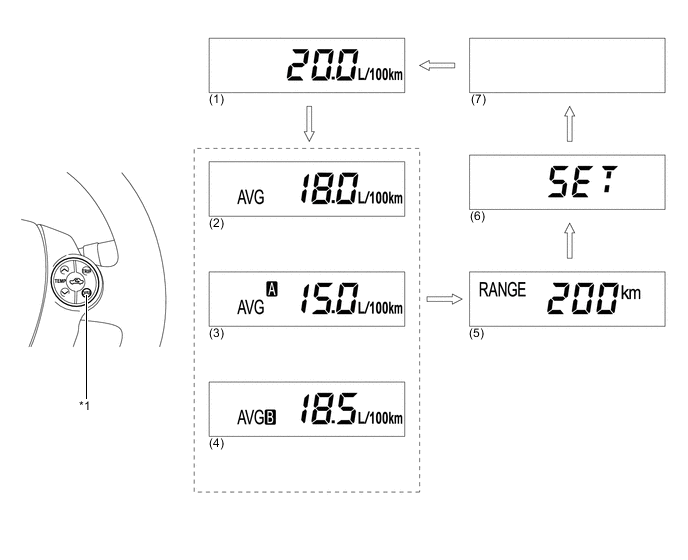
Text in Illustration *1 DISP Switch - - 
DISP switch pressed briefly. - - -
The trip information items displayed are as follows:
No. Information Outline (1) Current Fuel Consumption
-
Displays a value that has been calculated by the combination meter sub-assembly. When the power switch is turned on (IG), the combination meter sub-assembly calculates this value based on the distance driven and the volume of fuel consumed (fuel injection signal from the No. 1 cylinder).
-
This display is updated every 0.5 seconds.
(2) Average Fuel Consumption
-
Displays a value that has been calculated by the combination meter sub-assembly based on the distance driven and the volume of fuel consumed (fuel injection signal from the No. 1 cylinder).
-
This display is updated every 10 seconds.
(3) Average Fuel Consumption (TRIP A)
-
Displays a value that has been calculated by the combination meter sub-assembly based on the distance driven and the volume of fuel consumed (fuel injection signal from the No. 1 cylinder).
-
Separately calculates the average fuel consumption for TRIP A and TRIP B and displays the corresponding value.
-
Displays a blank screen if the fuel consumption volume data is not received due to a communication malfunction.
-
This display is updated every 10 seconds.
(4) Average Fuel Consumption (TRIP B) (5) Cruising Range
-
Displays a value that has been calculated by the combination meter sub-assembly. When the power switch is turned on (IG), the combination meter sub-assembly calculates the range based on continuously monitoring and storing information on fuel consumption data, and the residual fuel volume.
-
This display is updated every 10 seconds.
(6) Settings Changes which of the following items are displayed: Hybrid System Indicator, Eco Driving Indicator Light and the EV Driving Indicator Light. (7) Blank - -
-
In the SET screen, pressing and holding the DISP switch enters setting mode.
-
In settings mode, it is possible to select whether to display all or some of the following items: Hybrid System Indicator, Eco Driving Indicator Light and EV Driving Indicator Light.
Display Pattern Display Item 1
-
Hybrid System Indicator
-
Eco Driving Indicator Light
-
EV Driving Indicator Light
2
-
Hybrid System Indicator
-
EV Driving Indicator Light
3 Hybrid System Indicator 4 Blank 5 Eco Driving Indicator Light -
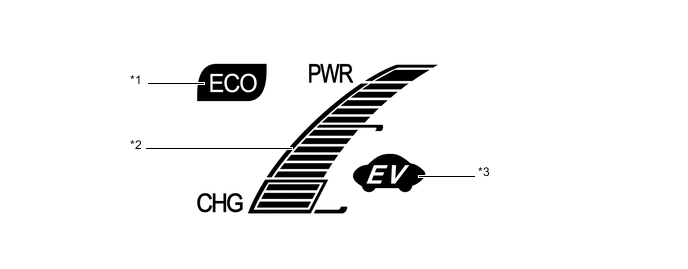
Text in Illustration *1 Eco Driving Indicator Light *2 Hybrid System Indicator *3 EV Driving Indicator Light - - -
-
-
Multi-information Display
-
Display Function Flow
-
The multi-information display can be switched as shown in the flow chart below:
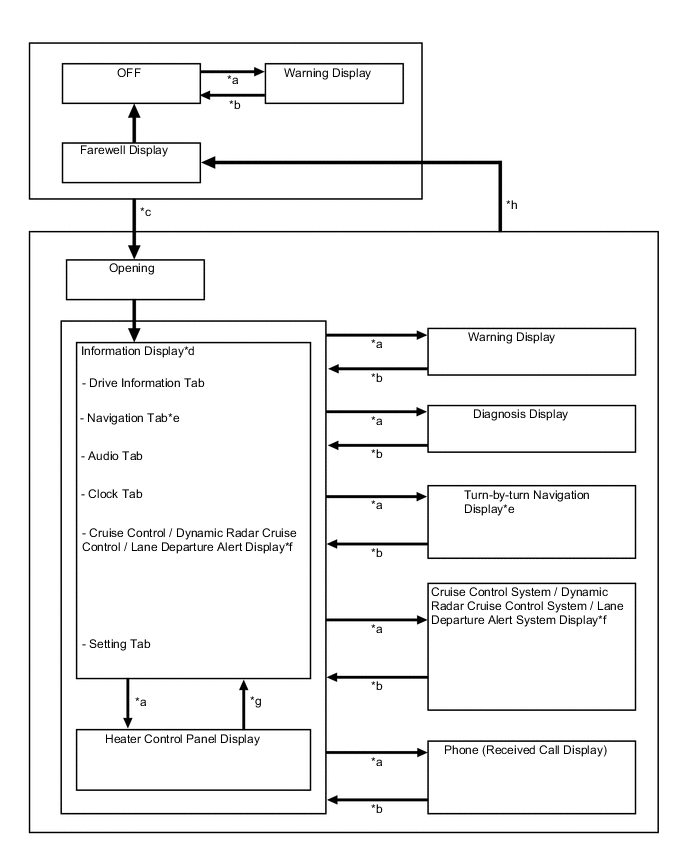
No. Display Change Condition *a Conditions are met. *b Conditions are not met. *c Power switch off to on. *d An item or display is selected by operating the steering pad switch. *e Models with navigation system *f Models with dynamic radar cruise control system or lane departure alert system *g Heater control panel switch is not operated for more than 3 seconds. *h Power switch on (IG) to off.
-
-
Information Display Tab Operation
-
The information currently displayed can be switched using the RIGHT or LEFT switch of the steering pad switch assembly.
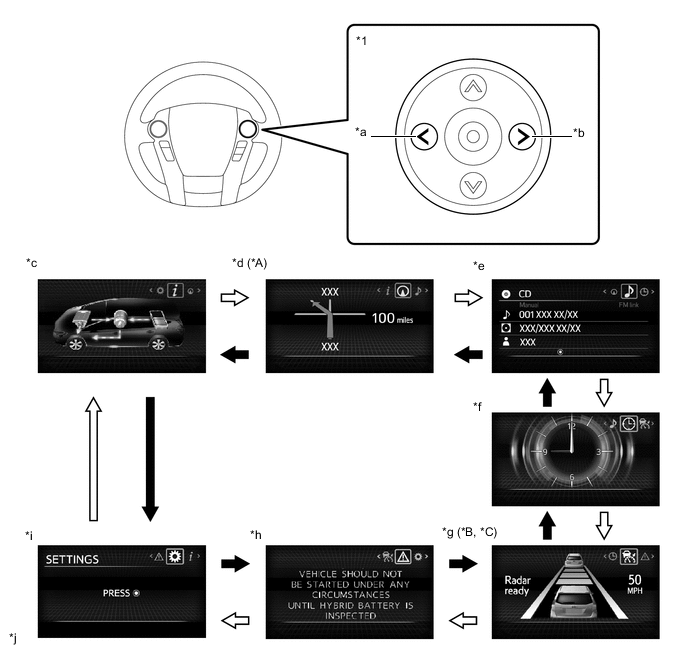
Text in Illustration *A Models with Navigation System *B Models with Dynamic Radar Cruise Control System *C Models with Lane Departure Alert System - - *1 Steering Pad Switch Assembly - - *a LEFT Switch *b RIGHT Switch *c Drive Information *d Navigation Information *e Audio Information *f Clock *g Cruise Control System/Dynamic Radar Cruise Control System/Lane Departure Alert System Information *h Warning Message *i Settings *j The illustrations shown are examples only. 
LEFT switch operation RIGHT switch operation -
-
Drive Information Mode Function
-
The drive information tab shows vehicle information such as drivable range and fuel consumption.
-
The drive information display can be changed by using the UP/DOWN switch of the steering pad switch assembly.
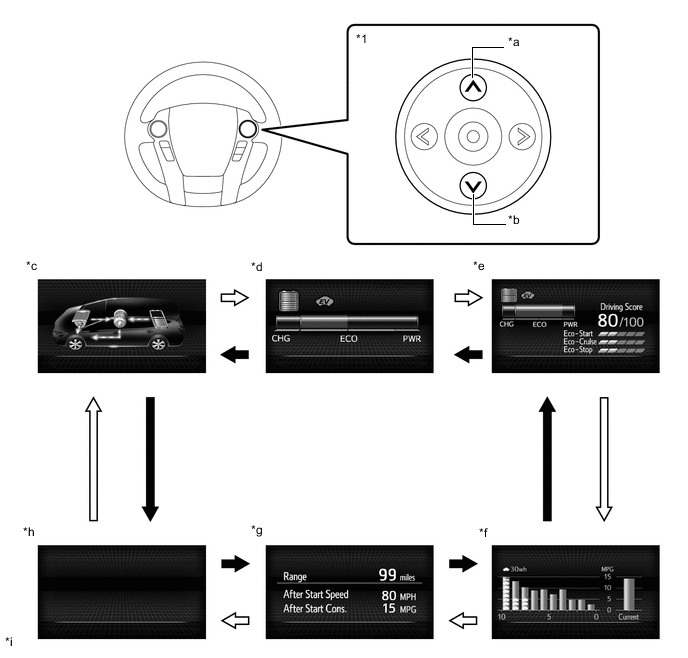
Text in Illustration *1 Steering Pad Switch Assembly - - *a UP Switch *b DOWN Switch *c Energy Monitor *d Hybrid System Indicator *e Eco Judge Monitor *f Current Fuel Consumption/Average Fuel Consumption *g Cruising Range/Average Vehicle Speed After Hybrid System Start-up/Average Fuel Consumption After Hybrid System Start-up *h Blank *i The illustrations shown are examples only. - - DOWN switch operation UP switch operation
-
-
Setting Function
-
The items displayed on the multi-information display can be customized.
-
The following items can be selected on the information setting screen.
Item Available Setting Language The language used on the multi-information display can be selected:
-
English (Default)
-
French
-
Spanish
-
German
-
Italian
Unit The unit displayed on the multi-information display can be selected:
-
km (L/100 km)
-
miles (MPG)
-
km (km/L)
Interruption Display The following displays that appear as soon as the set conditions are met can be switched to ON (default) or OFF:
-
Turn-by-turn Navigation Display*
-
Incoming Telephone Display
-
Heater Control Panel Switch Operation
Initialization The set items can be initialized. *: Models with navigation system
-
-
Warning Mode Function
-
When a warning is necessary, the warning display interrupts the current display on the multi-information display.
-
The master warning light may illuminate or blink and the buzzer in the combination meter sub-assembly may sound depending on the item displayed on the multi-information display.
Priority Display Master Warning Light Buzzer 1 MAINTENANCE MODE - - CERTIFICATION MODE - - ADJUSTING LDA CAMERA*1 - - ADJUSTING FRONT RADAR BEAM*2 - - CHECKING CRUISE CONTROL C/D*2 - - CHECKING CRUISE CONTROL BRAKE*2 - - BRAKE!*3 - - 2 Dynamic radar cruise control warning reminder indicator (image display)*2 - - Lane departure alert warning reminder indicator (image display)*1 - - SHIFT TO P
BEFORE EXITING VEHICLE
Blinks Sounds 3 POWER TURNED OFF TO SAVE BATTERY - - 4 SHIFT TO P
BEFORE EXITING VEHICLE
Blinks Sounds 5 SHIFT IS IN N
RELEASE ACCELERATOR BEFORE SHIFTING
Blinks Sounds DEPRESS BRAKE WHEN VEHICLE IS STOPPED
HYBRID SYSTEM MAY OVERHEAT
Blinks Sounds HYBRID BATTERY LOW HYBRID SYSTEM STOPPED
SHIFT TO P AND RESTART
Blinks Sounds 6 P LOCK MALFUNCTION WHEN PARKING, PARK IN FLAT PLACE AND APPLY PARKING BRAKE SECURELY Illuminates Sounds 7 HYBRID SYSTEM MALFUNCTION
STOP IN A SAFE PLACE SEE OWNER'S MANUAL
Illuminates Sounds HYBRID BATTERY LOW
SHIFT OUT OF N TO RECHARGE
Blinks Sounds KEY NOT DETECTED Blinks Sounds 8 CLEAN RADAR SENSOR*2 Illuminates Sounds CRUISE CONTROL NOT AVAILABLE*2 Illuminates Sounds ENTRY & START SYSTEM CHECK HAVE YOUR VEHICLE CHECKED BY A DEALER Blinks Sounds CHECK CRUISE CONTROL SYSTEM Illuminates Sounds LANE DEPARTURE ALERT MALFUNCTION
VISIT YOUR DEALER*1
Illuminates Sounds LANE DEPARTURE ALERT UNAVAILABLE
CAMERA OVERHEATED
Illuminates Sounds PRE-CRASH SAFETY MALFUNCTION
VISIT YOUR DEALER*3
Illuminates Sounds Engine Oil Pressure Low Warning (image display) Illuminates Sounds LANE DEPARTURE ALERT UNAVAILABLE BELOW APPROX 50KM/H*1, *4 - - LANE DEPARTURE ALERT UNAVAILABLE BELOW APPROX 32MPH*1, *5 - - LANE DEPARTURE ALERT UNAVAILABLE AT CURRENT SPEED*1 - - 9 Dynamic radar cruise control indicator (image display)*2 - - Lane departure alert indicator (image display)*1 - - Pre-crash Safety System warning timing display*3 - - TURN POWER OFF Blinks Sounds KEY DETECTED IN VEHICLE Blinks Sounds DEPRESS BRAKE PEDAL, TOUCH POWER SWITCH WITH KEY Blinks Sounds DEPRESS BRAKE PEDAL AND PUSH POWER SWITCH TO START Blinks Sounds SHIFT TO P POSITION TO START Blinks Sounds 10 SHIFT TO P POSITION TO START Blinks Sounds 11 KEY BATTERY LOW Illuminates Sounds HYBRID SYSTEM OVERHEAT Illuminates Sounds HEADLIGHT SYSTEM MALFUNCTION
VISIT YOUR DEALER*6
Illuminates Sounds 12 MAINTENANCE REQUIRED FOR HYBRID BATTERY COOLING PARTS AT YOUR DEALER - - 13 AUX BATTERY LOW SEE OWNER'S MANUAL - - TRACTION CONTROL TURNED OFF - - TO ACTIVATE AUTO HIGH BEAM, SWITCH HEADLIGHTS TO HIGH BEAM*6 - - POWER ON - - Hybrid System Start Ready State (image display) - - VSC TURNED OFF PRE-CRASH BRAKE SYSTEM UNAVAILABLE*3 - - EV MODE CURRENTLY NOT AVAILABLE - Sounds EV MODE NOT AVAILABLE WARMING UP - Sounds EV MODE NOT AVAILABLE LOW BATTERY - Sounds EV MODE NOT AVAILABLE EXCESSIVE SPEED - Sounds EV MODE NOT AVAILABLE EXCESSIVE ACCELERATION - Sounds EV MODE DEACTIVATED - Sounds EV MODE DEACTIVATED LOW BATTERY - Sounds EV MODE DEACTIVATED EXCESSIVE SPEED - Sounds EV MODE DEACTIVATED EXCESSIVE ACCELERATION - Sounds HAVE HYBRID BATTERY INSPECTED - - VEHICLE WILL SOON NOT BE ABLE TO BE STARTED HAVE HYBRID BATTERY INSPECTED - Sounds VEHICLE SHOULD NOT BE STARTED UNDER ANY CIRCUMSTANCES UNTIL HYBRID BATTERY IS INSPECTED - - INSUFFICIENTRY AUX BATTERY CHARGE SHIFT IS UNAVAILABLE.
SEE OWNER'S MANUAL
Blinks Sounds SHIFTING TEMPORARILY UNAVAILABLE. WAIT A MOMENT AND TRY AGAIN. Blinks Sounds CAN NOT SHIFT TO B.
SHIFT TO D ONCE TO SHIFT TO B
Blinks Sounds CAN NOT SHIFT TO D OR R.
SHIFT AFTER HYBRID SYSTEM STARTS
Blinks Sounds SHIFTING UNAVAILABLE. PRESS BRAKE PEDAL BEFORE SHIFTING Blinks Sounds SWITCHED TO N.
SHIFT TO D ONCE TO SHIFT TO B
Blinks Sounds SWITCHED TO N.
TO SHIFT TO D, STOP CAR FIRST
Blinks Sounds SWITCHED TO N.
TO SHIFT TO R, STOP CAR FIRST
Blinks Sounds SWITCHED TO N.
TO SHIFT TO P, STOP CAR AND PRESS P SWITCH
Blinks Sounds INSUFFICIENT AUX BATTERY CHARGE WHEN PARKING, APPLY PARKING BRAKE SECURELY
THEN SEE OWNER'S MANUAL
Illuminates Sounds SHIFT SYSTEM MALFUNCTION WHEN PARKING, APPLY PARKING BRAKE SECURELY
THEN SEE OWNER'S MANUAL
Illuminates Sounds SHIFT SYSTEM MALFUNCTION SEE OWNER'S MANUAL Illuminates Sounds SHIFT SYSTEM COMMUNICATION MALFUNCTION.
WHEN PARKING, APPLY PARKING BRAKE SECURELY
THEN SEE OWNER'S MANUAL
Illuminates Sounds CHECK HEADLIGHT SYSTEM*7 Illuminates/Blinks -
-
*1: Models with lane departure alert system
-
*2: Models with dynamic radar cruise control system
-
*3: Models with pre-crash safety system
-
*4: When km unit is selected
-
*5: When mile unit is selected
-
*6: Models with automatic high beam system
-
*7: Models with LED headlight
-
-
-
Rear Seat Belt Warning
-
The combination meter sub-assembly displays the rear seat belt warning based on the rear seat belt buckle switches and courtesy switches for the rear doors. If a warning is necessary, the buzzer in the combination meter sub-assembly will also sound.
-
The flow of operations that results in a rear seat belt warning is as follows:
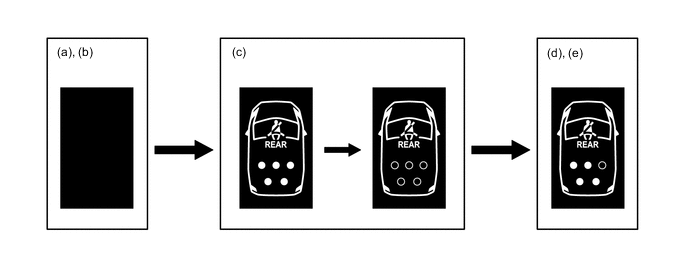
Step Condition Transition Multi-information Display Buzzer (a) Power switch is off. Warning is not displayed. No Sound (b) A rear door is opened then closed. (c)
-
Power switch is turned on (IG).
-
A seat belt is fastened.
-
In this case, all seats will be displayed as being unfastened regardless of the number of occupants. If seat belts are then fastened, the display for the relevant seat will go off.
-
The warning will be displayed for approximately 34 seconds and then go off.
(d) Any of the rear seat belts are unfastened.
-
Seats with an unfastened seat belt will be displayed regardless of the number of occupants.
If the vehicle speed exceeds 20 km/h (12 mph):
-
Sounds for 30 seconds*1
-
Sounds for an additional 90 seconds*2
(e)
-
When one of the following conditions is met, the buzzer will stop sounding.
-
The seat belt is refastened.
-
The vehicle speed decreases to less than approximately 2 km/h (1.2 mph) and either the parking brake is applied or the P position switch is pressed.
-
Seats with an unfastened seat belt will be displayed regardless of the number of occupants.
-
The warning message will be displayed for approximately 34 seconds and then go off.
Stops sounding *1: Sound cycle is 1.2 seconds.
*2: Sound cycle is 0.4 seconds.
-
-
-
Headup Display Customize
-
The items displayed on the headup display can be customized.
-
Pressing and holding the SET switch changes the headup display to setting mode, enabling each display to be enabled or disabled.
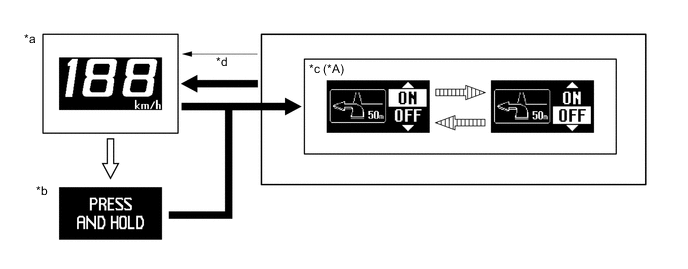
Text in Illustration *A Models with Navigation System - - *a Vehicle Speed Display *b Advisory Display of Switching to On/off Setting Mode *c Turn-by-turn Navigation ON/OFF Setting *d Returns to the normal headup display when vehicle speed reaches 8 km/h (5 mph) or when 10 seconds have elapsed without any operation. SET switch is pressed and held. SET switch is pressed briefly. 
Position adjustment switch is operated. - -
-
-
-
CONSTRUCTION
-
Headup Display
-
The headup display projects the image from the dot Vacuum Fluorescent Display (VFD), built into the headup display unit (combination meter mirror ECU), in a position approximately 2 m (6.6 ft) forward of the driver using a concave mirror and the windshield in order to support the driver with various information.
-
By changing the angle of the concave mirror, the position of the image displayed can be adjusted.
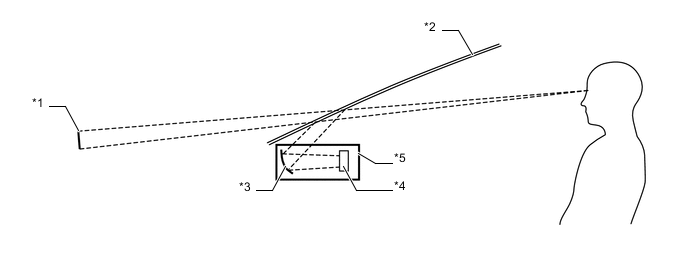
Text in Illustration *1 Headup Display Image *2 Windshield Glass *3 Concave Mirror *4 Dot VFD *5 Headup Display Unit (Combination Meter Mirror ECU) - -
-
-
Windshield Glass for Headup Display
-
Windshield glass without a combiner treatment is used for the headup display.
-
This glass has a wedge-shaped inner film. This film, with its varying thickness, is located between the outer and inner layers of glass.
-
The light that strikes the glass is reflected by the inner surface of the inner glass, and also by the inner side of the outer surface of outer layer of glass. With a conventional windshield, the light reflected from these 2 surfaces diverges due to the thickness of the glass, resulting in a double image.
-
The film's wedge shape is used to eliminate the reflection angle difference between the outer glass and inner glass. This recombines the reflected light and eliminates the double image.
-
Thus, the reflected light from the headup display unit is seen by the driver as a single display image.
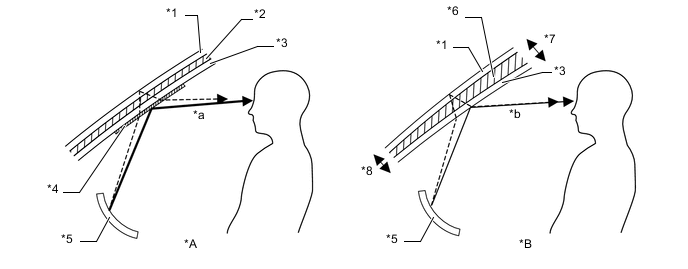
Text in Illustration *A Windshield Glass with Normal Film *B Windshield Glass with Wedge-shaped Film *1 Outer Glass *2 Uniform Thickness Film *3 Inner Glass *4 Combiner *5 Concave Mirror *6 Wedge-shaped Film *7 Thick *8 Thin *a The combiner makes the light reflected by the inner glass brighter, however, a double image is caused by a divergence of the reflected light. *b Reflected light is recombined and a double image is prevented.
-
-