RADIO RECEIVER REMOVAL
-
DISCONNECT CABLE FROM NEGATIVE BATTERY TERMINAL
Note
When disconnecting the cable, some systems need to be initialized after the cable is reconnected Click here.
-
REMOVE CENTER INSTRUMENT CLUSTER FINISH PANEL ASSEMBLY
-
for Manual Air Conditioning System:
-
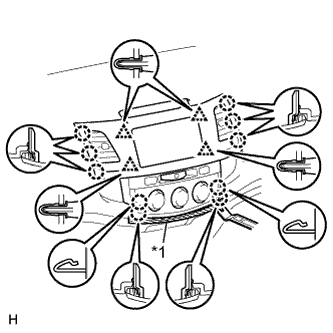
Text in Illustration *1 Protective Tape Put protective tape around the center instrument cluster finish panel.
-
Using a moulding remover, detach the 10 claws and 4 clips.
-
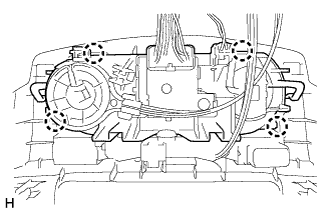
Detach the 4 claws and disconnect the air conditioner control.
-
Disconnect the connectors and remove the center instrument cluster finish panel.
-
-
for Automatic Air Conditioning System:
-
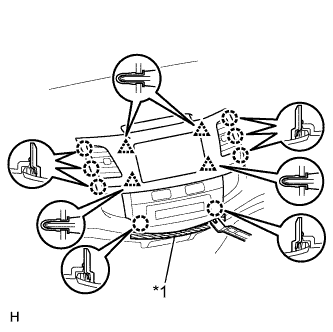
Text in Illustration *1 Protective Tape Put protective tape around the center instrument cluster finish panel.
-
Using a moulding remover, detach the 8 claws and 4 clips.
-
Disconnect the connectors and remove the center instrument cluster finish panel.
-
-
-
REMOVE RADIO RECEIVER ASSEMBLY WITH BRACKET (for Radio Receiver Type)
-
w/ CD Player:
-
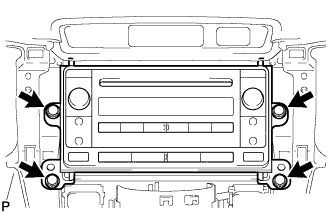
Remove the 4 screws.
-
Disconnect all the connectors and remove the radio receiver assembly with bracket.
-
-
w/ Cassette Tape Player:
-
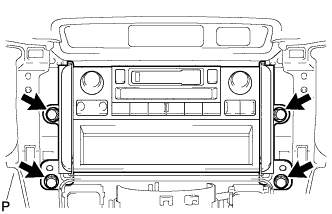
Remove the 4 screws.
-
Disconnect all the connectors and remove the radio receiver assembly with bracket.
-
-
-
REMOVE RADIO AND DISPLAY RECEIVER ASSEMBLY (for Radio and Display Type)
-
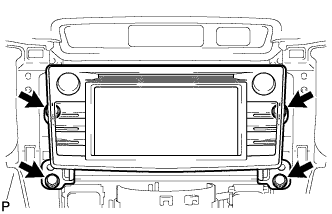
Remove the 4 screws.
-
Disconnect all the connectors and remove the radio receiver assembly with bracket.
-
-
REMOVE NO. 1 RADIO BRACKET (w/ Cassette Tape Player)
-
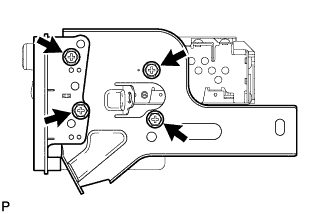
Remove the 4 screws, radio receiver panel RH and No. 1 radio bracket from the radio receiver.
-
-
REMOVE NO. 1 RADIO BRACKET (for Radio Receiver Type)
-
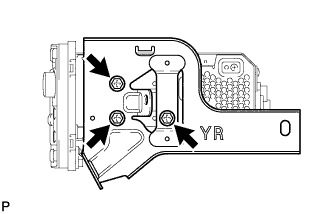
Remove the 3 screws and No. 1 radio bracket from the radio receiver.
-
-
REMOVE NO. 1 RADIO RECEIVER BRACKET (for Radio and Display Type)
-
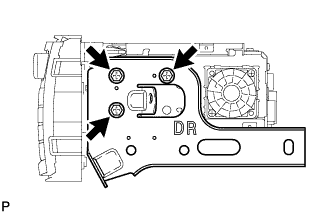
Remove the 3 screws and No. 1 radio bracket from the radio receiver
-
-
REMOVE NO. 2 RADIO BRACKET (w/ Cassette Tape Player)
-
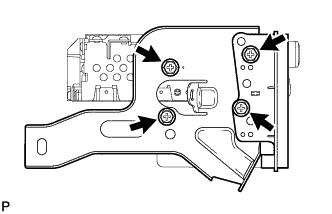
Remove the 4 screws, radio receiver panel LH and No. 1 radio bracket from the radio receiver.
-
-
REMOVE NO. 2 RADIO BRACKET (for Radio Receiver Type)
-
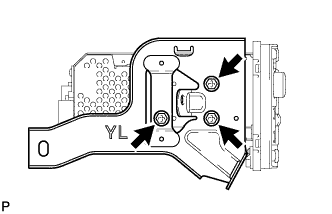
Remove the 3 screws and No. 2 radio bracket from the radio receiver.
-
-
REMOVE NO. 2 RADIO RECEIVER BRACKET (for Radio and Display Type)
-
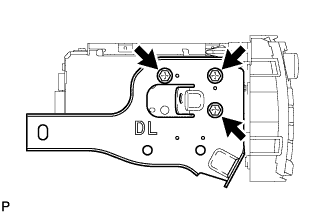
Remove the 3 screws and No. 2 radio bracket from the radio receiver.
-