NAME PLATE INSTALLATION
CAUTION / NOTICE / HINT
Tech Tips
When install new name plates or side panel emblem, heat the back door panel and name plates or side panel emblem using a heat light.
| Item | Temperature |
|---|---|
| Back Door Panel | 40 to 60°C (104 to 140°F) |
| Name Plate or Back Door Emblem | 20 to 30°C (68 to 86°F) |
CAUTION:
-
Do not touch the heat light and heated parts, touching the heat light may result in burns.
-
Touching heated parts for a long time may result in burns.
Note
Do not heat the back door panel, back door name plates or side panel emblem excessively.
PROCEDURE
-
INSTALL NO. 1 BACK DOOR EMBLEM
-
Engage the pin and 3 claws to install the No. 1 back door emblem.
-
Install the back door outside garnish sub-assembly.
-
-
INSTALL NO. 2 BACK DOOR NAME PLATE
-
Clean the back door panel surface.
-
Using a heat light, heat the back door panel surface.
-
Remove any remaining double-sided tape from the back door panel.
-
Wipe off any tape adhesive residue with cleaner.
-
-
Using a heat light, heat the back door panel and a new No. 2 back door name plate.
-
Remove the release paper from the No. 2 back door name plate.
Tech Tips
After removing the release paper, keep the exposed adhesive free from foreign matter.
-
Install the No. 2 back door name plate as shown in the illustration.
for Type A:
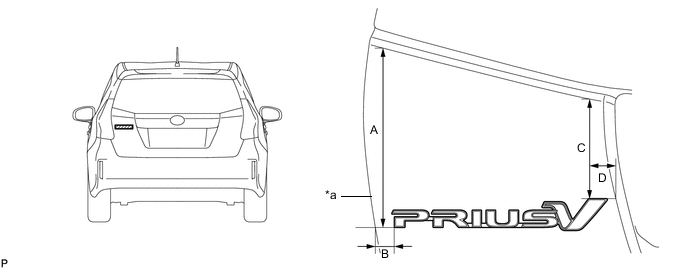
*a Profile of Back Door Panel - - Standard Measurement Area Measurement Area Measurement A 168.7 mm (6.64 in.) B 17.2 mm (0.677 in.) C 95.1 mm (3.74 in.) D 23.0 mm (0.906 in.) Note
Press the No. 2 back door name plate firmly to install it.
for Type B:
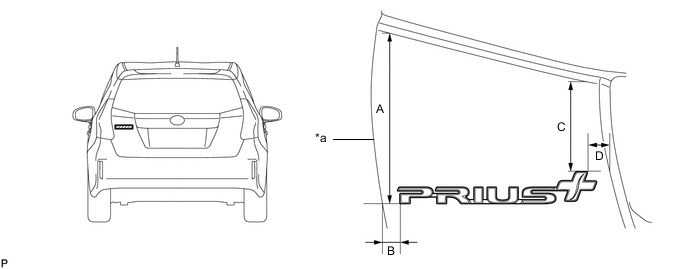
*a Profile of Back Door Panel - - Standard Measurement Area Measurement Area Measurement A 168.7 mm (6.64 in.) B 17.2 mm (0.677 in.) C 90.2 mm (3.55 in.) D 18.3 mm (0.720 in.) Note
Press the No. 2 back door name plate firmly to install it.
for Type C:
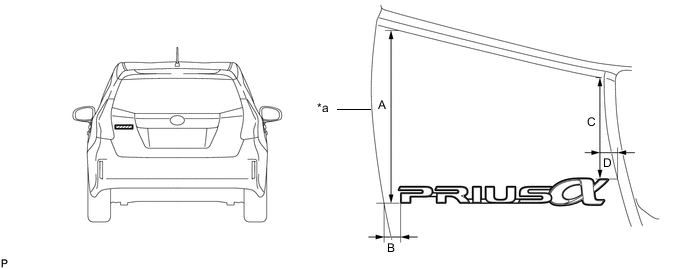
*a Profile of Back Door Panel - - Standard Measurement Area Measurement Area Measurement A 168.7 mm (6.64 in.) B 17.2 mm (0.677 in.) C 97.7 mm (3.85 in.) D 15.0 mm (0.591 in.) Note
Press the No. 2 back door name plate firmly to install it.
-
-
INSTALL NO. 1 BACK DOOR NAME PLATE
-
Clean the back door panel surface.
-
Using a heat light, heat the back door panel surface.
-
Remove any remaining double-sided tape from the back door panel.
-
Wipe off any tape adhesive residue with cleaner.
-
-
Using a heat light, heat the back door panel and a new No. 1 back door name plate.
-
Remove the release paper from the No. 1 back door name plate.
Tech Tips
After removing the release paper, keep the exposed adhesive free from foreign matter.
-
Install the No. 1 back door name plate as shown in the illustration.
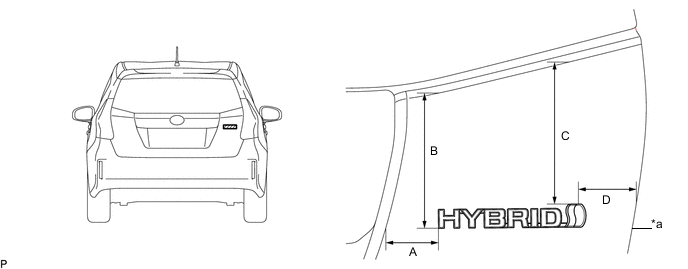
*a Profile of Back Door Panel - - Standard Measurement Area Measurement Area Measurement A 49.6 mm (1.95 in.) B 128.3 mm (5.05 in.) C 137.7 mm (5.42 in.) D 54.1 mm (2.13 in.) Note
Press the No. 1 back door name plate firmly to install it.
-
-
INSTALL SIDE PANEL EMBLEM
Tech Tips
Use the same procedure for the RH side and LH side.
-
Clean the side panel surface.
-
Using a heat light, heat the side panel surface.
-
Remove any remaining double-sided tape from the side panel.
-
Wipe off any tape adhesive residue with cleaner.
-
-
Using a heat light, heat the side panel and a new side panel emblem.
-
Remove the release paper from the side panel emblem.
Tech Tips
After removing the release paper, keep the exposed adhesive free from foreign matter.
-
Engage the 2 pins to install the side panel emblem as shown in the illustration.
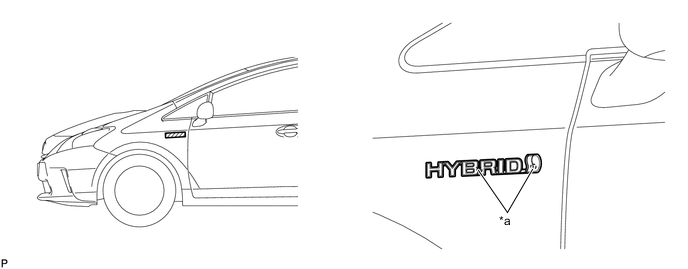
*a Location Pin - - Note
Press the side panel emblem firmly to install it.
-