METER / GAUGE SYSTEM OPERATION CHECK
INSPECT INDICATOR/WARNING LIGHT
Check the following indicators and warning lights.
Indicator/Warning Light
Switch Condition
Specified Condition
BRAKE warning light
Engine switch off → on (IG)
Comes on for 3 seconds
ABS warning light
SLIP indicator light
VSC OFF indicator light
CRAWL indicator light*1
Downhill assist control indicator light*2
KDSS indicator light
Eco driving indicator light
PCS indicator light*3
Master warning light
BSM indicator light*4
Headlight beam level control system warning light
LED headlight warning light
Tire pressure warning light
SRS warning light
Engine switch off → on (IG)
Comes on for 6 seconds
CHARGE warning light
Engine switch off → on (IG)
Illuminates when engine switch turned on (IG)
Turns off when engine started
MIL
*1: w/ CRAWL Control
*2: w/ Downhill Assist Control
*3: w/ Pre-crash Safety System
*4: w/ Blind Spot Monitor System
INSPECT SPEEDOMETER
Connect the intelligent tester to the DLC3.
Turn the engine switch on (IG).
Turn the intelligent tester on.
Enter the following menus: Powertrain / Engine and ECT / Data List.
Reference
Standard Indication (km/h)
Acceptable Range (km/h)
20
21 to 25
40
41.7 to 46.2
60
62.7 to 67.2
80
83.4 to 88.4
100
104.3 to 109.3
120
125.1 to 130.6
160
166.2 to 173.2
180
186.9 to 194.5
If the result is not as specified, the speedometer may have a malfunction.
Note:Do not use worn, underinflated or overinflated tires as the speedometer reading will be inaccurate.
Check the deflection width of the speedometer indicator.
Reference
Within 0.3°
INSPECT TACHOMETER
Connect a tune-up tachometer and start the engine.
Compare the test results with the tachometer indicator.
DC 13.5 V at 25°C (77°F)
Standard Indication (rpm)
Acceptable Range
Data in ( ) is for Reference (rpm)
700
630 to 770
1000
(900 to 1100)
2000
(1850 to 2150)
3000
2800 to 3200
4000
(3800 to 4200)
5000
4800 to 5200
6000
(5750 to 6250)
If the result is not as specified, the tachometer may have a malfunction.
INSPECT METER/GAUGE
Connect the intelligent tester to the DLC3.
Perform the Active Test (Click here).
OK
Each meter/gauge needle indication is normal.
INSPECT WARNING/INDICATOR LIGHT
Connect the intelligent tester to the DLC3.
Perform the Active Test (Click here).
OK
Each warning/indicator light can be turned on and off using the intelligent tester.
INSPECT MULTI-INFORMATION DISPLAY
-
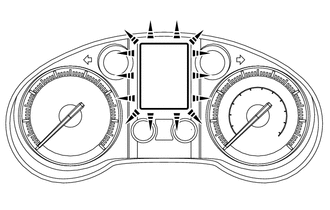
Connect the intelligent tester to the DLC3.
Perform the Active Test (Click here).
Tip:If this Active Test is being performed and the engine switch is turned off and then on (IG), the ODO/TRIP display background may turn white. If this occurs, end the Active Test and turn the engine switch off.
OK
All dots in the multi-information display can be turned on and off using the intelligent tester.
-