G-BOOK SYSTEM(w/ Telematics Transceiver), Diagnostic DTC:B15EF
| DTC Code | DTC Name |
|---|---|
| B15EF | Helpnet Vehicle Installation Device ID Malfunction/Unmatched |
DESCRIPTION
This DTC will be stored when either of the following conditions is met:
The mayday ID is not detected in the nonvolatile memory for 5 minutes during the mayday ID confirmation that is performed every minute after the engine switch is turned on (ACC).
The mayday ID stored in the multi-media module receiver assembly and the mayday ID stored in the telematics transceiver are different.
DTC No. |
Detection Item |
DTC Detection Condition |
Trouble Area |
|---|---|---|---|
B15EF |
Helpnet Vehicle Installation Device ID Malfunction/Unmatched |
Mayday ID is invalid |
- |
PROCEDURE
CHECK DEVICE
Check the part replacement history.
Check if the multi-media module receiver assembly or telematics transceiver has been replaced in the past.
Check the mayday ID.
Enter diagnostic mode.
-
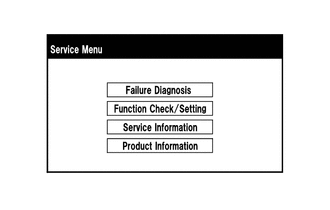
Select "Service Information" on the "Service Menu" screen.
-
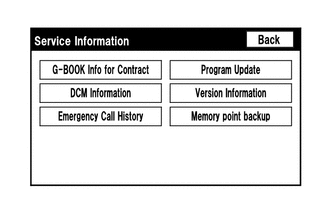
Select "DCM Information" on the "Service Information" screen.
-
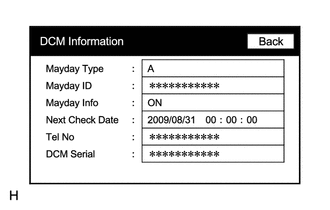
Check the mayday ID using the "DCM Information" screen.
Contact the G-BOOK support center.
Contact the G-BOOK support center and inform them of the following:
Replacement history of the multi-media module receiver assembly
Replacement history of the telematics transceiver
Mayday ID
Tip:The G-BOOK support center will perform an investigation and provide the results.
Perform the vehicle contract setting.
Result
Proceed to
NEXT
CLEAR DTC
Clear the DTCs.
Body Electrical > Navigation System > Clear DTCs
Result
Proceed to
NEXT
NEXT END