AUDIO AND VISUAL SYSTEM, Diagnostic DTC:B15D0
| DTC Code | DTC Name |
|---|---|
| B15D0 | MOST Communication Malfunction |
DESCRIPTION
This DTC is stored when the MOST network cannot be established after the master unit is activated.
| DTC No. | Detection Item | DTC Detection Condition | Trouble Area |
|---|---|---|---|
| B15D0 | MOST Communication Malfunction | MOST network cannot be established |
|
-
*: w/ Rear Seat Entertainment System
Tech Tips
-
The radio receiver assembly is the master unit.
-
Errors may occur in MOST communication between devices due to problems such as electrical noise.
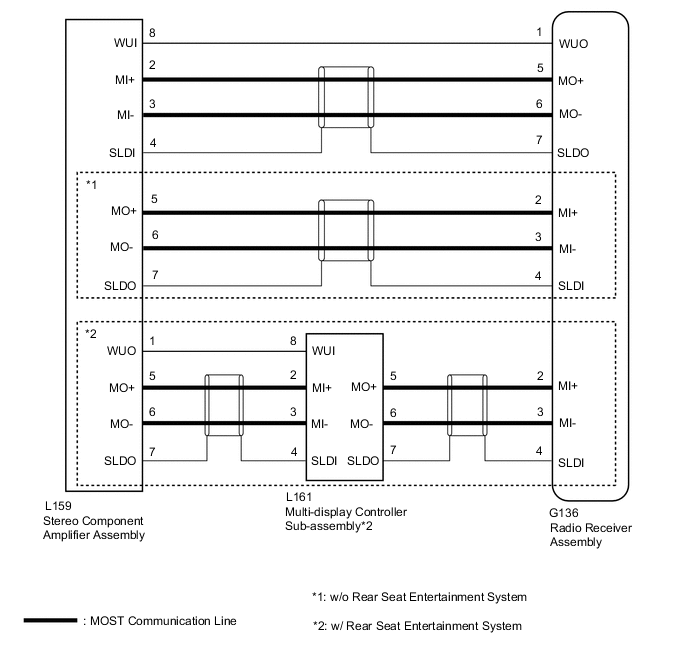
WIRING DIAGRAM
CAUTION / NOTICE / HINT
Note
-
Inspect the fuses for circuits related to this system before performing the following procedure.
-
When replacing the radio receiver assembly, always replace it with a new one.
If a radio receiver assembly which was installed to another vehicle is used, the following may occur:
-
A communication malfunction DTC may be stored.
-
The radio receiver assembly may not operate normally.
Tech Tips
Depending on the parts that are replaced during vehicle inspection or maintenance, performing initialization, registration or calibration may be needed. Refer to Precaution for Audio and Visual System.
PROCEDURE
-
CHECK RESULT OF SYSTEM CHECK MODE
-
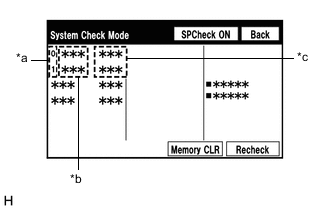
*a Node position number for devices connected to the MOST network *b Device Name *c Result Enter the "System Check Mode" screen. Refer to Check DTC (Check Using System Check Mode Screen) in DTC Check / Clear.
-
Check the result on the "System Check Mode" screen.
Result Result Proceed to "MOST" is displayed for "EMV-M". A "DETAIL" is displayed for "EMV-M". B
B 
USE SIMULATION METHOD TO CHECK Click here
A 
-
-
PERFORM MOST LINE CHECK
-
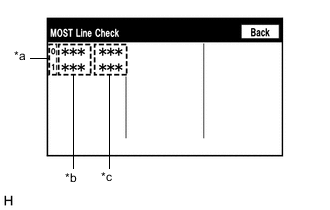
*a Node position number for devices connected to the MOST network *b Device Name *c Result Enter the "MOST Line Check" screen. Refer to Check DTC (Check Using System Check Mode Screen) in DTC Check / Clear.
-
Check if the MOST communication lines connectors and terminals of the radio receiver assembly, stereo component amplifier assembly and multi-display controller sub-assembly* for connection problems.
-
*: w/ Rear Seat Entertainment System
-
-
Check the result on the "MOST Line Check" screen.
Result Result Proceed to "OK" is displayed for all items.
(w/o Rear Seat Entertainment System)
A "OK" is displayed for all items.
(w/ Rear Seat Entertainment System)
B "NCON" is displayed for "AMP".
(w/o Rear Seat Entertainment System)
C "NCON" is displayed for "REAR".
(w/ Rear Seat Entertainment System)
D "NCON" is displayed for "REAR" and "AMP".
(w/ Rear Seat Entertainment System)
E "NCON" is displayed for "DCU". F Tech Tips
-
When "NCON" is displayed for more than 1 item, proceed to the step for the device that has the smallest node position number.
-
The "MOST Line Check" screen can be displayed only when DTC B15D0 is stored.
-
B 
CHECK HARNESS AND CONNECTOR (RADIO RECEIVER ASSEMBLY - STEREO COMPONENT AMPLIFIER ASSEMBLY) Click here
C
CHECK HARNESS AND CONNECTOR (WAKE-UP SIGNAL) Click here
D
CHECK HARNESS AND CONNECTOR (WAKE-UP SIGNAL) Click here
E
CHECK HARNESS AND CONNECTOR (WAKE-UP SIGNAL) Click here
F
REPLACE RADIO RECEIVER ASSEMBLY Click here
A
-
-
CHECK HARNESS AND CONNECTOR (RADIO RECEIVER ASSEMBLY - STEREO COMPONENT AMPLIFIER ASSEMBLY)
-
Disconnect the G136 radio receiver assembly connector.
-
Disconnect the L159 stereo component amplifier assembly connector.
-
Measure the resistance according to the value(s) in the table below.
Standard Resistance Tester Connection Condition Specified Condition G136-2 (MI+) - L159-5 (MO+) Always Below 1 Ω G136-3 (MI-) - L159-6 (MO-) Always Below 1 Ω G136-4 (SLDI) - L159-7 (SLDO) Always Below 1 Ω G136-5 (MO+) - L159-2 (MI+) Always Below 1 Ω G136-6 (MO-) - L159-3 (MI-) Always Below 1 Ω G136-7 (SLDO) - L159-4 (SLDI) Always Below 1 Ω G136-2 (MI+) or L159-5 (MO+) - Body ground Always 10 kΩ or higher G136-3 (MI-) or L159-6 (MO-) - Body ground Always 10 kΩ or higher G136-4 (SLDI) or L159-7 (SLDO) - Body ground Always 10 kΩ or higher G136-5 (MO+) or L159-2 (MI+) - Body ground Always 10 kΩ or higher G136-6 (MO-) or L159-3 (MI-) - Body ground Always 10 kΩ or higher G136-7 (SLDO) or L159-4 (SLDI) - Body ground Always 10 kΩ or higher Result Proceed to OK NG
NG
REPAIR OR REPLACE HARNESS OR CONNECTOR
OK
-
-
REPLACE STEREO COMPONENT AMPLIFIER ASSEMBLY
-
Replace the stereo component amplifier assembly with a new or known good one.
-
Clear the DTCs.
Body Electrical > Navigation System > Clear DTCs -
Recheck for DTCs and check that no DTCs are output.
Body Electrical > Navigation System > Trouble CodesOK No DTCs are output. Result Proceed to OK NG
OK
END
NG
REPLACE RADIO RECEIVER ASSEMBLY Click here
-
-
CHECK HARNESS AND CONNECTOR (RADIO RECEIVER ASSEMBLY - STEREO COMPONENT AMPLIFIER ASSEMBLY)
-
Disconnect the G136 radio receiver assembly connector.
-
Disconnect the L159 stereo component amplifier assembly connector.
-
Measure the resistance according to the value(s) in the table below.
Standard Resistance Tester Connection Condition Specified Condition G136-5 (MO+) - L159-2 (MI+) Always Below 1 Ω G136-6 (MO-) - L159-3 (MI-) Always Below 1 Ω G136-7 (SLDO) - L159-4 (SLDI) Always Below 1 Ω G136-5 (MO+) or L159-2 (MI+) - Body ground Always 10 kΩ or higher G136-6 (MO-) or L159-3 (MI-) - Body ground Always 10 kΩ or higher G136-7 (SLDO) or L159-4 (SLDI) - Body ground Always 10 kΩ or higher Result Proceed to OK NG
NG
REPAIR OR REPLACE HARNESS OR CONNECTOR
OK
-
-
CHECK HARNESS AND CONNECTOR (STEREO COMPONENT AMPLIFIER ASSEMBLY - MULTI-DISPLAY CONTROLLER SUB-ASSEMBLY)
-
Disconnect the L159 stereo component amplifier assembly connector.
-
Disconnect the L161 multi-display controller sub-assembly connector.
-
Measure the resistance according to the value(s) in the table below.
Standard Resistance Tester Connection Condition Specified Condition L159-5 (MO+) - L161-2 (MI+) Always Below 1 Ω L159-6 (MO-) - L161-3 (MI-) Always Below 1 Ω L159-7 (SLDO) - L161-4 (SLDI) Always Below 1 Ω L159-5 (MO+) or L161-2 (MI+) - Body ground Always 10 kΩ or higher L159-6 (MO-) or L161-3 (MI-) - Body ground Always 10 kΩ or higher L159-7 (SLDO) or L161-4 (SLDI) - Body ground Always 10 kΩ or higher Result Proceed to OK NG
NG
REPAIR OR REPLACE HARNESS OR CONNECTOR
OK
-
-
CHECK HARNESS AND CONNECTOR (RADIO RECEIVER ASSEMBLY - MULTI-DISPLAY CONTROLLER SUB-ASSEMBLY)
-
Disconnect the G136 radio receiver assembly connector.
-
Disconnect the L161 multi-display controller sub-assembly connector.
-
Measure the resistance according to the value(s) in the table below.
Standard Resistance Tester Connection Condition Specified Condition G136-2 (MI+) - L161-5 (MO+) Always Below 1 Ω G136-3 (MI-) - L161-6 (MO-) Always Below 1 Ω G136-4 (SLDI) - L161-7 (SLDO) Always Below 1 Ω G136-2 (MI+) or L161-5 (MO+) - Body ground Always 10 kΩ or higher G136-3 (MI-) or L161-6 (MO-) - Body ground Always 10 kΩ or higher G136-4 (SLDI) or L161-7 (SLDO) - Body ground Always 10 kΩ or higher Result Proceed to OK NG
NG
REPAIR OR REPLACE HARNESS OR CONNECTOR
OK
-
-
REPLACE MULTI-DISPLAY CONTROLLER SUB-ASSEMBLY
-
Replace the multi-display controller sub-assembly with a new or known good one.
-
Clear the DTCs.
Body Electrical > Navigation System > Clear DTCs -
Recheck for DTCs and check that no DTCs are output.
Body Electrical > Navigation System > Trouble CodesOK No DTCs are output. Result Proceed to OK NG
OK
END
NG
-
-
REPLACE STEREO COMPONENT AMPLIFIER ASSEMBLY
-
Replace the stereo component amplifier assembly with a new or known good one.
-
Clear the DTCs.
Body Electrical > Navigation System > Clear DTCs -
Recheck for DTCs and check that no DTCs are output.
Body Electrical > Navigation System > Trouble CodesOK No DTCs are output. Result Proceed to OK NG
OK
END
NG
REPLACE RADIO RECEIVER ASSEMBLY Click here
-
-
CHECK HARNESS AND CONNECTOR (WAKE-UP SIGNAL)
-
Disconnect the L159 stereo component amplifier assembly connector.
-
Measure the voltage according to the value(s) in the table below.
Standard Voltage Tester Connection Condition Specified Condition L159-8 (WUI) - Body ground Engine switch on (ACC) 4.5 V or higher Result Proceed to OK NG
OK
REPLACE STEREO COMPONENT AMPLIFIER ASSEMBLY Click here
NG
-
-
CHECK HARNESS AND CONNECTOR (RADIO RECEIVER ASSEMBLY - STEREO COMPONENT AMPLIFIER ASSEMBLY)
-
Disconnect the G136 radio receiver assembly connector.
-
Disconnect the L159 stereo component amplifier assembly connector.
-
Measure the resistance according to the value(s) in the table below.
Standard Resistance Tester Connection Condition Specified Condition G136-1 (WUO) - L159-8 (WUI) Always Below 1 Ω G136-1 (WUO) or L159-8 (WUI) - Body ground Always 10 kΩ or higher Result Proceed to OK NG
OK
REPLACE RADIO RECEIVER ASSEMBLY Click here
NG
REPAIR OR REPLACE HARNESS OR CONNECTOR
-
-
CHECK HARNESS AND CONNECTOR (WAKE-UP SIGNAL)
-
Disconnect the L161 multi-display controller sub-assembly connector.
-
Measure the voltage according to the value(s) in the table below.
Standard Voltage Tester Connection Condition Specified Condition L161-8 (WUI) - Body ground Engine switch on (ACC) 4.5 V or higher Result Proceed to OK NG
OK
REPLACE MULTI-DISPLAY CONTROLLER SUB-ASSEMBLY Click here
NG
-
-
CHECK HARNESS AND CONNECTOR (STEREO COMPONENT AMPLIFIER ASSEMBLY - MULTI-DISPLAY CONTROLLER SUB-ASSEMBLY)
-
Disconnect the L159 stereo component amplifier assembly connector.
-
Disconnect the L161 multi-display controller sub-assembly connector.
-
Measure the resistance according to the value(s) in the table below.
Standard Resistance Tester Connection Condition Specified Condition L159-1 (WUO) - L161-8 (WUI) Always Below 1 Ω L159-1 (WUO) or L161-8 (WUI) - Body ground Always 10 kΩ or higher Result Proceed to OK NG
OK
REPLACE STEREO COMPONENT AMPLIFIER ASSEMBLY Click here
NG
REPAIR OR REPLACE HARNESS OR CONNECTOR
-
-
CHECK HARNESS AND CONNECTOR (WAKE-UP SIGNAL)
-
Disconnect the L159 stereo component amplifier assembly connector.
-
Measure the voltage according to the value(s) in the table below.
Standard Voltage Tester Connection Condition Specified Condition L159-8 (WUI) - Body ground Engine switch on (ACC) 4.5 V or higher Result Proceed to OK NG
NG
REPAIR OR REPLACE HARNESS OR CONNECTOR
OK
-
-
REPLACE STEREO COMPONENT AMPLIFIER ASSEMBLY
-
Replace the stereo component amplifier assembly with a new or known good one.
-
Clear the DTCs.
Body Electrical > Navigation System > Clear DTCs -
Recheck for DTCs and check that no DTCs are output.
Body Electrical > Navigation System > Trouble CodesOK No DTCs are output. Result Proceed to OK NG
OK
END
NG
-
-
CHECK HARNESS AND CONNECTOR (WAKE-UP SIGNAL)
-
Disconnect the L161 multi-display controller sub-assembly connector.
-
Measure the voltage according to the value(s) in the table below.
Standard Voltage Tester Connection Condition Specified Condition L161-8 (WUI) - Body ground Engine switch on (ACC) 4.5 V or higher Result Proceed to OK NG
OK
REPLACE MULTI-DISPLAY CONTROLLER SUB-ASSEMBLY Click here
NG
REPAIR OR REPLACE HARNESS OR CONNECTOR
-