NAME PLATE INSTALLATION
PROCEDURE
INSTALL BACK DOOR NAME PLATE
Tip:When installing the back door name plate, heat the back door panel and back door name plate using a heat light.
Standard
Item
Temperature
Back Door Panel
40 to 60°C (104 to 140°F)
Back Door Name Plate
20 to 30°C (68 to 86°F)
Note:Do not heat the back door panel or back door name plate excessively.
Clean the back door panel surface.
Using a heat light, heat the back door panel surface.
Remove the double-sided tape from the back door panel.
Wipe off any tape adhesive residue with cleaner.
-
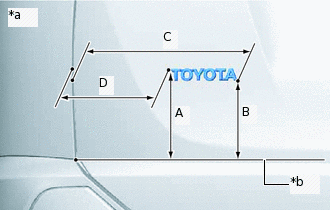
*a
Reference Values
*b
Horizontal Line
Install a new back door name plate.
Using a heat light, heat the back door panel and a new back door name plate.
Remove the peeling paper from the face of the back door name plate.
Tip:After removing the peeling paper, keep the exposed adhesive free from foreign matter.
Install the back door name plate in the position shown in the illustration.
Tip:Press the back door name plate firmly to install it.
Standard
Area
Specified Condition
A
170.2 mm (6.70 in.)
B
149.5 mm (5.89 in.)
C
332.0 mm (13.1 in.)
D
203.0 mm (7.99 in.)
INSTALL NO. 1 BACK DOOR EMBLEM
Tip:When installing the No. 1 back door emblem, heat the back door panel and No. 1 back door emblem using a heat light.
Standard
Item
Temperature
Back Door Panel
40 to 60°C (104 to 140°F)
No. 1 Back Door Emblem
20 to 30°C (68 to 86°F)
Note:Do not heat the back door panel or No. 1 back door emblem excessively.
Clean the back door panel surface.
Using a heat light, heat the back door panel surface.
Remove the double-sided tape from the back door panel.
Wipe off any tape adhesive residue with cleaner.
-
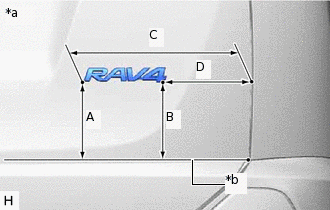
*a
Reference Values
*b
Horizontal Line
Install a new No. 1 back door emblem.
Using a heat light, heat the back door panel and a new No. 1 back door emblem.
Remove the peeling paper from the face of the No. 1 back door emblem.
Tip:After removing the peeling paper, keep the exposed adhesive free from foreign matter.
Install the No. 1 back door emblem in the position shown in the illustration.
Tip:Press the No. 1 back door emblem firmly to install it.
Standard
Area
Specified Condition
A
149.2 mm (5.87 in.)
B
146.8 mm (5.78 in.)
C
341.2 mm (13.4 in.)
D
188.2 mm (7.41 in.)
INSTALL NO. 4 BACK DOOR NAME PLATE
Tip:When installing the No. 4 back door name plate, heat the lower back door outside garnish sub-assembly and No. 4 back door name plate using a heat light.
Standard
Item
Temperature
Lower Back Door Outside Garnish Sub-assembly
20 to 30°C (68 to 86°F)
No. 4 Back Door Name Plate
20 to 30°C (68 to 86°F)
Note:Do not heat the lower back door outside garnish sub-assembly or No. 4 back door name plate excessively.
Clean the lower back door outside garnish sub-assembly surface.
Using a heat light, heat the lower back door outside garnish sub-assembly surface.
Remove the double-sided tape from the lower back door outside garnish sub-assembly.
Wipe off any tape adhesive residue with cleaner.
-
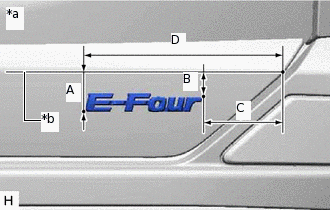
*a
Reference Values
*b
Horizontal Line
Install a new No. 4 back door name plate.
Using a heat light, heat the lower back door outside garnish sub-assembly and a new No. 4 back door name plate.
Remove the peeling paper from the face of the No. 4 back door name plate.
Tip:After removing the peeling paper, keep the exposed adhesive free from foreign matter.
Install the No. 4 back door name plate in the position shown in the illustration.
Tip:Press the No. 4 back door name plate firmly to install it.
Standard
Area
Specified Condition
A
33.4 mm (1.31 in.)
B
20.1 mm (0.791 in.)
C
72.4 mm (2.85 in.)
D
184.5 mm (7.26 in.)
INSTALL NO. 5 BACK DOOR NAME PLATE
Tip:When installing the No. 5 back door name plate, heat the back door panel and No. 5 back door name plate using a heat light.
Standard
Item
Temperature
back door panel
40 to 60°C (104 to 140°F)
No. 5 Back Door Name Plate
20 to 30°C (68 to 86°F)
Note:Do not heat the back door panel or No. 5 back door name plate excessively.
Clean the back door panel surface.
Using a heat light, heat the back door panel surface.
Remove the double-sided tape from the back door panel.
Wipe off any tape adhesive residue with cleaner.
-
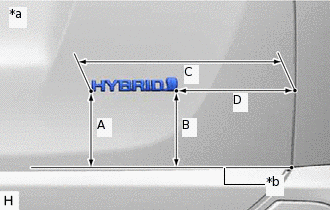
*a
Reference Values
*b
Horizontal Line
Install a new No. 5 back door name plate.
Using a heat light, heat the back door panel and a new No. 5 back door name plate.
Remove the peeling paper from the face of the No. 5 back door name plate.
Tip:After removing the peeling paper, keep the exposed adhesive free from foreign matter.
Install the No. 5 back door name plate in the position shown in the illustration.
Tip:Press the No. 5 back door name plate firmly to install it.
Standard
Area
Specified Condition
A
115.7 mm (4.56 in.)
B
116.5 mm (4.59 in.)
C
336.3 mm (13.2 in.)
D
205.8 mm (8.10 in.)
INSTALL FRONT FENDER NO. 2 NAME PLATE
Tip:When installing the front fender No. 2 name plate, heat the vehicle body and front fender No. 2 name plate using a heat light.
Standard
Item
Temperature
Vehicle Body
40 to 60°C (104 to 140°F)
Front Fender No. 2 Name Plate
20 to 30°C (68 to 86°F)
Note:Do not heat the vehicle body or front fender No. 2 name plate excessively.
Clean the vehicle body surface.
Using a heat light, heat the vehicle body surface.
Remove the double-sided tape from the vehicle body.
Wipe off any tape adhesive residue with cleaner.
-
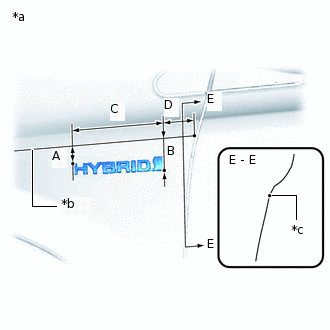
*a
Reference Values
*b
Horizontal Line
*c
R End
Install a new front fender No. 2 name plate.
Using a heat light, heat the vehicle body and a new front fender No. 2 name plate.
Remove the peeling paper from the face of the front fender No. 2 name plate.
Tip:After removing the peeling paper, keep the exposed adhesive free from foreign matter.
Install the front fender No. 2 name plate in the position shown in the illustration.
Tip:Press the front fender No. 2 name plate firmly to install it.
Standard
Area
Specified Condition
A
29.6 mm (1.17 in.)
B
53.0 mm (2.09 in.)
C
148.3 mm (5.84 in.)
D
53.3 mm (2.10 in.)
INSTALL FRONT FENDER NO. 1 NAME PLATE
Tip:When installing the front fender No. 1 name plate, heat the vehicle body and front fender No. 1 name plate using a heat light.
Standard
Item
Temperature
Vehicle Body
40 to 60°C (104 to 140°F)
Front Fender No. 1 Name Plate
20 to 30°C (68 to 86°F)
Note:Do not heat the vehicle body or front fender No. 1 name plate excessively.
Clean the vehicle body surface.
Using a heat light, heat the vehicle body surface.
Remove the double-sided tape from the vehicle body.
Wipe off any tape adhesive residue with cleaner.
-
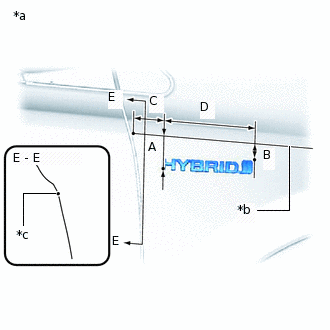
*a
Reference Values
*b
Horizontal Line
*c
R End
Install a new front fender No. 1 name plate.
Using a heat light, heat the vehicle body and a new front fender No. 1 name plate.
Remove the peeling paper from the face of the front fender No. 1 name plate.
Tip:After removing the peeling paper, keep the exposed adhesive free from foreign matter.
Install the front fender No. 1 name plate in the position shown in the illustration.
Tip:Press the front fender No. 1 name plate firmly to install it.
Standard
Area
Specified Condition
A
50.2 mm (1.98 in.)
B
25.2 mm (0.992 in.)
C
47.6 mm (1.87 in.)
D
148.3 mm (5.84 in.)