NAVIGATION ANTENNA INSTALLATION
CAUTION / NOTICE / HINT
Tech Tips
-
Use the same procedure for RHD and LHD vehicles.
-
The procedure listed below is for LHD vehicles.
PROCEDURE
-
INSTALL NAVIGATION ANTENNA BRACKET
-
INSTALL NAVIGATION ANTENNA ASSEMBLY
-
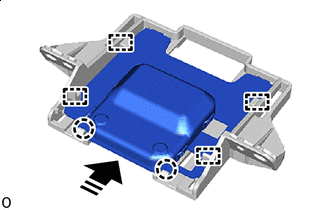

Install in this Direction While moving the navigation antenna assembly in the direction indicated in the illustration, install it to the navigation bracket guide.
-
Attach the claw and install the navigation antenna assembly.
-
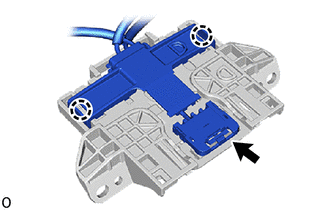
Connect the connector and attach the claw.
-
-
INSTALL NAVIGATION ANTENNA ASSEMBLY WITH BRACKET (for LHD)
-
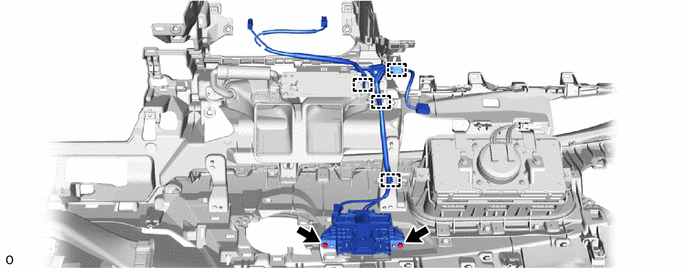
except ERA-GLONASS:
-
Install the navigation antenna with bracket assembly with the 2 screws.
-
Attach the clamp.
-
-
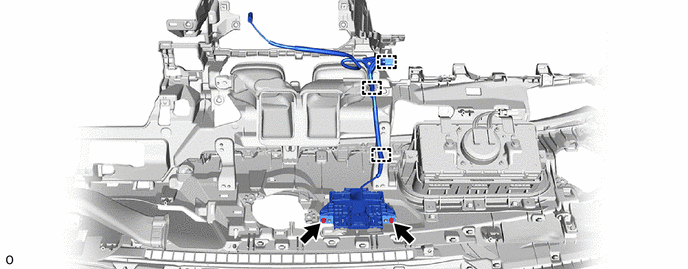
for ERA-GLONASS:
-
Install the navigation antenna with bracket assembly with the 2 screws.
-
Attach the clamp.
-
-
-
INSTALL NAVIGATION ANTENNA ASSEMBLY WITH BRACKET (for RHD)
-
Install the navigation antenna with bracket assembly with the 2 screws.
-
Attach the clamp.
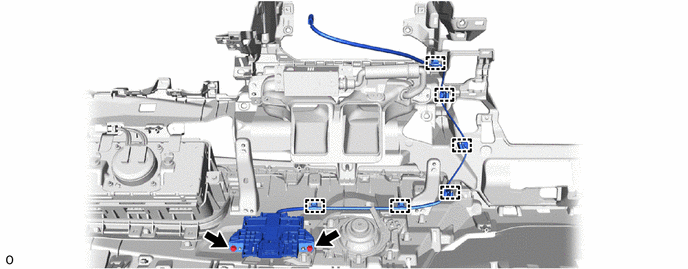
-
-
INSTALL DEFROSTER NOZZLE ASSEMBLY
-
INSTALL NO. 2 SIDE DEFROSTER NOZZLE DUCT
-
INSTALL NO. 5 HEATER TO REGISTER DUCT
-
INSTALL INSTRUMENT PANEL SAFETY PAD ASSEMBLY
-
CONNECT CABLE TO NEGATIVE BATTERY TERMINAL
Note
When disconnecting the cable, some systems need to be initialized after the cable is reconnected.
-
INSTALL LUGGAGE COMPARTMENT MAT SUB-ASSEMBLY
-
PERFORM DIAGNOSTIC SYSTEM CHECK
-
INSPECT SRS WARNING LIGHT