WIRELESS CHARGING SYSTEM SYSTEM DESCRIPTION
-
WIRELESS CHARGING SYSTEM
-
The wireless charging system allows Qi-compatible* devices to be charged without the use of a charging cable by placing them on the charging area of the mobile wireless charger cradle assembly.
Tech Tips
*: The Qi (chee) standard is an international wireless charging standard set by the Wireless Power Consortium (WPC). This is a standard for low power supply of 5 W or less for mobile devices such as smart phones and mobile batteries.
-
Qi-compatible devices that do not fit on the charging area cannot be used. Also, depending on the Qi-compatible device, the device may not operate normally. Check the operating instructions for the Qi-compatible device to be used.
-
The charger can be used with Qi-compatible devices.
Tech Tips
-
"Qi" and the "Qi" logo are registered trademarks of the Wireless Power Consortium (WPC).
-
The wireless charging system complies with the Qi standard, but compatibility with all Qi-compatible devices is not guaranteed.
-
-
-
INDICATOR DISPLAY
-
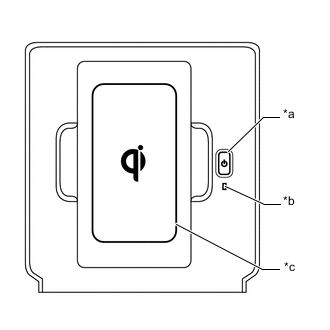
*a Wireless Charger Switch *b Indicator (Green/Amber) *c Charging Area The wireless charging system displays the system operation condition with an indicator.
Indicator Operation Condition Condition Color Not illuminated - Wireless charging system off Illuminated Green
-
Wireless charging system on (idle)
-
Qi-compatible device charging complete*1
Illuminated Amber
-
Qi-compatible device detected
-
Qi-compatible device charging
Illuminated
(4.5 seconds)*2
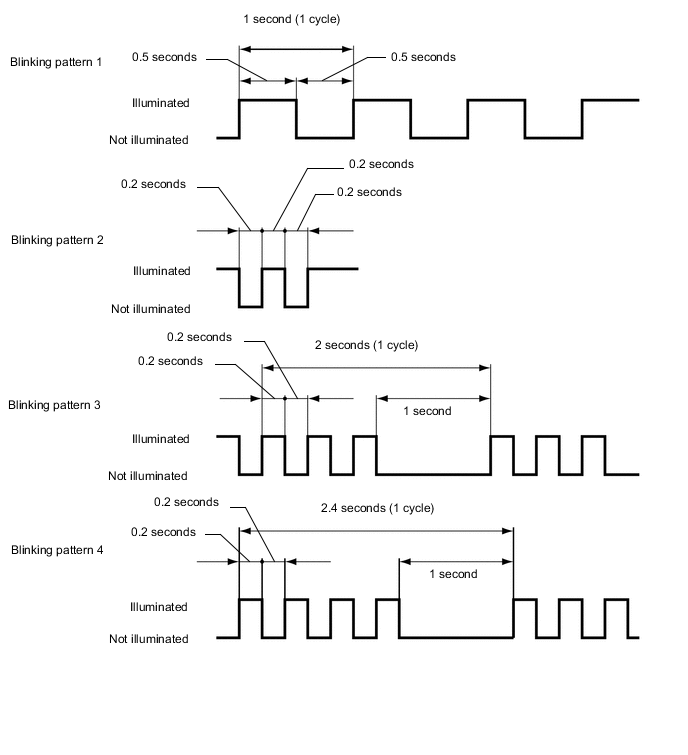
Green Charging temporarily stopped by charging stop signal from entry and start system Blink
(Pattern 1)*3
Amber Open circuit in charging stop signal circuit detected Blink
(Pattern 2)*3
Amber Charge frequency change operation in progress Blinking
(Pattern 3)*3
Amber
-
Foreign object detected between Qi-compatible device and charging area
-
Gap detected between Qi-compatible device and charging area
-
Qi-compatible device positioned improperly
-
Change in Qi-compatible device position from when charging started detected
Blinking
(Pattern 4)*3
Amber Abnormal rise in temperature of mobile wireless charger cradle assembly detected *1: Even when using a Qi-compatible device, case or accessory, the indicator may fail to illuminate green when the charging is complete. In this case, check the charge condition on the device.
*2: When the charging stop signal input lasts for 4.5 seconds or less, the indicator illuminates green for 4.5 seconds.
*3: For the blinking patterns, see the figure.
-
-
-
RESUMING CHARGING
-
After the Qi-compatible device fully charges and charging stops, if the device is left in place for 30 minutes, charging restarts.
-
After the Qi-compatible device fully charges and charging stops, if the device is moved or repositioned within the charging area, or replaced with another Qi-compatible device within 30 minutes, charging restarts at the new position.
-
If the Qi-compatible device is moved during charging, charging restarts at the new position.
Tech Tips
If consecutive recharges are performed due to the Qi-compatible device being moved, a communications error, etc., recharging should be stopped after a certain number of recharges in order to protect the device.
-
-
CHARGING STOP THAT OCCURS WHEN ELECTRICAL KEY TRANSMITTER SUB-ASSEMBLY POSITION IS DETECTED
-
The charging frequency of the wireless charging system overlaps with the electrical wave frequency band that is used when the entry and start system detects the position of the electrical key transmitter sub-assembly. Therefore, when the electrical key transmitter sub-assembly position is being detected, the charging stop signal from the certification ECU (smart key ECU assembly) makes the wireless charging system stop charging.
Tech Tips
-
When charging is stopped by the charging stop signal, the indicator illuminates green.
-
If an open in the charging stop signal circuit occurs, the indicator blinks amber (pattern 1).
-
-
If any of the following conditions is met, the certification ECU (smart key ECU assembly) sends a charging stop signal.
-
A door is opened or closed.
-
The back door opener switch is pressed.
-
The back door is closed.
-
Turn the engine switch on (IG).
-
The electrical key transmitter sub-assembly is outside the detection area.
-
-
-
CHARGING FREQUENCY CHANGE FUNCTION
-
If there is noise in AM radio reception during charging, turn off the power for the wireless charging system and check if the noise is reduced. If reduced, the charging frequency can be changed to reduce the noise by holding down the charging switch on the wireless charging system for approximately 1.7 seconds during charging.
Tech Tips
When the charging frequency is changed, the indicator blinks amber (Pattern 2).
-