DYNAMIC RADAR CRUISE CONTROL SYSTEM SYSTEM DESCRIPTION
-
GENERAL
-
The dynamic radar cruise control system has 2 cruise control modes: the constant speed control mode and vehicle-to-vehicle distance control mode.
-
The vehicle-to-vehicle distance control mode is always selected when starting the dynamic radar cruise control system.
-
Operation of the constant speed control mode is the same as the cruise control system.
-
-
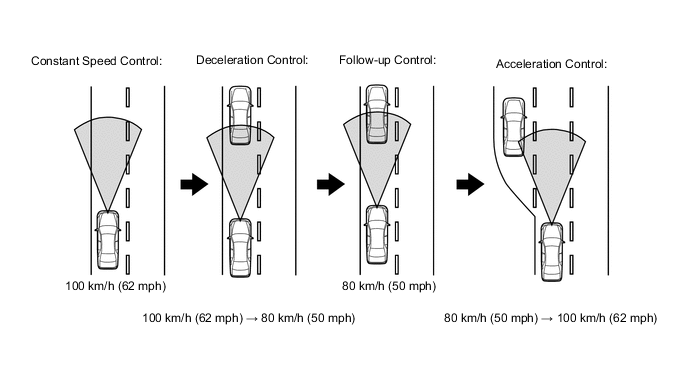
The vehicle-to-vehicle distance control mode maintains the vehicle speed that the driver has set, as long as there are no vehicles ahead in the same lane. In that case, the system maintains the vehicle distance that has been set by the driver. If the system detects a vehicle driving at a slower speed ahead while the driver is driving at a constant speed, it closes the throttle valve to decelerate. If further deceleration is required, the system controls the brake actuator in order to apply the brakes. Thereafter, if there are no vehicles ahead within the set vehicle-to-vehicle distance because either the vehicle ahead or the driver has changed lanes, the system accelerates slowly to reach the set vehicle speed and resumes driving at the constant speed.
-
The constant speed control mode is designed to maintain a constant cruising speed. The vehicle-to-vehicle distance control mode is designed to control cruising using a constant speed function, deceleration cruising function, follow-up cruising function and acceleration cruising function.
-
The millimeter wave radar sensor and driving support ECU control the system while the vehicle-to-vehicle distance control mode is in operation and send signals to each actuator and ECU.
-
In vehicle-to-vehicle distance control mode, the dynamic radar cruise control system receives signals from the yaw rate sensor and steering angle sensor. Based on these signals, it then estimates curve radius and corrects the information on the preceding vehicle while turning. It can also adjust the brake control when approaching another vehicle.
-
This system judges the presence of a vehicle in front and the distance to it based on the signals from the millimeter wave radar sensor while the vehicle-to-vehicle distance control mode is in operation. Using this information, the system informs the driver of any danger with the warning buzzer, performs brake control, and turns on the stop light when approaching the vehicle in front.
-
The following illustration shows an example under the following conditions: your vehicle speed is 100 km/h (62 mph) and the speed of the vehicle in front is 80 km/h (50 mph). The vehicle distance setting can be changed to 3 distances by operating the steering pad switch (distance control switch): long (approximately 50 m [160 ft.]), middle (approximately 40 m [130 ft.]) and short (approximately 30 m [100 ft.]) (when the vehicle speed is approximately 80 km/h (50 mph)).
Tech Tips
-
Vehicle distance increases and decreases in accordance with vehicle speed.
-
Controlling condition is indicated on the multi-information display in the combination meter.
-
-
-
FUNCTION OF MAIN COMPONENTS
Item Outline Combination meter (CRUISE main indicator light)
-
Turns on when cruise control switch is on
-
If ECM detects malfunction, this light flashes to warn driver
Combination meter (Master warning light) If ECM detects automatic cancel signal while vehicle is operating under cruise control, this light turns on to inform driver Combination meter (Buzzer) If ECM detects automatic cancel signal while vehicle is operating under cruise control, this buzzer sounds once to inform driver Combination meter (Multi-information display)
-
While system is in vehicle-to-vehicle distance control mode, multi-information display receives signals from ECM in order to display system conditions in graphic area
-
If ECM detects malfunction signal while vehicle is operating under cruise control, warning message will be displayed in warning area to inform driver
Cruise control switch (ON-OFF switch) Turns cruise control system on/off Cruise control switch (Control switch)
-
Vehicle speed setting, deceleration setting preset speed resumption, acceleration setting and canceling signals are output to driving support ECU through operation of this switch
-
Switch's control modes: constant speed control mode and vehicle-to-vehicle distance control mode
Steering pad switch (Distance control switch) While system is in vehicle-to-vehicle distance control mode, driver can operate steering pad switch (distance control switch) to select vehicle-to-vehicle distance from 3 possible settings: long, middle and short Stop light switch Outputs brake pedal status signal to ECM which is then sent to driving support ECU Windshield wiper switch Transmits windshield wiper switch information to driving support ECU Millimeter wave radar sensor Emits radar waves forward, uses reflected waves for detecting presence of vehicle in front, vehicle-to-vehicle distance and relative speed and transmits this information to driving support ECU Steering angle sensor Detects angle and direction of steering and transmits its signal to driving support ECU Yaw rate sensor Detects yaw rate of vehicle and transmits its signal to driving support ECU Skid control ECU
-
Actuates brakes
-
While system is in vehicle-to-vehicle distance control mode, skid control ECU actuates brake actuator in accordance with brake request signal received from ECM
-
Upon receiving signal from ECM, skid control ECU sounds skid control buzzer
Skid control buzzer This buzzer sounds upon receiving signal from skid control ECU ECM Controls dynamic radar cruise control system in accordance with signals from switches, sensors and driving support ECU Park/neutral position switch Outputs shift position signal to ECM which is then sent to driving support ECU Driving support ECU While system is in vehicle-to-vehicle distance control mode, driving support ECU detects vehicle in front based on signal from millimeter wave radar sensor. Then, driving support ECU calculates acceleration or deceleration rate in order to attain target vehicle-to-vehicle distance and outputs request signals to ECM and skid control ECU. -
-
LIMIT CONTROL
-
Low speed limit
The lower limit of the speed setting range is set at approximately 50 km/h (30 mph). The cruise control system cannot be set when the driving vehicle speed is below the low speed limit. Cruise control operation will be automatically canceled when the vehicle speed decreases below the low speed limit (40 km/h [25 mph]) while the cruise control system is in operation. When the vehicle speed is increased above the low speed limit after the cruise control operation is canceled, pressing the +RES switch increases the vehicle speed to the stored speed.
Tech Tips
Even if the speed is 40 km/h (25 mph) or less, the vehicle-to-vehicle distance control mode is not canceled by the dynamic radar cruise control system.
-
High speed limit (Constant speed control mode)
The upper limit of the speed setting range is approximately 200 km/h (125 mph). The cruise control system cannot be set when the driving vehicle speed is over the high speed limit. Also, RESUME/ACCEL cannot be used to increase speed beyond the high speed limit.
-
-
CRUISE CONTROL OPERATION
The cruise control switch operates 8 functions: SET, COAST, TAP-DOWN, RESUME, ACCEL, TAP-UP, CANCEL and MODE. The SET, TAP-DOWN and COAST functions and the RESUME, TAP-UP and ACCEL functions are operated with the same switch. The cruise control switch is an automatic return type switch which turns on only while pushing it in each arrow direction and turns off after releasing it. The dynamic radar cruise control system has two cruise control modes: the constant speed control mode and vehicle-to-vehicle distance control mode.
-
The vehicle-to-vehicle distance control mode is always selected when starting up the dynamic radar cruise control system.
-
Operation of the constant speed control mode is the same as the cruise control system.
-
MODE CONTROL
Pushing the cruise control switch to MODE for more than 1 second while driving with the cruise control switch on (RADAR READY is on) sets the mode to the constant speed control mode.
-
SET CONTROL (Constant speed control mode)
Vehicle speed is stored and constant speed control is maintained when pushing the cruise control switch to -SET while driving with the vehicle speed within the set speed range (between the low and high speed limits) after pushing the cruise control switch on (RADAR READY is on) and entering the constant speed control mode.
-
SET CONTROL (Vehicle-to-vehicle distance control mode)
Vehicle speed is stored and vehicle-to-vehicle control is maintained when pushing the cruise control switch to -SET while driving with the cruise control switch on (RADAR READY is on) and with the vehicle speed within the set speed range (between the low and high speed limits).
-
COAST CONTROL (Constant speed control mode)
When the cruise control switch is pushed to -SET and held in that position while the cruise control system is operating, the ECM generates a "fuel injection volume 0%" demand signal for the cruise control system. Then the vehicle speed, when the cruise control switch is released, is stored and maintained.
-
COAST CONTROL (Vehicle-to-vehicle distance control mode)
When the cruise control switch is pushed to -SET and held while the vehicle-to-vehicle distance control mode is in operation, the stored vehicle speed decreases by approximately 5 km/h or 5 mph.
-
TAP-DOWN CONTROL (Constant speed control mode)
When tapping down the cruise control switch to -SET (for approximately 0.6 seconds) while the constant speed control mode is in operation, the stored vehicle speed decreases each time by approximately 1.6 km/h (1 mph). When the cruise control switch is released from -SET and the difference between the driving and stored vehicle speed is more than 5 km/h (3 mph), the vehicle speed is stored and constant speed control is maintained.
-
TAP-DOWN CONTROL (Vehicle-to-vehicle distance control mode)
When tapping down the cruise control switch to -SET (for approximately 0.6 seconds) while the vehicle-to-vehicle distance control mode is in operation, the stored vehicle speed decreases each time by approximately 5 km/h or 5 mph.
-
ACCELERATION CONTROL (Constant speed control mode)
While the cruise control system is in operation, if the cruise control switch is pressed to +RES, the injector driver increases the fuel injection quantity. When the cruise control switch is released from +RES, the vehicle speed is stored and the vehicle is controlled at a constant speed.
-
ACCELERATION CONTROL (Vehicle-to-vehicle distance control mode)
When the cruise control switch is pushed to +RES and held while the vehicle-to-vehicle distance control mode is in operation, the stored vehicle speed increases by approximately 5 km/h or 5 mph. Pushing the cruise control switch to +RES while following the vehicle in front with the vehicle-to-vehicle distance control mode on does not increase the actual vehicle speed, but changes only the set vehicle speed.
-
TAP-UP CONTROL (Constant speed control mode)
When tapping up the cruise control switch to +RES (for approximately 0.6 seconds) while the constant speed control mode is in operation, the stored vehicle speed increases each time by approximately 1.6 km/h (1 mph). However, when the difference between the driving and the stored vehicle speeds is more than 5 km/h (3 mph), the stored vehicle speed will not be changed.
-
TAP-UP CONTROL (Vehicle-to-vehicle distance control mode)
When tapping up the cruise control switch to +RES (for approximately 0.6 seconds) while the vehicle-to-vehicle distance control mode is in operation, the stored vehicle speed increases each time by approximately 5 km/h or 5 mph.
-
OVERDRIVE CONTROL
-
Overdrive may be canceled automatically when using cruise control while driving on inclined roads, etc.
-
After overdrive is canceled, if the system determines that the road is no longer inclined based on the fuel injection volume opening amount, overdrive will be restored.
-
If overdrive was canceled during an ACCEL or RESUME operation, overdrive will be restored after the ACCEL or RESUME operation is completed.
-
-
MANUAL CANCEL CONTROL
Performing any of the following cancels cruise control while it is in operation (the stored vehicle speed in the ECM is maintained).
-
Depressing the brake pedal
-
Moving the shift lever to any position except D
-
Driving the vehicle while the vehicle stability control system is operating
-
Pulling the cruise control switch to CANCEL
-
Pushing the cruise control switch off (the stored vehicle speed in the ECM is not maintained)
-
-
RESUME CONTROL
-
If cruise control operation was canceled with the stop light switch, CANCEL switch, etc., and if the driving speed is within the set speed range, pushing the cruise control switch to +RES restores the vehicle speed memorized at the time of cancellation, and initiates constant speed control.
-
Vehicle-to-vehicle distance control mode
When the vehicle-to-vehicle distance control mode is operating, if the vehicle in front changes lanes, your vehicle changes lanes, or another situation occurs so that there is no vehicle in front, the vehicle speed automatically increases slowly to the stored vehicle speed. At this time, if the +RES switch is pressed, the vehicle speed increases quickly to the stored vehicle speed.
-
-
-
AUTO CANCEL (FAIL-SAFE)
This system has an automatic cancellation function (fail-safe) Click here.