RADIO RECEIVER INSTALLATION
PROCEDURE
-
INSTALL NO. 2 RADIO BRACKET (for Radio Receiver Type)
-
Install the No. 2 radio bracket with the 3 screws.
- Torque:
- 4.0 N*m { 40 kgf*cm, 35 in.*lbf }
-
-
INSTALL NO. 2 RADIO RECEIVER BRACKET (for Radio and Display Type)
-
Install the No. 2 radio receiver bracket with the 3 screws.
- Torque:
- 4.0 N*m { 40 kgf*cm, 35 in.*lbf }
-
-
INSTALL NO. 1 RADIO BRACKET (for Radio Receiver Type)
-
Install the No. 1 radio bracket with the 3 screws.
- Torque:
- 4.0 N*m { 40 kgf*cm, 35 in.*lbf }
-
-
INSTALL NO. 1 RADIO RECEIVER BRACKET (for Radio and Display Type)
-
Install the No. 1 radio receiver bracket with the 3 screws.
- Torque:
- 4.0 N*m { 40 kgf*cm, 35 in.*lbf }
-
-
INSTALL RADIO RECEIVER ASSEMBLY WITH BRACKET (for Radio Receiver Type)
-
Connect the connectors.
-

Insert the radio receiver assembly with bracket to attach the 4 clips and 2 claws on its backside.
Note
When inserting the radio receiver, do not press the knobs on it.
-
Install the radio receiver assembly with bracket with the 4 screws.
- Torque:
- 4.0 N*m { 40 kgf*cm, 35 in.*lbf }
-
-
INSTALL RADIO AND DISPLAY RECEIVER ASSEMBLY WITH BRACKET (for Radio and Display Type)
-
Connect the connectors.
-
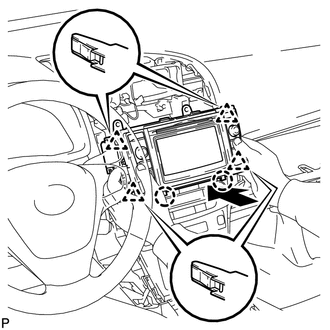
Insert the radio and display receiver assembly with bracket to attach the 4 clips and 2 claws on its backside.
Note
When inserting the radio and display receiver, do not press the knobs on it.
-
Install the radio and display receiver assembly with bracket with the 4 screws.
- Torque:
- 4.0 N*m { 40 kgf*cm, 35 in.*lbf }
-
-
INSTALL CENTER INSTRUMENT PANEL REGISTER ASSEMBLY WITH FINISH PANEL
-
INSTALL NO. 3 BOX PANEL
-
INSTALL INSTRUMENT PANEL FINISH PANEL END RH (for LHD)
-
INSTALL INSTRUMENT PANEL FINISH PANEL END RH (for RHD)
-
INSTALL INSTRUMENT PANEL FINISH PANEL END LH
-
INSTALL LOWER NO. 1 INSTRUMENT PANEL FINISH PANEL
-
INSTALL LOWER NO. 2 INSTRUMENT PANEL FINISH PANEL
-
CONNECT CABLE TO NEGATIVE BATTERY TERMINAL
Note
When disconnecting the cable, some systems need to be initialized after the cable is reconnected Click here.