METER / GAUGE SYSTEM CUSTOMIZE PARAMETERS
PROCEDURE
CUSTOMIZE METER / GAUGE SYSTEM
Note:When the customer requests a change in a function, first make sure that the function can be customized.
Record the current settings before customizing.
Connect the intelligent tester to the DLC3.
Turn the ignition switch to ON.
Turn the intelligent tester on.
Enter the following menus: Customize Setting.
Select the setting by referring to the table below.
Table 1. Warning Display
Default
Contents
Setting
Key Remind Volume
LARGE
To change the volume of the key reminder buzzer.
LARGE/MEDIUM/SMALL
Key Remind Sound
SLOW
To change the frequency of the key reminder buzzer.
NORMAL/FAST/SLOW
Driver Side Seatbelt Warning Buzzer
ON
To enable or disable the seat belt warning buzzer.
ON/OFF
Front Passenger Side Seatbelt Warning Buzzer
ON
To enable or disable the seat belt warning buzzer.
ON/OFF
Rear Seatbelt Warning Buzzer*1, *2
ON
To enable or disable the seat belt warning buzzer.
ON/OFF
*1: w/ Rear No. 1 Seat
*2: w/ Rear No. 2 Seat
Table 2. Display Display
Default
Contents
Setting
ECO Drive Indicator*
ON
To activate or deactivate the Eco Driving Indicator Zone Display.
ON/OFF
ODO Display Time After IG OFF Setting
30 s
Function to change the odometer display time
30 s/60 s/600 s/OFF
*: except Manual Transaxle
Customizing ECO driving indicator light.
Tip:The driver can stay off.
When the eco driving indicator light is deactivated, the system check for the indicator is disabled.
-
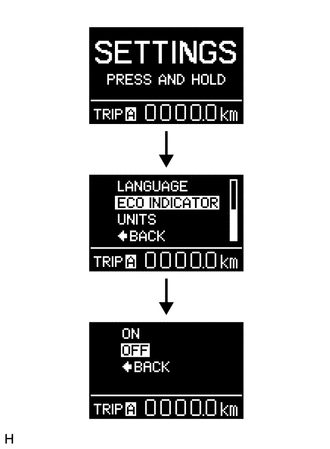
Select "SETTING" of Multi-information display while the vehicle is recognized as stopped (vehicle speed is below 8 km/h).
Keep the DISP switch pressed for a while.
Select "ECO INDICATOR" from the displayed items.
Keep the DISP switch pressed for a while.
Select "OFF" from the displayed items. Then keep the switch pressed for a while. the eco drive indicator light is deactivated.
Tip:To activate the eco driving indicator light, select "ON".
-