AUTOMATIC TRANSAXLE SYSTEM, Diagnostic DTC:P079112, P079114, P079131

| DTC Code | DTC Name |
|---|---|
| P079112 | Intermediate Shaft Speed Sensor "A" Circuit Short to Battery |
| P079114 | Intermediate Shaft Speed Sensor "A" Circuit Short to Ground or Open |
| P079131 | Intermediate Shaft Speed Sensor "A" No Signal |
DESCRIPTION
The output speed sensor NC detects the rotation speed of the counter gear, which indicates the intermediate shaft revolution (speed) of the transaxle. By comparing the input speed sensor NT signal with the output speed sensor NC signal, the ECM detects the shift timing of the gears and appropriately controls the engine torque and hydraulic pressure according to various conditions, thus, providing smooth gear shifts.
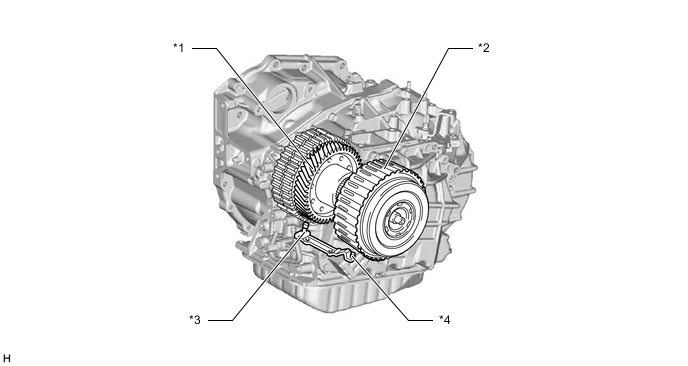
| *1 | Counter Gear | *2 | C2 Piston |
| *3 | Output Speed Sensor NC | *4 | Input Speed Sensor NT |
| DTC No. | Detection Item | DTC Detection Condition | Trouble Area | MIL | Memory | Note |
|---|---|---|---|---|---|---|
| P079112 | Intermediate Shaft Speed Sensor "A" Circuit Short to Battery | All of the following conditions are met (1-trip detection logic):
|
|
Comes on | DTC stored | SAE Code: P07C6 |
| P079114 | Intermediate Shaft Speed Sensor "A" Circuit Short to Ground or Open | All of the following conditions are met (1-trip detection logic):
|
|
Comes on | DTC stored | SAE Code: P07C5 |
| P079131 | Intermediate Shaft Speed Sensor "A" No Signal | All of the following conditions are met (1-trip detection logic):
|
|
Comes on | DTC stored | SAE Code: P0793 |
MONITOR DESCRIPTION
The NC terminal of the ECM detects a revolution signal from the output speed sensor NC (counter gear RPM). The ECM calculates gear shifts by comparing the input speed sensor NT signal to the output speed sensor NC signal.
If the intermediate (counter) shaft revolution is less than 300 rpm* although the vehicle speed is 11 km/h (7 mph) or more, the ECM interprets this as a malfunction, illuminates the MIL and stores a DTC.
*: Pulse is not output or is irregularly output.
CONFIRMATION DRIVING PATTERN
CAUTION:
When performing the confirmation driving pattern, obey all speed limits and traffic laws.
Tech Tips
After repairs have been completed, clear the DTCs and then check that the vehicle has returned to normal by performing the following All Readiness check procedure.
-
Connect the GTS to the DLC3.
-
Turn the engine switch on (IG) and turn the GTS on.
-
Clear the DTCs (even if no DTCs are stored, perform the clear DTC procedure).
-
Turn the engine switch off and wait for 2 minutes or more.
-
Turn the engine switch on (IG) and turn the GTS on.
-
Start the engine.
-
Perform the D Position Shift Test inspection in Road Test and drive the vehicle for 2 seconds or more at 11 km/h (7 mph) or more.
-
Stop the vehicle.
-
Enter the following menus: Powertrain / Transmission / Utility / All Readiness.
-
Input the DTC: P079112, P079114 or P079131.
-
Check the DTC judgment result.
GTS Display Description NORMAL
-
DTC judgment completed
-
System normal
ABNORMAL
-
DTC judgment completed
-
System abnormal
INCOMPLETE
-
DTC judgment not completed
-
Perform driving pattern after confirming DTC enabling conditions
N/A
-
Unable to perform DTC judgment
-
Number of DTCs which do not fulfill DTC preconditions has reached ECU memory limit
Tech Tips
-
If the judgment result shows NORMAL, the system is normal.
-
If the judgment result shows ABNORMAL, the system has a malfunction.
-
If the judgment result shows INCOMPLETE or N/A, perform the Confirmation Driving Pattern and check the DTC judgment result again.
-
CAUTION / NOTICE / HINT
Note
Perform registration and/or initialization when parts related to the automatic transaxle are replaced.
Tech Tips
Using the GTS to read the Data List allows the values or states of switches, sensors, actuators and other items to be read without removing any parts. This non-intrusive inspection can be very useful because intermittent conditions or signals may be discovered before parts or wiring is disturbed. Reading the Data List information early in troubleshooting is one way to save diagnostic time.
-
DATA LIST
-
Warm up the engine.
-
Turn the engine switch off.
-
Connect the GTS to the DLC3.
-
Turn the engine switch on (IG).
-
Turn the GTS on.
-
Enter the following menus: Powertrain / Transmission / Data List.
-
Read the Data List according to the display on the GTS.
Powertrain > Transmission > Data ListTester Display Measurement Item Range Normal Condition Diagnostic Note NC Sensor Speed Counter gear speed Min.: 0 rpm
Max.: 12750 rpm
- Data is displayed in increments of 50 rpm.
Powertrain > Transmission > Data ListTester Display NC Sensor Speed Tech Tips
-
NC Speed Sensor is always 0 while driving: Open or short in the sensor or circuit.
-
NC Speed Sensor is always more than 0 and less than 300 rpm while driving the vehicle at 50 km/h (31 mph) or more: Sensor malfunction, improper installation or intermittent connection malfunction in the circuit.
-
-
PROCEDURE
-
READ VALUE USING GTS (NC SENSOR SPEED AND NC SENSOR VOLTAGE)
-
Connect the GTS to the DLC3.
-
Turn the engine switch on (IG).
-
Turn the GTS on.
-
Enter the following menus: Powertrain / Transmission / Data List.
-
According to the display on the GTS, read the Data List.
Powertrain > Transmission > Data ListTester Display Measurement Item Range Normal Condition Diagnostic Note NC Sensor Speed Counter gear speed Min.: 0 rpm
Max.: 12750 rpm
- Data is displayed in increments of 50 rpm. NC Sensor Voltage Counter gear speed sensor output voltage Min.: 0 V
Max.: 4.999 V
0.1 to 1.9 V -
Powertrain > Transmission > Data ListTester Display NC Sensor Speed NC Sensor Voltage Result Result Proceed to Data List values are normal A Data List values are not normal B
A 
REPLACE ECM Click here
B 
-
-
INSPECT TRANSMISSION REVOLUTION SENSOR (NC)
-
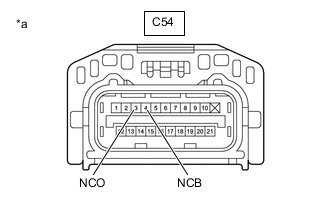
*a Front view of wire harness connector
(to Wiring Harness Connector)
Disconnect the C54 wiring harness connector connector.
-
Measure the resistance according to the value(s) in the table below.
Standard Resistance: Tester Connection Condition Specified Condition C54-3 (NCO) - Body ground Always 99 to 101 Ω -
Turn the engine switch on (IG).
-
Measure the voltage according to the value(s) in the table below.
Standard Voltage Tester Connection Condition Specified Condition C54-4 (NCB) - Body ground Engine switch on (IG) 11 to 14 V Result Proceed to OK NG
NG 
CHECK HARNESS AND CONNECTOR (ECM - WIRING HARNESS CONNECTOR) Click here
OK
-
-
INSPECT WIRING HARNESS CONNECTOR
-
Remove the wiring harness connector.
-
Measure the resistance according to the value(s) in the table below.
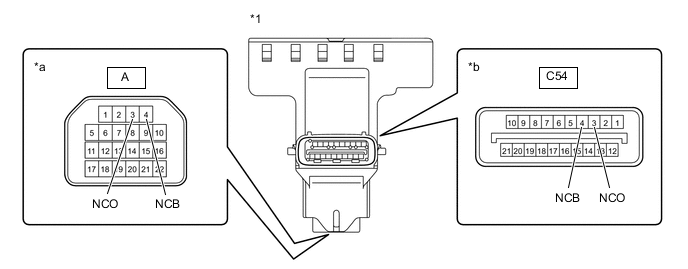
*1 Wiring Harness Connector - - *a Transmission wire side *b ECM side Standard Resistance Tester Connection Condition Specified Condition C54-3 (NCO) - A-3 (NCO) Always Below 1 Ω C54-4 (NCB) - A-4 (NCB) Always Below 1 Ω C54-3 (NCO) or A-3 (NCO) - Other terminals Always 10 kΩ or higher C54-4 (NCB) or A-4 (NCB) - Other terminals Always 10 kΩ or higher Result Proceed to OK NG
NG
REPLACE WIRING HARNESS CONNECTOR Click here
OK
-
-
INSPECT TRANSMISSION REVOLUTION SENSOR (SPEED SENSOR INSTALLATION)
-
Remove the transmission valve body assembly.
-
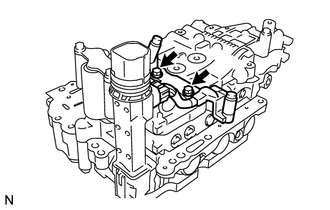
Make sure that the connector is properly connected, and check the transmission revolution sensor installation.
OK The installation bolts are tightened properly and there is no clearance between the transmission revolution sensor and transmission valve body assembly. Result Proceed to OK NG
NG
REPAIR OR REPLACE TRANSMISSION REVOLUTION SENSOR Click here
OK
-
-
INSPECT TRANSMISSION WIRE
-
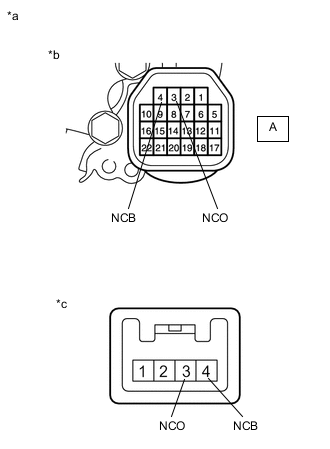
*a Component without harness connected
(Transmission Wire)
*b Wiring harness connector side *c Transmission revolution sensor side Disconnect the transmission revolution sensor connector from the transmission wire.
-
Measure the resistance according to the value(s) in the table below.
Standard Resistance Tester Connection Condition Specified Condition 3 (NCO) sensor side - A-3 (NCO) wiring harness connector side Always Below 1 Ω 4 (NCB) sensor side - A-4 (NCB) wiring harness connector side Always Below 1 Ω 3 (NCO) sensor side or A-3 (NCO) wiring harness connector side - Body ground and other terminals Always 10 kΩ or higher 4 (NCB) sensor side or A-4 (NCB) wiring harness connector side - Body ground and other terminals Always 10 kΩ or higher Result Proceed to OK NG
OK
REPLACE TRANSMISSION REVOLUTION SENSOR Click here
NG
REPLACE TRANSMISSION WIRE Click here
-
-
CHECK HARNESS AND CONNECTOR (ECM - WIRING HARNESS CONNECTOR)
-
Disconnect the C58 ECM connector.
-
Disconnect the C54 wiring harness connector connector.
-
Measure the resistance according to the value(s) in the table below.
Standard Resistance Tester Connection Condition Specified Condition C58-73 (NCB) - C54-4 (NCB) Always Below 1 Ω C58-74 (NCO) - C54-3 (NCO) Always Below 1 Ω C58-73 (NCB) or C54-4 (NCB) - Body ground and other terminals Always 10 kΩ or higher C58-74 (NCO) or C54-3 (NCO) - Body ground and other terminals Always 10 kΩ or higher Result Proceed to OK NG
OK
REPLACE ECM Click here
NG
REPAIR OR REPLACE HARNESS OR CONNECTOR
-