LIGHTING SYSTEM CUSTOMIZE PARAMETERS

-
CUSTOMIZING FUNCTION WITH GTS
Note
-
When the customer requests a change in a function, first make sure that the function can be customized.
-
Be sure to make a note of the current settings before customizing.
Tech Tips
The following items can be customized.
-
Connect the GTS to the DLC3.
-
Turn the ignition switch to ON.
-
Turn the GTS on.
-
Enter the following menus: Utility / Customize / (desired system).
-
Select the setting by referring to the table below.
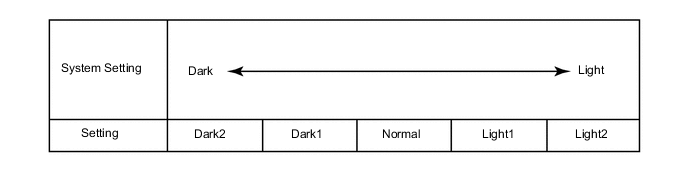
Warning Display Description Default Setting ECU Lane Change Flashing Times Setting Function to change the number of flashes for the lane change flasher 3 OFF, 3, 4, 5, 6 or 7 Combination meter assembly Light Control Display Description Default Setting ECU Sensitivity* A function to adjust the ambient light sensitivity of the automatic light control system.*1 Normal Normal, Dark2, Dark1, Light1 or Light2 Main body ECU (Instrument panel junction block assembly) Follow Me Home Lighting Time* Changes the low beam headlight lighting time when ignition switch is off and light control switch is pulled to flash the headlights once. 30 s 30 s, 60 s, 90 s or 120 s Main body ECU (Instrument panel junction block assembly)
-
*: w/ Automatic Light Control System
Tech Tips
The sensitivity adjustment may be difficult to confirm. Check by driving the customer's vehicle.
Figure 1. *1
Tech Tips
When the setting is closer to the "Light" side, the system turns the lights on even when the surrounding area is relatively bright. When the setting is closer to the "Dark" side, the system waits until the surrounding area is darker before turning on the lights.
-
-
-
CUSTOMIZING FUNCTION WITH MULTI-DISPLAY (for Radio and Display Type)
Note
-
When the customer requests a change in a function, first make sure that the function can be customized.
-
Be sure to make a note of the current settings before customizing.
Tech Tips
The following items can be customized.
-
Turn the ignition switch to ON.
-
Enter the following menus: Setup / Vehicle.
-
Select the setting by referring to the table below.
Light Control Display Default Content Setting Light sensor sensitivity 0 A function to adjust the ambient light sensitivity of the automatic light control system.* -2, -1, 0, +1 or +2 Tech Tips
The sensitivity adjustment may be difficult to confirm. Check by driving the customer's vehicle.
Figure 2. *
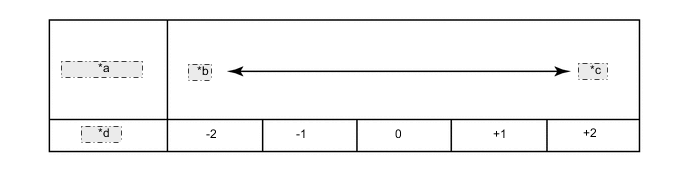
*a System Setting *b Dark *c Light *d Setting Tech Tips
When the setting is closer to the "Light" side, the system turns the lights on even when the surrounding area is relatively bright. When the setting is closer to the "Dark" side, the system waits until the surrounding area is darker before turning on the lights.
-