COOLING FAN MOTOR INSTALLATION
PROCEDURE
-
INSTALL NO. 2 COOLING FAN MOTOR
-
Install the No. 2 cooling fan motor with the 3 screws.
- Torque:
- 3.9 N*m { 40 kgf*cm, 35 in.*lbf }
-
Attach the 6 clamps.
-
Attach the guide and install the cooling fan motor insulator to the fan shroud with the 2 screws.
- Torque:
- 2.6 N*m { 27 kgf*cm, 23 in.*lbf }
-
-
INSTALL COOLING FAN MOTOR
-
Install the cooling fan motor with the 3 screws.
- Torque:
- 3.9 N*m { 40 kgf*cm, 35 in.*lbf }
-
Attach the 3 clamps.
-
-
INSTALL NO. 2 FAN
Note
Do not switch the fan and No. 2 fan when installing them. Parts may be damaged if the cooling fans are installed in the wrong locations.
-
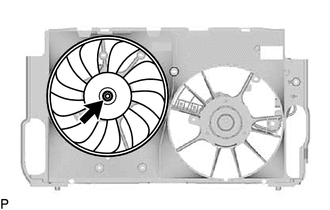
Install the No. 2 fan with the nut.
- Torque:
- 6.3 N*m { 64 kgf*cm, 56 in.*lbf }
-
-
INSTALL FAN
Note
Do not switch the fan and No. 2 fan when installing them. Parts may be damaged if the cooling fans are installed in the wrong locations.
-
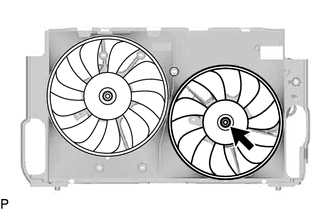
Install the fan with the nut.
- Torque:
- 6.3 N*m { 64 kgf*cm, 56 in.*lbf }
-
-
INSTALL COOLING FAN ECU
-
Install the cooling fan ECU with the 2 screws.
- Torque:
- 2.6 N*m { 27 kgf*cm, 23 in.*lbf }
-
Connect the connector to the cooling fan ECU.
-
Install the No. 2 cooling fan ECU with the 2 screws.
- Torque:
- 2.6 N*m { 27 kgf*cm, 23 in.*lbf }
-
Connect the connector to the No. 2 cooling fan ECU.
-
-
INSTALL FAN SHROUD WITH COOLING FAN
-
CHECK COOLING FAN MOTOR OPERATION