HYBRID CONTROL SYSTEM HV Battery High-voltage Line Circuit
| DTC Code | DTC Name |
|---|---|
| HV Battery High-voltage Line Circuit |
DESCRIPTION
The cause of the malfunction may be the HV battery high-voltage line circuit.
Check the continuity in the high-voltage line from the HV battery to the inverter.
Check the connection condition and for an open circuit in the frame wire from the service plug grip and HV battery to the inverter and perform a function check of the system main relay.
Area |
Inspection |
Step |
|---|---|---|
High-voltage circuit from HV battery to inverter |
Check connection condition and for open circuit. |
1, 4, 5 |
Service plug grip |
Check connection condition and for open circuit. |
2, 3 |
System Main Relay |
Check operation condition as relay. |
6, 7 |
SYSTEM DESCRIPTION
The HV battery high voltage is supplied to the inverter via the system main relay operation.
WIRING DIAGRAM

CAUTION / NOTICE / HINT
This step is referenced from the procedures for each DTC.
If the inspection results below are normal, perform the next procedure for the referenced DTC.
Before inspecting the high-voltage system or disconnecting the low voltage connector of the inverter with converter assembly, take safety precautions such as wearing insulated gloves and removing the service plug grip to prevent electrical shocks. After removing the service plug grip, put it in your pocket to prevent other technicians from accidentally reconnecting it while you are working on the high-voltage system.
After removing the service plug grip, wait for at least 10 minutes before touching any of the high-voltage connectors or terminals. After waiting for 10 minutes, check the voltage at the terminals in the inspection point in the inverter with converter assembly. The voltage should be 0 V before beginning work.
Tip:Waiting for at least 10 minutes is required to discharge the high-voltage capacitor inside the inverter with converter assembly.
After turning the power switch off, waiting time may be required before disconnecting the cable from the negative (-) auxiliary battery terminal. Therefore, make sure to read the disconnecting the cable from the negative (-) auxiliary battery terminal notices before proceeding with work.
PROCEDURE
CHECK INVERTER WITH CONVERTER ASSEMBLY (NO. 2 FRAME WIRE CONNECTION CONDITION)
CAUTION:Be sure to wear insulated gloves.
Check that the service plug grip is not installed.
Note:After removing the service plug grip, do not turn the power switch on (READY), unless instructed by the repair manual because this may cause a malfunction.
-
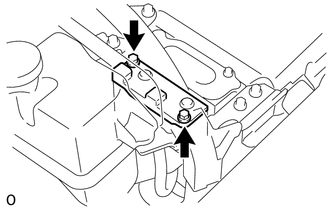
Remove the connector cover assembly from the inverter with converter assembly.
-

Check that the bolt for the No. 2 frame wire is tightened to the specified torque, the No. 2 frame wire is connected securely, and there are no contact problems.
Specified condition
T = 8.0 N*m (82 kgf*cm, 71 in.*lbf)
Note:Make sure that the tightening torque of the bolt is between 6.4 and 9.6 N*m (65 and 98 kgf*cm, 57 and 85 in.*lbf).
Disconnect the No. 2 frame wire from the inverter with converter assembly.
Check for arc marks at the bolt and terminals for the No. 2 frame wire.
Result
Result
Proceed to
The terminals are connected securely and there are no contact problems.
There are no arc marks.
A
The terminals are not connected securely and there is a contact problem.
There are arc marks.
B
The terminals are not connected securely and there is a contact problem.
There are no arc marks.
C
The terminals are connected securely and there are no contact problems.
There are arc marks.
B
Reconnect the No. 2 frame wire.
Install the connector cover assembly.
B REPLACE MALFUNCTIONING PARTS
C CONNECT SECURELY
CHECK SERVICE PLUG GRIP (CONNECTION CONDITION)
CAUTION:Be sure to wear insulated gloves.
Visually check the connection of the service plug grip to the HV battery. Remove the service plug grip and check for contamination.
OK
Dirt or foreign matter has not entered the connectors, and there is no evidence of contamination.
Install the service plug grip.
Result
Proceed to
OK
NG
INSPECT SERVICE PLUG GRIP
Remove the service plug grip.
-

*1
Service Plug Grip
Measure the resistance according to the value(s) in the table below.
Standard Resistance
Tester Connection
Condition
Specified Condition
Service plug grip terminals
Always
Below 1 Ω
Install the service plug grip.
Result
Proceed to
OK
NG
CHECK HV BATTERY JUNCTION BLOCK ASSEMBLY (NO. 2 FRAME WIRE CONNECTION CONDITION)
CAUTION:Be sure to wear insulated gloves.
Check that the service plug grip is not installed.
Note:After removing the service plug grip, do not turn the power switch on (READY), unless instructed by the repair manual because this may cause a malfunction.
Remove the No. 2 hybrid vehicle battery shield reinforcement.
-

Check that the nuts for the No. 2 frame wire are tightened to the specified torque, the No. 2 frame wire is connected securely, and there are no contact problems.
Specified condition
T = 9.0 N*m (92 kgf*cm, 80 in.*lbf)
Check for arc marks on the terminals of the No. 2 frame wire and the HV battery junction block assembly.
Result
Result
Proceed to
The terminals are connected securely and there are no contact problems.
There are no arc marks.
A
The terminals are not connected securely and there is a contact problem.
There are arc marks.
B
The terminals are not connected securely and there is a contact problem.
There are no arc marks.
C
The terminals are connected securely and there are no contact problems.
There are arc marks.
B
Install the No. 2 hybrid vehicle battery shield reinforcement.
B REPLACE MALFUNCTIONING PARTS
C CONNECT SECURELY
CHECK NO. 2 FRAME WIRE
CAUTION:Be sure to wear insulated gloves.
Check that the service plug grip is not installed.
Note:After removing the service plug grip, do not turn the power switch on (READY), unless instructed by the repair manual because this may cause a malfunction.
Remove the No. 2 hybrid vehicle battery shield reinforcement.
-
Disconnect the No. 2 frame wire from the HV battery junction block assembly.
-
Remove the connector cover assembly from the inverter with converter assembly.
-
Disconnect the No. 2 frame wire from the inverter with converter assembly.
-

*1
Shield Ground
*a
No. 2 Frame Wire
(Inverter with Converter Assembly Side)
*b
No. 2 Frame Wire
(HV Battery Junction Block Assembly Side)
Measure the resistance according to the value(s) in the table below.
Standard Resistance
Tester Connection
Condition
Specified Condition
t2-1 (CBI) - t5-1 (CBI)
Power switch off
Below 1 Ω
t2-2 (CEI) - t6-1 (CEI)
Power switch off
Below 1 Ω
Using a megohmmeter set to 500 V, measure the resistance according to the value(s) in the table below.
Note:Be sure to set the megohmmeter to 500 V when performing this test. Using a setting higher than 500 V can result in damage to the component being inspected.
Standard Resistance
Tester Connection
Condition
Specified Condition
t5-1 (CBI) - Body ground and shield ground
Power switch off
10 MΩ or higher
t6-1 (CEI) - Body ground and shield ground
Power switch off
10 MΩ or higher
t5-1 (CBI) - t6-1 (CEI)
Power switch off
10 MΩ or higher
Reconnect the No. 2 frame wire to the HV battery junction block assembly.
Reconnect the No. 2 frame wire to the inverter with converter assembly.
Install the connector cover assembly.
Install the No. 2 hybrid vehicle battery shield reinforcement.
Result
Proceed to
OK
NG
CHECK HV BATTERY JUNCTION BLOCK ASSEMBLY (SMRB)
CAUTION:Be sure to wear insulated gloves.
Check that the service plug grip is not installed.
Note:After removing the service plug grip, do not turn the power switch on (READY), unless instructed by the repair manual because this may cause a malfunction.
Remove the HV battery junction block assembly.
-

*a
Component without harness connected
(HV Battery Junction Block Assembly)
Measure the resistance according to the value(s) in the table below.
Standard Resistance
Tester Connection
Condition
Specified Condition
x2-1 (+) - t5-1 (CBI)
Auxiliary battery voltage not applied between terminals y1-4 (SMRB) and y1-2 (GND)
10 kΩ or higher
x2-1 (+) - t5-1 (CBI)
Auxiliary battery voltage applied between terminals y1-4 (SMRB) and y1-2 (GND)
Below 1 Ω
Measure the resistance according to the value(s) in the table below.
Standard Resistance
Tester Connection
Condition
Specified Condition
y1-4 (SMRB) - y1-2 (GND)
-40 to 80°C (-40 to 176°F)
20.6 to 40.8 Ω
Install the HV battery junction block assembly.
Result
Proceed to
OK
NG
CHECK HV BATTERY JUNCTION BLOCK ASSEMBLY (SMRG)
CAUTION:Be sure to wear insulated gloves.
Check that the service plug grip is not installed.
Note:After removing the service plug grip, do not turn the power switch on (READY), unless instructed by the repair manual because this may cause a malfunction.
Remove the HV battery junction block assembly.
-

*a
Component without harness connected
(HV Battery Junction Block Assembly)
Measure the resistance according to the value(s) in the table below.
Standard Resistance
Tester Connection
Condition
Specified Condition
x3-1 (-) - t6-1 (CEI)
Auxiliary battery voltage not applied between terminals y1-1 (SMRG) and y1-2 (GND)
10 kΩ or higher
x3-1 (-) - t6-1 (CEI)
Auxiliary battery voltage applied between terminals y1-1 (SMRG) and y1-2 (GND)
Below 1 Ω
Measure the resistance according to the value(s) in the table below.
Standard Resistance
Tester Connection
Condition
Specified Condition
y1-1 (SMRG) - y1-2 (GND)
-40 to 80°C (-40 to 176°F)
20.6 to 40.8 Ω
Install the HV battery junction block assembly.
Result
Proceed to
OK
NG
OK HV BATTERY HIGH-VOLTAGE LINE CIRCUIT NORMAL (PERFORM NEXT STEP FOR REFERENCED DTC)