TIRE PRESSURE WARNING SYSTEM REGISTRATION
PROCEDURE
-
BEFORE REGISTRATION
Note
The transmitter ID is written on the tire pressure warning valve and transmitter. It is not possible to read the transmitter ID after installing the tire to the wheel. Therefore, make a note of the transmitter ID before installing the tire.
-
In case of tire pressure warning ECU and receiver replacement:
-
Read the registered transmitter IDs that are stored in the old ECU using the GTS and note them down.
-
If reading the stored transmitter IDs is impossible due to malfunctions of components such as the tire pressure warning ECU and receiver, remove the tires from the wheels and check the IDs located on the tire pressure warning valve and transmitters.
-
-
In case of tire pressure warning valve and transmitter replacement:
-
Take a note of the 7 digit number (transmitter ID) written on the tire pressure warning valve and transmitter.
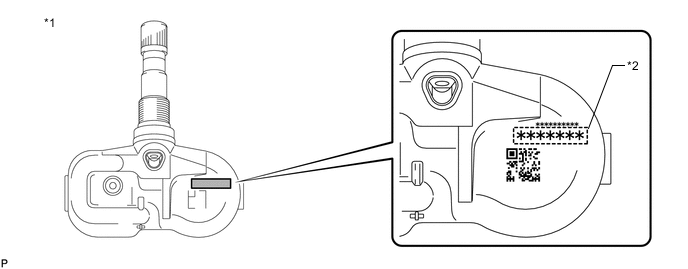
Text in Illustration *1 Tire Pressure Warning Valve and Transmitter *2 Transmitter ID (7 Digit Number)
-
-
-
REGISTER TRANSMITTER ID
Note
-
When performing ID registration for the 2nd tire set, make sure that ID registration has been completed for the main tire set.
-
If ID registration for the main tire set has not been completed, it is not possible to perform ID registration for the 2nd tire set.
-
When performing ID registration for the 2nd tire set, place the tires and wheels of the 2nd tire set and main tire set close to the vehicle (less than 10 m (32.8 ft.) away from the vehicle).
Tech Tips
When registering an ID on the 2nd tire set, a tire and wheel which have an ID from the main tire set are necessary to also perform ID certification for the main tire set. If ID certification is not performed on the main tire set, DTC C2126/26 is stored by the tire pressure warning ECU and receiver.
-
When using the 2nd tire set or switching from the 2nd tire set to the main tire set after registration for the 2nd tire set is completed, switch to the appropriate set of IDs after installing the tires and wheels.
Tech Tips
-
The previously registered IDs will be cleared from memory when the registration is completed.
-
If the ID registration step is not completed within 300 seconds, ID registration will be canceled.
-
In order to perform ID registration for the 2nd set of tires, select "Change"*1 or "CHANGE"*2 on the display screen.
-
*1: for Multi-information Display (Color Type)
-
*2: for Multi-information Display (Monochrome Type)
-
Set the air pressure of all tires to the specified value(s) Click here.
-
Turn the ignition switch off.
-
Connect the GTS to the DLC3.
-
Turn the ignition switch to ON and the GTS on.
-
Enter the following menus: Chassis / Tire Pressure Monitor / Utility / ID Registration.
-
Perform the procedure displayed on the GTS.
-
-
CONFIRMATION OF TRANSMITTER ID REGISTRATION
Note
-
It may take up to a few minutes to update the tire pressure data. If the values are not displayed after a few minutes, perform troubleshooting according to the inspection procedure for DTCs C2121/21 to C2124/24 Click here.
-
If the IDs have not been registered, DTC C2171/71 is stored in the tire pressure warning ECU and receiver after 3 minutes or more.
-
If normal pressure values are displayed, the IDs have been registered correctly.
-
If the tire pressure values are not displayed after a few minutes, the IDs may be incorrect or the system may have a malfunction.
-
After all IDs are registered, DTC C2126/26 is stored in the tire pressure warning ECU and receiver and the tire pressure warning light blinks for 1 minute and then illuminates. When the tire pressure warning ECU and receiver successfully receives signals from all the transmitters whose IDs are stored in the ECU, DTC C2126/26 is cleared and the tire pressure warning light goes off.
-
When checking the registration of IDs on the sub-transmitter (2nd) side, operate the steering pad switch assembly and switch to the sub-transmitter (2nd) side.
-
Enter the following menus: Chassis / Tire Pressure Monitor / Data List.
-
Read the "ID Tire Inflation Pressure" values.
-
Confirm that the tire pressure data of all tires is displayed on the GTS screen.
-
Reduce the tire inflation pressure of each tire 40 kPa (0.4 kgf/cm2, 5.8 psi) or more, and check that the "ID Tire Inflation Pressure" data is updated and that the actual tire inflation pressures are displayed.
-
Check that the tire pressure data has been updated, and then adjust the tire pressures to the specified pressure, operate the steering pad switch assembly and perform initialization.
-
-
METHOD TO SWITCH ID
-
Method to switch IDs:
Note
-
When the tire pressure warning system is malfunctioning, be sure to perform troubleshooting for the system before performing ID switching.
-
It is not possible to perform the ID switching function while the system is being checked or during Test Mode.
-
Install the tires and wheels that use the correct IDs to the vehicle.
-
Turn the engine switch on (IG).
-
for Multi-information Display (Color Type):
According to the display on the multi-information display, operate the steering pad switch assembly to display "Change".
for Multi-information Display (Monochrome Type):
According to the display on the multi-information display, operate the steering pad switch assembly to display "CHANGE".
-
for Multi-information Display (Color Type):
Select "Change" on the multi-information display and press the "ENTER" switch (steering pad switch assembly).
for Multi-information Display (Monochrome Type):
Select "CHANGE" on the multi-information display and press and hold the "DISP" switch (steering pad switch assembly).
-
Check the answer-back function of the tire pressure warning light.
Tech Tips
Make sure that the tire pressure warning light illuminates for 3 seconds and turns off for 0.5 seconds 3 times.
-
-
ID switching function check:
Note
-
It may take up to 2 to 3 minutes in order to update the tire pressure data.
-
If all of the tire pressure data values are updated, ID switching has been completed.
-
After switching the IDs, DTC C2126/26 is stored in the tire pressure warning ECU and receiver and the tire pressure warning light blinks for 1 minute and then illuminates. If data from all of the tire pressure warning valve and transmitters registered in the tire pressure warning ECU and receiver is sent to the tire pressure warning ECU and receiver, DTC C2126/26 is cleared and the tire pressure warning light turns off.
-
Connect the GTS to the DLC3.
-
Enter the following menus: Chassis / Tire Pressure Monitor / Data List.
-
Reduce the tire inflation pressure of each tire 40 kPa (0.4 kgf/cm2, 5.8 psi) or more, and check that the "ID Tire Inflation Pressure" data is updated and that the actual tire inflation pressures are displayed.
-
Check that the tire pressure data has been updated, and then adjust the tire pressures to the specified pressure, operate the steering pad switch assembly and perform initialization.
-
-