DYNAMIC RADAR CRUISE CONTROL SYSTEM ROAD TEST
-
PROBLEM SYMPTOM CONFIRMATION
Tech Tips
The dynamic radar cruise control system has 2 cruise control modes: constant speed control mode and vehicle-to-vehicle distance control mode.
-
Vehicle-to-vehicle distance control mode is selected by default when the dynamic radar cruise control system is turned on using the cruise control main switch.
-
Operation of constant speed control mode is the same as that for a conventional cruise control system.
-
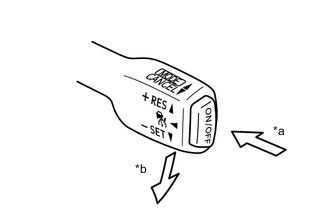
*a ON/OFF *b -SET Inspect the SET function.
-
Turn the cruise control system on using the cruise control main switch (ON/OFF).
-
Check that the cruise control indicator light illuminates in the combination meter assembly.
-
Drive at a speed between approximately 50 km/h (31 mph) and 170 km/h (106 mph).
-
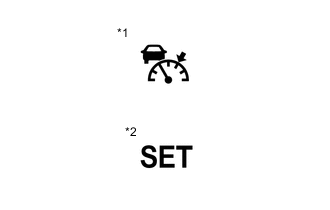
*1 Cruise Control Indicator Light
(Vehicle-to-vehicle distance control mode)
*2 Cruise Control SET Indicator Light Push the cruise control main switch to -SET.
-
Check that the cruise control indicator light remains illuminated, the cruise control SET indicator light illuminates in the combination meter assembly and the set speed is displayed on the multi-information display.
-
After releasing the switch, check that the vehicle maintains the set speed.
-
-
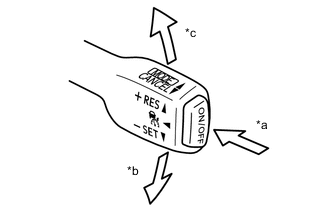
*a ON/OFF *b -SET *c +RES Inspect the + (ACCEL) function.
-
Turn the cruise control system on using the cruise control main switch (ON/OFF).
-
Drive at a speed between approximately 50 km/h (31 mph) and 170 km/h (106 mph).
-
Push the cruise control switch to -SET.
-
Check that vehicle speed increases while the cruise control main switch is pushed to +RES, and that the vehicle maintains the newly set speed when the switch is released.
-
Push the cruise control main switch to +RES and then release it immediately. Check that the vehicle speed increases* (tap-up control).
Tech Tips
*: Constant speed control mode: increases by approximately 1.6 km/h (1 mph); vehicle-to-vehicle distance control mode: increases by approximately 5 km/h (5 mph)(for Europe) or 1 km/h (1 mph)(except Europe).
-
-
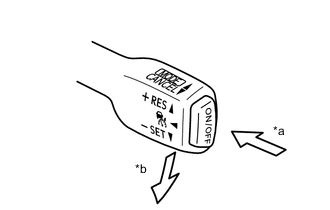
*a ON/OFF *b -SET Inspect the - (COAST) function.
-
Turn the cruise control system on using the cruise control main switch (ON/OFF).
-
Drive at a speed between approximately 50 km/h (31 mph) and 170 km/h (106 mph).
-
Push the cruise control main switch to -SET.
-
Check that vehicle speed decreases while the cruise control main switch is pushed to -SET, and that the vehicle maintains the newly set speed when the switch is released.
-
Push the cruise control main switch to -SET, and then release it immediately. Check that the vehicle speed decreases* (tap-down control).
Tech Tips
*: Constant speed control mode: decreases by approximately 1.6 km/h (1 mph); vehicle-to-vehicle distance control mode: decreases by approximately 5 km/h (5 mph)(for Europe) or 1 km/h (1 mph)(except Europe).
-
-
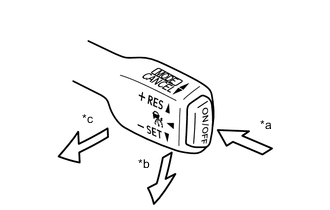
*a ON/OFF *b -SET *c CANCEL Inspect the CANCEL function.
-
Turn the cruise control system on using the cruise control main switch (ON/OFF).
-
Drive at a speed between approximately 50 km/h (31 mph) and 170 km/h (106 mph).
-
Push the cruise control main switch to -SET.
-
When any of the following are performed, check that control of vehicle speed by the dynamic radar cruise control system is canceled and that the normal driving mode (no control of vehicle speed by the dynamic radar cruise control system) resumes.
-
Depressing the brake pedal
-
Moving the shift lever from D to any other position
-
Selecting the 3rd, 2nd or 1st range using the transmission shift switch assembly with the shift lever in D.
-
Pulling the cruise control main switch to CANCEL
-
Turning the cruise control system off using the cruise control main switch.
The stored vehicle speed in the driving support ECU assembly is not maintained.
-
-
-
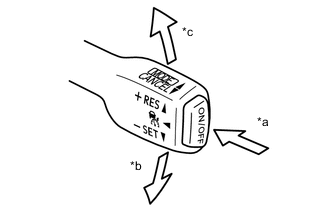
*a ON/OFF *b -SET *c +RES Inspect the RES (RESUME) function.
-
Turn the cruise control system on using the cruise control main switch (ON/OFF).
-
Drive at a speed between approximately 50 km/h (31 mph) and 170 km/h (106 mph).
-
Push the cruise control main switch to -SET.
-
Cancel control of vehicle speed by the dynamic radar cruise control system by performing any of the CANCEL functions (other than turning the dynamic radar cruise control system off using the cruise control main switch [ON/OFF]).
-
After pushing the cruise control main switch to +RES while driving the vehicle at a speed of more than approximately 40 km/h (25 mph), check that the vehicle resumes the speed set prior to cancellation and that the cruise control SET indicator light comes on.
Tech Tips
The stored vehicle speed is retained even if vehicle speed drops below approximately 40 km/h (25 mph). The previously stored vehicle speed can be resumed by pushing the cruise control switch to +RES when the vehicle speed has returned to approximately 40 km/h (25 mph) or more.
-
-
-
CHECK FULL-SPEED FOLLOWING FUNCTION
-
Check cruise control setting
-
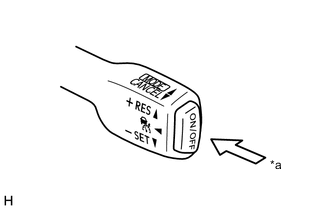
*a ON/OFF Turn the cruise control system on using the cruise control main switch (ON/OFF).
-
Drive the vehicle at a speed of approximately 40 km/h (25 mph) to 100 km/h (62 mph).
-
Check that there is a preceding vehicle that can be tracked.
Tech Tips
Tracking control may not follow the preceding vehicle in the following conditions:
-
A motorcycle or other thin target object is between the vehicle and the preceding vehicle.
-
The preceding vehicle is a car carrier trailer, truck, etc., with a small rear end.
-
-
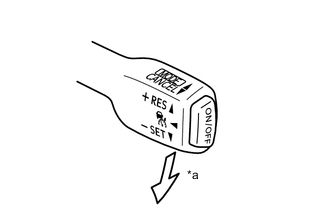
*a -SET Push the cruise control main switch down to the -SET position.
-
When the cruise control main switch is released with the vehicle speed between 0 km/h (0 mph) and 100 km/h (62 mph), check that the preceding vehicle is tracked.
-
Check that the set vehicle speed is displayed on the multi-information display of the combination meter assembly.
-
-
Check deceleration
-
When the preceding vehicle that is tracked decelerates, check that the vehicle automatically decelerates while maintaining the set vehicle-to-vehicle distance.
-
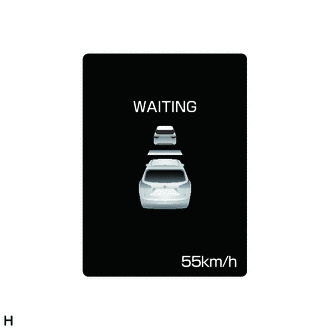
When the vehicle stops, check that "WAITING" is displayed on the multi-information display of the combination meter assembly.
Tech Tips
When "WAITING" is displayed on the multi-information display of the combination meter assembly, even if the brake pedal is depressed, tracking control is not canceled.
-
-
Check acceleration
-
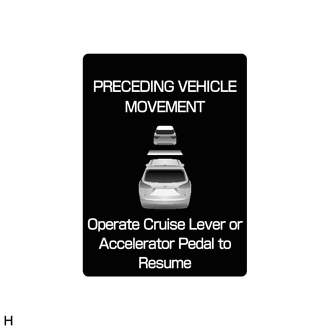
When the preceding vehicle accelerates from a stop, check that "PRECEDING VEHICLE MOVEMENT/Operation Cruise Lever or Accelerator Pedal to Resume" is displayed on the multi-information display of the combination meter assembly.
-
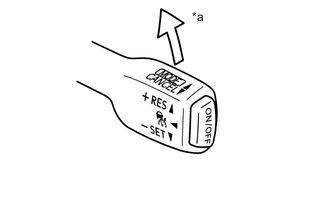
*a +RES When the cruise control main switch is pushed up to the +RES position or the accelerator pedal is depressed, check that tracking control resumes tracking the preceding vehicle.
-
-
Check tracking control cancel
-
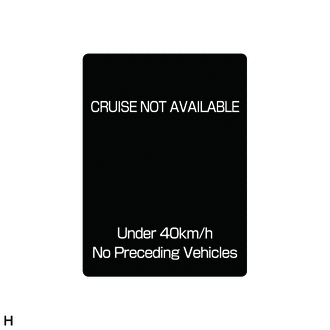
When the vehicle speed is approximately 40 km/h (25 mph) or less and the preceding vehicle that is tracked is no longer in front of the vehicle, check that "CRUISE NOT AVAILABLE/Under 40 km/h No Preceding Vehicles" is displayed on the multi-information display of the combination meter assembly, the warning buzzer beeps 4 times and tracking control cancels.
Tech Tips
The tracking function also automatically cancels when the preceding vehicle which is tracked moves outside the detection range due to a curve, etc., when the vehicle speed is 40 km/h (25 mph) or less.
-
-