VEHICLE STABILITY CONTROL SYSTEM, Diagnostic DTC:C1426
| DTC Code | DTC Name |
|---|---|
| C1426 | Stop Light Switch OFF Stuck Malfunction |
DESCRIPTION
The skid control ECU (brake actuator assembly) receives stop light switch signals and brake operation condition information.
| DTC Code | DTC Detection Condition | Trouble Area |
|---|---|---|
| C1426 | When the brake pedal load sensing switch is on, the master cylinder pressure is 2 MPa or higher and the deceleration calculated from the vehicle speed is 0.2 G or more, the stop light switch is off for 2 seconds or more. |
|
WIRING DIAGRAM
Refer to DTC C1422 Click here.
INSPECTION PROCEDURE
Note
-
After replacing the brake actuator assembly, perform calibration Click here.
-
Inspect the fuses for circuits related to this system before performing the following inspection procedure.
-
Before disconnecting the connector, make sure that there are no problems with the connection.
-
After disconnecting the connector, make sure that the connector case and terminals are not deformed or corroded.
PROCEDURE
-
CHECK STOP LIGHT OPERATION
-
Check that the stop light LH and RH come on when the brake pedal is depressed, and go off when the brake pedal is released.
OK Condition Illumination Condition Brake pedal depressed On Brake pedal released Off
NG 
OK 
-
-
READ VALUE USING INTELLIGENT TESTER (STOP LIGHT SW/BRAKE PEDAL LOAD SENSING SW)
-
Turn the ignition switch off.
-
Connect the intelligent tester to the DLC3.
-
Turn the ignition switch to ON.
-
Turn the intelligent tester on.
-
Enter the following menus: Chassis / ABS/VSC/TRC / Data List.
ABS/VSC/TRC Tester Display Measurement Item/Range Normal Condition Diagnostic Note Stop Light SW Stop light switch / ON or OFF ON: Brake pedal depressed
OFF: Brake pedal released
- Brake Pedal Load Sensing SW Brake pedal load sensing switch / ON or OFF ON: Brake pedal depressed beyond specified point
OFF: Brake pedal not depressed beyond specified point
- -
Check that the stop light switch display and brake pedal load sensing switch display observed on the intelligent tester change according to the brake pedal operation.
OK The intelligent tester displays ON or OFF according to brake pedal operation. -
Slowly depress the brake pedal and check when the stop light switch and brake pedal load sensing switch are turned on.
OK The stop light switch turns on first, and then the brake pedal load sensing switch turns on. Result Result Proceed to OK A NG (Turning on of stop light switch is not confirmed) B NG (Brake pedal load sensing switch turns on first) C
B
C
ADJUST BRAKE PEDAL AND STOP LIGHT SWITCH INSTALLATION Click here
A
-
-
RECONFIRM DTC
-
Clear the DTC Click here.
-
Turn the ignition switch off.
-
Start the engine.
-
Depress the brake pedal several times to test the stop light circuit.
-
Check if the same DTC is output Click here.
Result Result Proceed to DTC is not output A DTC is output for LHD B for RHD C
B 
REPLACE BRAKE ACTUATOR ASSEMBLY Click here
C
REPLACE BRAKE ACTUATOR ASSEMBLY Click here
A 
USE SIMULATION METHOD TO CHECK Click here
-
-
INSPECT STOP LIGHT SWITCH ASSEMBLY
-
Turn the ignition switch off.
-
Remove the stop light switch assembly Click here.
-
Inspect the stop light switch assembly Click here.
NG
REPLACE STOP LIGHT SWITCH ASSEMBLY Click here
OK
-
-
CHECK TERMINAL VOLTAGE (STP TERMINAL)
-
Turn the ignition switch off.
-
Disconnect the skid control ECU (brake actuator assembly) connector.
-
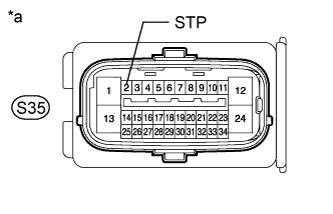
Text in Illustration *a Front view of wire harness connector
(to Skid Control ECU [Brake Actuator Assembly])
Measure the voltage according to the value(s) in the table below.
Standard Voltage Tester Connection Condition Specified Condition S35-2 (STP) - Body ground Brake pedal depressed 8 to 14 V Brake pedal released Below 1.5 V Result Result Proceed to NG A OK for LHD B for RHD C
B
REPLACE BRAKE ACTUATOR ASSEMBLY Click here
C
REPLACE BRAKE ACTUATOR ASSEMBLY Click here
A
REPAIR OR REPLACE HARNESS OR CONNECTOR
-
-
ADJUST BRAKE PEDAL AND STOP LIGHT SWITCH INSTALLATION
-
Adjust the brake pedal height and stop light switch installation Click here.
NEXT
-
-
RECONFIRM DTC
-
Clear the DTC Click here.
-
Turn the ignition switch off.
-
Start the engine.
-
Depress the brake pedal several times to test the stop light circuit.
-
Check if the same DTC is output Click here.
Result Result Proceed to DTC is not output A DTC is output B
B
REPLACE BRAKE WITH SWITCH PEDAL SUB-ASSEMBLY Click here
A
END
-