VEHICLE STABILITY CONTROL SYSTEM Multi-terrain Select Indicator Light does not Come ON
| DTC Code | DTC Name |
|---|---|
| Multi-terrain Select Indicator Light does not Come ON |
DESCRIPTION
When the multi-function switch of the steering pad switch is operated, multi-terrain select control is enabled and the multi-terrain select indicator light illuminates.
After selecting a road surface type displayed on the multi-information display using the multi-function switch, the system optimizes throttle control and brake fluid pressure control for wheels that slip when accelerating, which allows the power lost when wheels slip during acceleration to be distributed to all 4 wheels.
The slip indicator light blinks while the system is operating.
The system can operate under the following conditions:
The vehicle stability control system is normal.
The vehicle speed is 12 km/h (7 mph) or less.
Crawl control is not operating.
The selected road surface is "Mud & Sand" and the transfer is set to H4 or L4, or the selected road surface is "Loose Rock", "Mogul" or "Rock" and the transfer is set to L4.
When there is a malfunction in the multi-terrain select system, the multi-terrain select indicator light blinks.
WIRING DIAGRAM
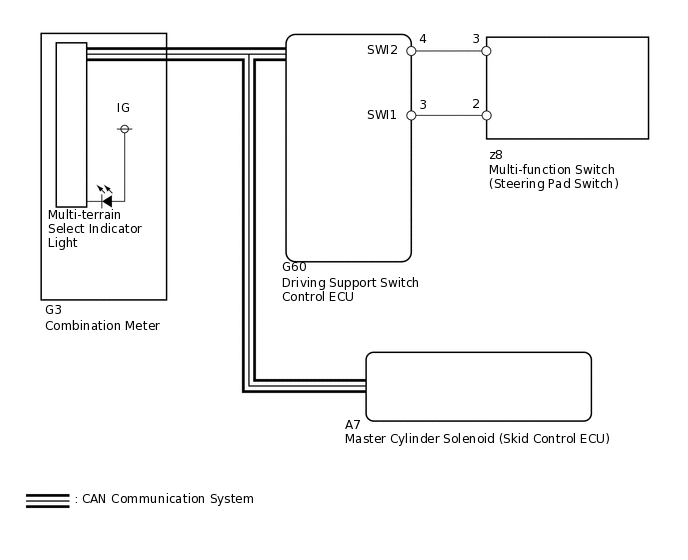
PROCEDURE
CHECK CAN COMMUNICATION LINE
Turn the engine switch off.
Connect the intelligent tester to the DLC3.
Turn the engine switch on (IG).
Turn the intelligent tester on.
Select CAN Bus Check from the System Selection Menu screen and follow the prompts on the screen to inspect the CAN bus.
OK
CAN Bus Check indicates no malfunctions in CAN communication.
Result
Result
OK
NG
CHECK DTC
Check for DTCs.
Result
Result
Proceed to
DTC is not output
A
DTC is output
B
Chassis > ABS/VSC/TRC > Trouble Codes
CHECK DTC (DRIVING SUPPORT SWITCH CONTROL ECU)
Check if DTC B2660 is output.
Result
Result
Proceed to
DTC is output
A
DTC is not output
B
Body Electrical > D-SEAT SW > Trouble Codes