AUDIO AND VISUAL SYSTEM(w/o Multi-display) Radio Receiver Communication Error
| DTC Code | DTC Name |
|---|---|
| Radio Receiver Communication Error |
WIRING DIAGRAM
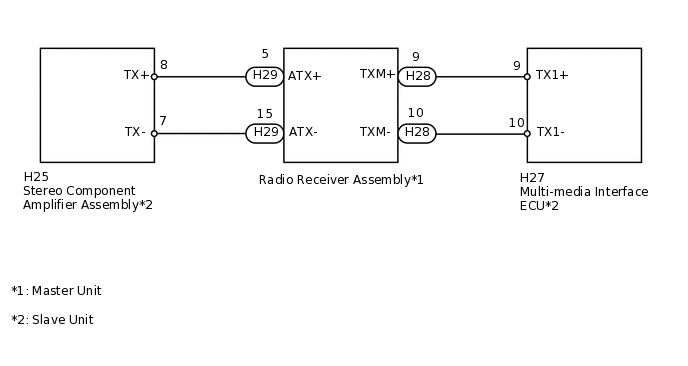
PROCEDURE
IDENTIFY COMPONENT SHOWN BY SUB-CODE
Enter the diagnostic mode.
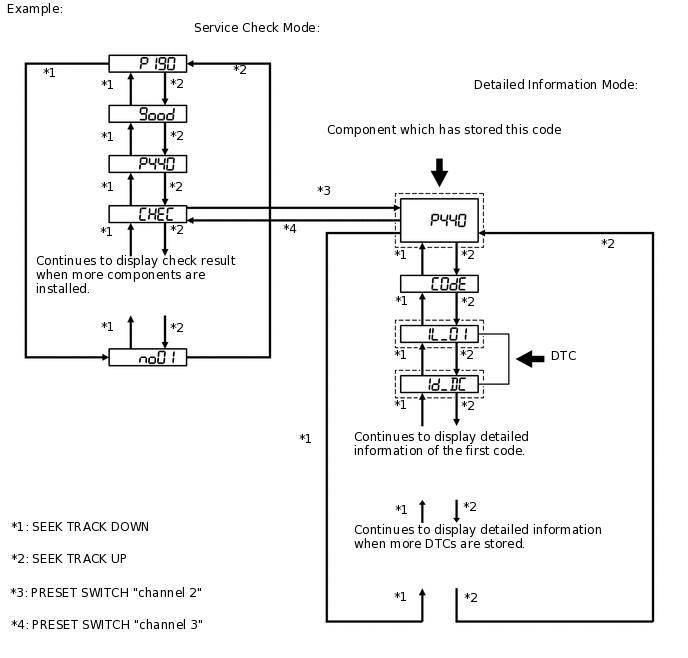
Press the preset switch "channel 3" to change to "Detailed Information Mode".
Identify the component shown by the sub-code.
Tip:"190 (radio receiver assembly)" is the component shown by the sub-code in the example shown in the illustration.
For details of the DTC display, refer to DTC Check/Clear.
Result
Result
NEXT
CHECK COMPONENT SHOWN BY SUB-CODE
Select the component which has stored this code.
Tip:The "Bluetooth" handsfree module is built into the radio receiver assembly. If there is a problem between the "Bluetooth" handsfree module and radio receiver assembly, replace the radio receiver assembly.
Component Table
Component
Proceed to
Except radio receiver assembly
A
Radio receiver assembly (190)
B
CHECK POWER SOURCE CIRCUIT OF COMPONENT SHOWN BY SUB-CODE
Inspect the power source circuit of the component shown by the sub-code.
Tip:If the power source circuit is operating normally, proceed to the next step.
Component Table
Component
Proceed to
Stereo component amplifier assembly (440)
Stereo Component Amplifier Power Source Circuit
Multi-media interface ECU (388)
Multi-media Interface ECU Power Source Circuit
Result
Result
NEXT
INSPECT RADIO RECEIVER ASSEMBLY
-
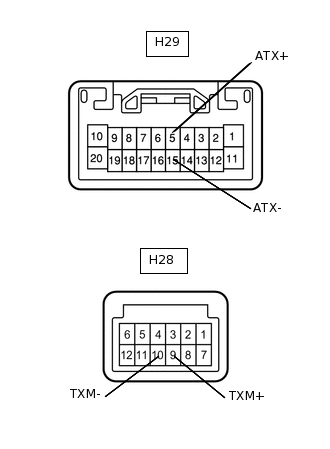
Disconnect the H29 and H28 radio receiver assembly connectors.
Measure the resistance according to the value(s) in the table below.
Standard Resistance
Tester Connection
Condition
Specified Condition
H29-5 (ATX+) - H29-15 (ATX-)
Always
60 to 80 Ω
H28-9 (TXM+) - H28-10 (TXM-)
Always
60 to 80 Ω
Result
Result
OK
NG
-
CHECK HARNESS AND CONNECTOR (RADIO RECEIVER - COMPONENT SHOWN BY SUB-CODE)
Tip:Start the check from the circuit that is near the component shown by the sub-code first.
For details of the connectors, refer to Terminals of ECU.
Referring to the wiring diagram below, check the AVC-LAN circuit between the radio receiver assembly and the component shown by the sub-code.
Disconnect all connectors between the radio receiver assembly and the component shown by the sub-code.
Check for an open or short in the AVC-LAN circuit between the radio receiver assembly and the component shown by the sub-code.
OK
There is no open or short circuit.
Result
Result
OK
NG
NG REPAIR OR REPLACE HARNESS OR CONNECTOR
REPLACE COMPONENT SHOWN BY SUB-CODE
Replace the component shown by the sub-code with a normal one and check if the same problem occurs again.
OK
The same problem does not occur.
Result
Result
OK
NG
OK END