ENTRY AND START SYSTEM(for Start Function) Engine does not Start
DESCRIPTION
When the electrical key transmitter sub-assembly is in the vehicle and the engine switch is pressed, the certification ECU (smart key ECU assembly) receives a signal and changes the power source mode. In addition, when the shift lever is in P or N*1 and the brake pedal*1 or clutch pedal*2 is depressed, the engine can be started by pressing the engine switch.
-
*1: for Automatic Transmission
-
*2: for Manual Transmission
Tech Tips
-
The engine can be started up with the shift lever in N only when the steering lock is unlocked*.
-
If the engine switch is pressed when the power source mode is on (IG) and the shift lever is in a position other than P, the power source mode changes to on (ACC). If the shift lever is then moved to P and the engine switch is pressed while stepping on the brake pedal, the power source mode changes to off*.
-
When the battery cable is disconnected and reconnected, the power source returns to the mode it was in before the battery cable was disconnected.
-
*: for Automatic Transmission
| Problem Symptom | Data List Item | Active Test Item |
|---|---|---|
| Engine does not start |
Power Source Control
Entry & Start
Engine |
- |
WIRING DIAGRAM
Refer to "System Diagram" Click here.
CAUTION / NOTICE / HINT
Note
-
When using the GTS with the engine switch off to troubleshoot:
Connect the GTS to the DLC3 and turn a courtesy light switch on and off at 1.5-second intervals until communication between the GTS and vehicle begins.
-
The entry and start system uses multiplex communication. First perform the inspections in "How to Proceed with Troubleshooting" to confirm that there are no communication malfunctions before proceeding with troubleshooting Click here.
-
Before replacing the certification ECU (smart key ECU assembly), steering lock actuator assembly (steering lock ECU), ID code box (immobiliser code ECU), refer to the entry and start system (for Entry Function) Click here.
-
If the entry and start system is disabled through the customize function, enable the system before performing troubleshooting Click here.
-
If the steering lock actuator assembly (steering lock ECU) is replaced, be sure to confirm that the steering is unlocked by turning the steering wheel to the left and right before starting the engine. If the steering is locked for any reason, open and close a door with the engine switch off, and then unlock the steering by pressing the engine switch. This prevents the engine from starting while the steering is locked.
-
After completing repairs, confirm that the problem does not reoccur.
-
Inspect the fuses of circuits related to this system before performing the following inspection procedure.
Tech Tips
If the brake pedal is repeatedly depressed while the engine is stopped, the brake booster pressure is released and the force required to depress the brake pedal to illuminate the stop lights increases.*
-
*: for Automatic Transmission
PROCEDURE
-
CHECK BATTERY
-
Measure the battery voltage.
Standard voltage 11 to 14 V Tech Tips
-
It may be possible to tell whether the vehicle battery is discharged by operating the horn.
-
If the battery voltage is less than 11 V, charge or replace it.
-
NEXT 
-
-
CHECK DTC (ALL)
-
Using the GTS, confirm the output of DTCs for all systems.
OK No DTCs are output
NG 
GO TO DIAGNOSTIC TROUBLE CODE CHART Click here
OK
-
-
CHECK WAVE ENVIRONMENT
-
If the problem occurs in certain locations or times of day, the possibility of wave interference is high.
Tech Tips
Whether or not the problem is due to wave interference can be checked by holding the electrical key transmitter assembly near the door control receiver (RF band).
NEXT
-
-
CHECK ENGINE SWITCH CONDITION
-
Get into the vehicle while carrying an electrical key transmitter assembly.
-
Move the shift lever to P*.
-
*: for Automatic Transmission
-
-
With the brake pedal*1 or clutch pedal*2 released, check that pressing the engine switch causes the power source mode to change.
-
*1: for Automatic Transmission
-
*2: for Manual Transmission
Result Result Proceed to Power source mode changes as follows (normal): off → on (ACC) → on (IG) → off A Power source mode does not change to on (IG) or on (ACC) B Power source mode does not change to on (IG) but does change to on (ACC) C Power source mode does not change to on (ACC) but does change to on (IG) D -
B
GO TO POWER SOURCE MODE DOES NOT CHANGE TO ON (IG AND ACC) Click here
C
GO TO POWER SOURCE MODE DOES NOT CHANGE TO ON (IG) Click here
D
GO TO POWER SOURCE MODE DOES NOT CHANGE TO ON (ACC) Click here
A
-
-
CHECK CRANKING FUNCTION
-
Get into the vehicle while carrying the electrical key transmitter assembly.
-
Move the shift lever to P*.
-
*: for Automatic Transmission
-
-
Depress the brake pedal*1 or clutch pedal*2.
-
*1: for Automatic Transmission
-
*2: for Manual Transmission
-
-
Confirm that the entry key indicator in the combination meter assembly illuminates in green, and then press the engine switch and check that the engine cranks.
OK Engine cranks Result Result Proceed to NG A OK B
B
GO TO SFI SYSTEM (PROBLEM SYMPTOMS TABLE) Click here
A
-
-
READ VALUE USING GTS (IMMOBILISER)
-
Connect the GTS to the DLC3.
-
Turn the engine switch on (IG).
-
Turn the GTS on.
-
Enter the following menus: Body Electrical / Entry & Start / Data List.
-
According to the display on the GTS, read the Data List.
Entry & Start Tester Display Measurement Item/Range Normal Condition Diagnostic Note Immobiliser State of immobiliser system determined by certification ECU (smart key ECU assembly) / Set or Unset Set: Engine immobiliser set (engine start prohibited) (engine switch off)
Unset: Engine immobiliser unset (engine start permitted) (engine switch on (ACC) or on (IG))
-
When the immobiliser cannot be unset, this item can be used to determine whether the certification ECU (smart key ECU assembly) is part of the problem.
-
The engine cannot be started when this item displays "Set"
OK The Data List item changes to "Unset" when the engine switch is turned on (ACC) or on (IG). Result Result Proceed to OK A NG (w/ ID Code Box) B NG (w/o ID Code Box) C -
B 
READ VALUE USING GTS (S CODE CHECK) Click here
C
CHECK STEERING LOCK Click here
A
-
-
CHECK COMBINATION METER ASSEMBLY (ENTRY KEY INDICATOR LIGHT)
-
Get into the vehicle while carrying the electrical key transmitter assembly, move the shift lever to P*1, depressing the brake pedal*1 or clutch pedal*2 and check that the entry key indicator light in the combination meter assembly changes.
-
*1: for Automatic Transmission
-
*2: for Manual Transmission
OK The entry key indicator light in green. Tech Tips
If the entry key indicator light in the combination meter assembly illuminates green when the procedure above is performed, the P, N and brake signals*1 or clutch signal*2 can be considered to be normal.
-
*1: for Automatic Transmission
-
*2: for Manual Transmission
Result Result Proceed to OK A NG (for Automatic Transmission) B NG (for Manual Transaxle) C -
B
READ VALUE USING GTS (NEUTRAL SW/ CLUTCH SW, SHIFT SW STATUS P OR N) Click here
C
READ VALUE USING GTS (NEUTRAL SW/ CLUTCH SW) Click here
A
-
-
READ VALUE USING GTS (STARTER REQUEST SIGNAL)
-
Connect the GTS to the DLC3.
-
Turn the engine switch on (IG).
-
Turn the GTS on.
-
Enter the following menus: Body Electrical / Power Source Control / Data List.
-
According to the display on the GTS, read the Data List.
Power Source Control Tester Display Measurement Item/Range Normal Condition Diagnostic Note Starter Request Signal Condition of engine start command signal / OFF or ON OFF: Engine switch released after approximately 1 second elapses
ON: Engine switch pressed and held while carrying electrical key transmitter assembly with shift lever in P*1 and brake pedal*1 or clutch pedal*2 depressed
-
When the engine cannot be started due to a start request signal malfunction, OFF is displayed.
-
When the engine switch is pressed, the duration of time that ON is displayed will be extremely short. As such, the engine switch needs to be pressed and held for a certain amount of time.
-
*1: for Automatic Transmission
-
*2: for Manual Transmission
OK The display changes in response to the operation of the engine switch. Note
Make sure that the entry key indicator in the combination meter assembly illuminates in green before pressing the engine switch.
-
NG
REPLACE CERTIFICATION ECU (SMART KEY ECU ASSEMBLY)
OK
-
-
CHECK HARNESS AND CONNECTOR (CERTIFICATION ECU (SMART KEY ECU ASSEMBLY) - BODY GROUND)
-
Disconnect the D48 certification ECU (smart key ECU assembly) connector.
-
Disconnect the A33 ECM connector.
-
Measure the resistance according to the value(s) in the table below.
Standard Resistance Tester Connection Condition Specified Condition D48-7 (STSW) - A33-17 (STSW) Always Below 1 Ω D48-7 (STSW) - Body ground Always 10 kΩ or higher
OK
GO TO SFI SYSTEM (PROBLEM SYMPTOMS TABLE) Click here
NG
REPAIR OR REPLACE HARNESS OR CONNECTOR
-
-
READ VALUE USING GTS (S CODE CHECK)
-
Connect the GTS to the DLC3.
-
Turn the engine switch on (IG).
-
Turn the GTS on.
-
Enter the following menus: Body Electrical / Entry & Start / Data List.
-
According to the display on the GTS, read the Data List.
Entry & Start Tester Display Measurement Item/Range Normal Condition Diagnostic Note S Code Check Verification result between certification ECU (smart key ECU assembly) and ID code box (immobiliser code ECU) / OK or NG OK: Verification result normal
NG: Verification result abnormal
When NG is displayed:
-
S code has not been registered for the certification ECU (smart key ECU assembly) or ID code box (immobiliser code ECU).
-
The steering cannot be locked.
-
The steering cannot be unlocked (the engine cannot be started).
OK OK (S code certification result normal) appears on the screen. -
NG
REPLACE CERTIFICATION ECU (SMART KEY ECU ASSEMBLY) Click here
OK
-
-
CHECK STEERING LOCK
-
Check that the steering unlocks when the engine switch is turned on (ACC).
OK The steering unlocks.
NG
READ VALUE USING GTS (STEERING UNLOCK SWITCH) Click here
OK
-
-
READ VALUE USING GTS (IMMOBILISER)
-
Connect the GTS to the DLC3.
-
Turn the engine switch on (IG).
-
Turn the GTS on.
-
Enter the following menus: Body Electrical / Entry & Start / Data List.
-
According to the display on the GTS, read the Data List.
Entry & Start Tester Display Measurement Item/Range Normal Condition Diagnostic Note Immobiliser State of immobiliser system determined by certification ECU (smart key ECU assembly) / Set or Unset Unset: Engine immobiliser unset (engine switch on [ACC] or on [IG])
Set: Engine immobiliser set (engine switch off)
-
When the immobiliser cannot be unset, this item can be used to determine whether the certification ECU (smart key ECU assembly) is part of the problem.
-
The engine cannot be started when this item displays "Set"
OK The Data List item changes to "Unset" when the engine switch is turned on (ACC) or on (IG). Result Result Proceed to OK A NG (w/ ID Code Box) B NG (w/o ID Code Box) C -
B
REPLACE CERTIFICATION ECU (SMART KEY ECU ASSEMBLY) Click here
C
REPLACE CERTIFICATION ECU (SMART KEY ECU ASSEMBLY)
A
-
-
READ VALUE USING GTS (STARTER REQUEST SIGNAL)
-
Connect the GTS to the DLC3.
-
Turn the engine switch on (IG).
-
Turn the GTS on.
-
Enter the following menus: Body Electrical / Power Source Control / Data List.
-
According to the display on the GTS, read the Data List.
Power Source Control Tester Display Measurement Item/Range Normal Condition Diagnostic Note Starter Request Signal Condition of engine start command signal / OFF or ON OFF: Engine switch released after approximately 1 second elapses
ON: Engine switch pressed and held while carrying electrical key transmitter assembly with shift lever in P*1 and brake pedal*1 or clutch pedal*2 depressed
-
When the engine cannot be started due to a start request signal malfunction, OFF is displayed.
-
When the engine switch is pressed, the duration of time that ON is displayed will be extremely short. As such, the engine switch needs to be pressed and held for a certain amount of time.
-
*1: for Automatic Transmission
-
*2: for Manual Transmission
OK The display changes in response to the operation of the engine switch. Note
Make sure that the entry key indicator in the combination meter assembly illuminates in green before pressing the engine switch.
-
OK
END
NG
REPLACE CERTIFICATION ECU (SMART KEY ECU ASSEMBLY)
-
-
READ VALUE USING GTS (NEUTRAL SW/ CLUTCH SW, SHIFT SW STATUS P OR N)
-
Connect the GTS to the DLC3.
-
Turn the engine switch on (IG).
-
Turn the GTS on.
-
Enter the following menus: Body Electrical / Power Source Control / Data List.
-
According to the display on the GTS, read the Data List.
Power Source Control Tester Display Measurement Item/Range Normal Condition Diagnostic Note Neutral SW / Clutch SW Shift position (P, N) / OFF or ON OFF: Shift lever not in P or N or released
ON: Shift lever in P or N depressed
-
Use this item to help determine if the park/neutral position switch is malfunctioning.
-
The engine cannot be started when this item is "OFF".
Enter the following menus: Powertrain / Engine / Data List.
Engine Tester Display Measurement Item/Range Normal Condition Diagnostic Note Shift SW Status (P Range) Condition of park/neutral position switch / OFF or ON OFF: Shift lever not in P
ON: Shift lever in P
When malfunctioning, the engine will not crank. Shift SW Status (N Range) Condition of park/neutral position switch / OFF or ON OFF: Shift lever not in N
ON: Shift lever in N
When malfunctioning, the engine will not crank. OK The items in the Data List change according to the shift position. -
NG
INSPECT PARK/NEUTRAL POSITION SWITCH ASSEMBLY Click here
OK
-
-
READ VALUE USING GTS (STOP LIGHT SWITCH1)
-
Connect the GTS to the DLC3.
-
Turn the engine switch on (IG).
-
Turn the GTS on.
-
Enter the following menus: Body Electrical / Power Source Control / Data List.
-
According to the display on the GTS, read the Data List.
Power Source Control Tester Display Measurement Item/Range Normal Condition Diagnostic Note Stop Light Switch1 State of brake pedal / OFF or ON OFF: Brake pedal released
ON: Brake pedal depressed
-
Use this item to determine whether the stop light switch is malfunctioning.
-
The engine cannot be started when this item is "OFF".
-
When this item is malfunctioning, the engine can be started by pressing and holding the engine switch for a certain period of time.
OK The item in the Data List changes when the brake pedal is depressed and released. -
OK
REPLACE CERTIFICATION ECU (SMART KEY ECU ASSEMBLY)
NG
INSPECT STOP LIGHT SWITCH ASSEMBLY Click here
-
-
INSPECT PARK/NEUTRAL POSITION SWITCH ASSEMBLY
-
Remove the park/neutral position switch assembly Click here.
-
Inspect the park/neutral position switch assembly Click here.
NG
REPLACE PARK/NEUTRAL POSITION SWITCH ASSEMBLY Click here
OK
-
-
CHECK HARNESS AND CONNECTOR (CERTIFICATION ECU (SMART KEY ECU ASSEMBLY) - PARK/NEUTRAL POSITION SWITCH ASSEMBLY)
-
Disconnect the D48 certification ECU (smart key ECU assembly) connector.
-
Disconnect the L2 park/neutral position switch assembly connector.
-
Measure the resistance according to the value(s) in the table below.
Standard Resistance Tester Connection Condition Specified Condition D48-5 (N-SW) - L2-4 Always Below 1 Ω L2-5 - Body ground Always Below 1 Ω D48-5 (N-SW) - Body ground Always 10 kΩ or higher
OK
REPLACE CERTIFICATION ECU (SMART KEY ECU ASSEMBLY)
NG
REPAIR OR REPLACE HARNESS OR CONNECTOR
-
-
INSPECT STOP LIGHT SWITCH ASSEMBLY
-
Remove the stop light switch assembly Click here.
-
Inspect the stop light switch assembly Click here.
NG
REPLACE STOP LIGHT SWITCH ASSEMBLY Click here
OK
-
-
CHECK HARNESS AND CONNECTOR (NOISE FILTER - CERTIFICATION ECU (SMART KEY ECU ASSEMBLY))
-
Disconnect the D48 certification ECU (smart key ECU assembly) connector.
-
Disconnect the A13 noise filter connector.
-
Measure the resistance according to the value(s) in the table below.
Standard Resistance Tester Connection Condition Specified Condition D48-18 (STP1) - A13-4 Always Below 1 Ω D48-18 (STP1) - Body ground Always 10 kΩ or higher -
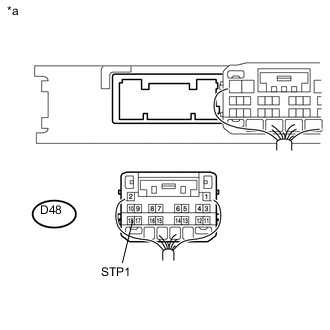
Text in Illustration *a Rear view of wire harness connector
(Certification ECU (Smart Key ECU Assembly))
Reconnect the A13 noise filter connector.
-
Measure the voltage according to the value(s) in the table below.
Standard Voltage Tester Connection Condition Specified Condition D48-18 (STP1) - Body ground Brake pedal released Below 1 V Brake pedal depressed 9 V or higher
OK
REPLACE CERTIFICATION ECU (SMART KEY ECU ASSEMBLY)
NG
REPAIR OR REPLACE HARNESS OR CONNECTOR
-
-
READ VALUE USING GTS (NEUTRAL SW/ CLUTCH SW)
-
Connect the GTS to the DLC3.
-
Turn the engine switch on (IG).
-
Turn the GTS on.
-
Enter the following menus: Body Electrical / Power Source Control / Data List.
-
According to the display on the GTS, read the Data List.
Power Source Control Tester Display Measurement Item/Range Normal Condition Diagnostic Note Neutral SW / Clutch SW State of clutch pedal / OFF or ON OFF: Clutch pedal released
ON: Clutch pedal depressed
-
Use this item to help determine if the clutch position switch is malfunctioning.
-
The engine cannot be started when this item is "OFF".
OK ON (clutch pedal depressed) and OFF (clutch pedal released) appear on the screen according to the condition of the clutch pedal. -
OK
REPLACE CERTIFICATION ECU (SMART KEY ECU ASSEMBLY)
NG
-
-
INSPECT CLUTCH START SWITCH ASSEMBLY
-
Remove the clutch start switch assembly.
-
for LHD Click here
-
for RHD Click here
-
-
Inspect the clutch start switch assembly.
-
for LHD Click here
-
for RHD Click here
Result Result Proceed to OK A NG (for LHD) B NG (for RHD) C -
B
REPLACE CLUTCH START SWITCH ASSEMBLY Click here
C
REPLACE CLUTCH START SWITCH ASSEMBLY Click here
A
-
-
CHECK HARNESS AND CONNECTOR (CERTIFICATION ECU (SMART KEY ECU ASSEMBLY) - CLUTCH START SWITCH ASSEMBLY)
-
Disconnect the D48 certification ECU (smart key ECU assembly) connector.
-
Disconnect the A20 clutch start switch assembly connector.
-
Measure the resistance according to the value(s) in the table below.
Standard Resistance Tester Connection Condition Specified Condition D48-10 (CLUT) - A20-2 Always Below 1 Ω D48-10 (CLUT) - Body ground Always 10 kΩ or higher -
Reconnect the A20 clutch start switch assembly connector.
-
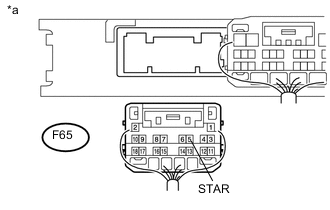
Measure the voltage according to the value(s) in the table below.
Standard Voltage Tester Connection Switch Condition Specified Condition D48-10 (CLUT) - Body ground Clutch pedal released → Clutch pedal depressed 1 V or less → 9 V or higher
OK
REPLACE CERTIFICATION ECU (SMART KEY ECU ASSEMBLY)
NG
REPAIR OR REPLACE HARNESS OR CONNECTOR
-
-
REPLACE CERTIFICATION ECU (SMART KEY ECU ASSEMBLY)
-
Replace the certification ECU (smart key ECU assembly) with a new one.
Note
When the certification ECU (smart key ECU assembly) is replaced, it is also necessary to replace all registered electrical key transmitter sub-assemblies.
-
Perform the registration procedures (Refer to Service Bulletin).
-
Use the Data List to check if S code certification is functioning properly again.
Entry & Start Tester Display Measurement Item/Range Normal Condition Diagnostic Note S Code Check Verification result between certification ECU (smart key ECU assembly) and ID code box (immobiliser code ECU) / OK or NG OK: Verification result normal
NG: Verification result abnormal
When NG is displayed:
-
S code has not been registered for the certification ECU (smart key ECU assembly) or ID code box (immobiliser code ECU).
-
The steering cannot be locked.
-
The steering cannot be unlocked (the engine cannot be started).
OK OK (S code certification result normal) appears on the screen. -
OK
END
NG
-
-
REPLACE ID CODE BOX (IMMOBILISER CODE ECU)
-
Replace the ID code box (immobiliser code ECU) with a new one.
-
Perform the registration procedures (Refer to Service Bulletin).
-
Use the Data List to check if S code certification is functioning properly again.
Entry & Start Tester Display Measurement Item/Range Normal Condition Diagnostic Note S Code Check Verification result between certification ECU (smart key ECU assembly) and ID code box (immobiliser code ECU) / OK or NG OK: Verification result normal
NG: Verification result abnormal
When NG is displayed:
-
S code has not been registered for the certification ECU (smart key ECU assembly) or ID code box (immobiliser code ECU).
-
The steering cannot be locked.
-
The steering cannot be unlocked (the engine cannot be started).
OK OK (S code certification result normal) appears on the screen. -
NEXT
END
-
-
READ VALUE USING GTS (STEERING UNLOCK SWITCH)
-
Connect the GTS to the DLC3.
-
Turn the engine switch on (IG).
-
Turn the GTS on.
-
Enter the following menus: Body Electrical / Power Source Control / Data List.
-
According to the display on the GTS, read the Data List.
Power Source Control Tester Display Measurement Item/Range Normal Condition Diagnostic Note Steering Unlock Switch State of steering unlock sensor signal output from steering lock actuator assembly / OFF or ON OFF: Steering locked
ON: Steering unlocked
-
When the shift lever is in P and the engine switch is off, if any door is opened or closed, the steering is locked.
-
When the electrical key transmitter assembly is inside the vehicle and the engine switch is turned on (ACC) or on (IG), the steering unlocks.
-
The engine cannot be started when the steering unlock signal is off.
OK The item in the Data List indicates "ON" (the steering is unlocked). -
OK
GO TO STEERING LOCK SYSTEM (UNABLE TO UNLOCK STEERING WHEEL) Click here
NG
-
-
READ VALUE USING GTS (L CODE CHECK)
-
Connect the GTS to the DLC3.
-
Turn the engine switch on (IG).
-
Turn the GTS on.
-
Enter the following menus: Body Electrical / Entry & Start / Data List.
-
According to the display on the GTS, read the Data List.
Entry & Start Tester Display Measurement Item/Range Normal Condition Diagnostic Note L Code Check Verification result between ID code box (immobiliser code ECU) and steering lock actuator assembly (steering lock ECU) / OK or NG OK: Verification result normal
NG: Verification result abnormal
When NG is displayed:
-
L code has not been registered for the ID code box (immobiliser code ECU) or steering lock actuator assembly (steering lock ECU).
-
The steering cannot be locked.
-
The steering cannot be unlocked (the engine cannot be started).
OK The Data List item changes to "OK" when the electrical key transmitter assembly is inside the vehicle. Tech Tips
Reasons for verification failure:
-
The steering lock ECU, ID code box (immobiliser code ECU)* is malfunctioning.
-
There is a problem with the communication between ECUs.
-
An ECU is replaced, but is not registered.
-
An ECU is replaced with an ECU which has a code already stored in it.
-
*: w/ ID Code Box
-
NG
REPLACE STEERING LOCK ACTUATOR ASSEMBLY (STEERING LOCK ECU) Click here
OK
-
-
REPLACE STEERING LOCK ACTUATOR ASSEMBLY (STEERING LOCK ECU)
-
Replace the steering lock actuator assembly (steering lock ECU) with a new one Click here.
-
Perform the registration procedures (Refer to Service Bulletin).
-
Turn the engine switch on (IG).
-
Operate the steering wheel and check the steering condition.
NEXT
END
-
-
REPLACE STEERING LOCK ACTUATOR ASSEMBLY (STEERING LOCK ECU)
-
Replace the steering lock actuator assembly (steering lock ECU) with a new one Click here.
-
Perform the registration procedures (Refer to Service Bulletin).
-
Use the Data List to check if L code certification is functioning properly again.
Entry & Start Tester Display Measurement Item/Range Normal Condition Diagnostic Note L Code Check Verification result between ID code box (immobiliser code ECU) and steering lock actuator assembly (steering lock ECU) / OK or NG OK: Verification result normal
NG: Verification result abnormal
When NG is displayed:
-
L code has not been registered for the ID code box (immobiliser code ECU) or steering lock actuator assembly (steering lock ECU).
-
The steering cannot be locked.
-
The steering cannot be unlocked (the engine cannot be started).
OK OK (L code certification result normal) appears on the screen. Result Result Proceed to OK A NG (w/ ID Code Box) B NG (w/o ID Code Box) C -
A
END
B
REPLACE ID CODE BOX (IMMOBILISER CODE ECU)
C
REPLACE CERTIFICATION ECU (SMART KEY ECU ASSEMBLY)
-
-
REPLACE CERTIFICATION ECU (SMART KEY ECU ASSEMBLY)
-
Replace the certification ECU (smart key ECU assembly) with a new one.
-
Perform the registration procedures (Refer to Service Bulletin for registration).
-
Use the Data List to check if S code certification is functioning properly again.
Entry & Start Tester Display Measurement Item/Range Normal Condition Diagnostic Note S Code Check Verification result between certification ECU (smart key ECU assembly) and ID code box (immobiliser code ECU) / OK or NG OK: Verification result normal
NG: Verification result abnormal
When NG is displayed:
-
S code has not been registered for the certification ECU (smart key ECU assembly) or ID code box (immobiliser code ECU).
-
The steering cannot be locked.
-
The steering cannot be unlocked (the engine cannot be started).
OK OK (S code certification result normal) appears on the screen. -
OK
END
NG
-
-
REPLACE ID CODE BOX (IMMOBILISER CODE ECU)
-
Replace the ID code box (immobiliser code ECU) with a new one.
-
Perform the registration procedures (Refer to Service Bulletin).
-
Use the Data List to check if S code certification is functioning properly again.
Entry & Start Tester Display Measurement Item/Range Normal Condition Diagnostic Note S Code Check Verification result between certification ECU (smart key ECU assembly) and ID code box (immobiliser code ECU) / OK or NG OK: Verification result normal
NG: Verification result abnormal
When NG is displayed:
-
S code has not been registered for the certification ECU (smart key ECU assembly) or ID code box (immobiliser code ECU).
-
The steering cannot be locked.
-
The steering cannot be unlocked (the engine cannot be started).
OK OK (S code certification result normal) appears on the screen. -
NEXT
END
-