AUDIO AND VISUAL SYSTEM(for Sedan Radio and Display Type) CD Sound Skips
| DTC Code | DTC Name |
|---|---|
| CD Sound Skips |
PROCEDURE
CHECK CD
-
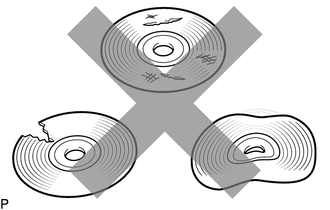
Check that the CD is not deformed or cracked.
OK
No deformation or cracks on the CD
Result
Proceed to
OK
NG
NG END (CD IS FAULTY)
-
CHECK CD
-
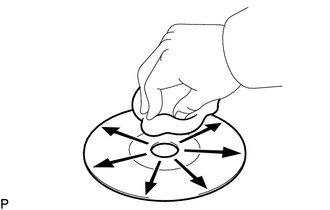
Check the CD.
OK
The CD is clean.
Note:Do not use a conventional record cleaner or anti-static preservative.
Tip:If dirt is on the CD surface, wipe it clean with a soft cloth from the inside to the outside in a radial direction.
Result
Proceed to
OK
NG
NG CLEAN CD
-
REPLACE CD AND RECHECK
Replace the CD with a known good one and check that the malfunction disappears.
OK
Malfunction disappears.
Result
Proceed to
OK
NG
OK END (CD WAS FAULTY)
CHECK RADIO AND DISPLAY RECEIVER ASSEMBLY
Check the radio and display receiver assembly installation condition.
Check that the radio and display receiver assembly is properly installed.
OK
The radio and display receiver assembly is properly installed.
Result
Proceed to
OK
NG
NG REINSTALL RADIO AND DISPLAY RECEIVER ASSEMBLY