POWER WINDOW MASTER SWITCH INSPECTION
PROCEDURE
-
INSPECT MULTIPLEX NETWORK MASTER SWITCH ASSEMBLY
-
Check the illumination.
-
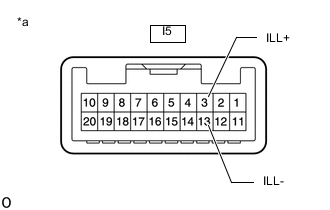
*a Component without harness connected
(Multiplex Network Master Switch Assembly)
for LHD:
Apply battery voltage to the connector and check the illumination conditions.
OK If the result is not as specified, replace the multiplex network master switch assembly.Tester Connection Specified Condition I5-3 (ILL+) - Battery positive (+)
I5-13 (ILL-) - Battery negative (-)
Illuminates
-
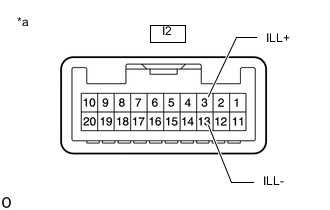
*a Component without harness connected
(Multiplex Network Master Switch Assembly)
for RHD:
Apply battery voltage to the connector and check the illumination conditions.
OK If the result is not as specified, replace the multiplex network master switch assembly.Tester Connection Specified Condition I2-3 (ILL+) - Battery positive (+)
I2-13 (ILL-) - Battery negative (-)
Illuminates
-
-