FORWARD RECOGNITION CAMERA SYSTEM, Diagnostic DTC:C1AAE
| DTC Code | DTC Name |
|---|---|
| C1AAE | Heater Circuit |
DESCRIPTION
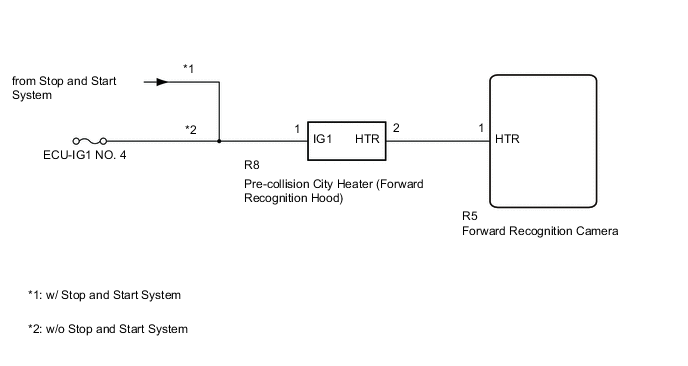
The forward recognition camera controls the current supplied to the pre-collision city heater (forward recognition hood).
| DTC No. | Detection Item | DTC Detection Condition | Trouble Area |
|---|---|---|---|
| C1AAE | Heater Circuit | When the ignition switch is turned to ON and one of the following conditions is met:
|
|
| Vehicle Condition | Vehicle Condition | ||
|---|---|---|---|
| Pattern 1 | Pattern 2 | ||
| Diagnosis Condition | Ignition switch ON | ○ | ○ |
| Malfunction Status |
|
○ | |
|
○ | ||
| Detection Time | 5 seconds or more | 5 seconds or more | |
| Number of Trips | 1 trip | 1 trip | |
Tech Tips
If any of the detection patterns above are met, a DTC is output.
WIRING DIAGRAM
CAUTION / NOTICE / HINT
Note
-
w/o Stop and Start System: Inspect the fuses for circuits related to this system before performing the following procedure.
-
When replacing the forward recognition camera, always replace it with a new one. If a forward recognition camera which was installed to another vehicle is used, the information stored in it will not match the information from the vehicle and a DTC may be stored.
-
After replacing or removing/installing the forward recognition camera or windshield glass, make sure to perform forward recognition camera axis adjustment.
PROCEDURE
-
CHECK FOR DTCs
-
Clear the DTCs.
Chassis > Front Recognition Camera > Clear DTCs -
Set the vehicle conditions to the conditions when DTCs were detected.
-
Check for DTCs.
Chassis > Front Recognition Camera > Trouble CodesResult Result Proceed to DTC C1AAE is not output A DTC C1AAE is output B
A 
USE SIMULATION METHOD TO CHECK Click here
B 
-
-
CHECK PRE-COLLISION CITY HEATER (FORWARD RECOGNITION HOOD)
-
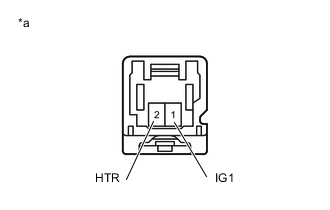
*a Component without harness connected
(Pre-collision City Heater (Forward Recognition Hood))
Disconnect the pre-collision city heater (forward recognition hood) connector.
-
Measure the resistance according to the value(s) in the table below.
Standard Resistance Tester Connection Switch Condition Specified Condition 1 (IG1) - 2 (HTR) Ignition switch off 36.1 to 39.9 Ω Result Proceed to OK NG
NG
REPLACE PRE-COLLISION CITY HEATER (FORWARD RECOGNITION HOOD) Click here
OK
-
-
CHECK HARNESS AND CONNECTOR (PRE-COLLISION CITY HEATER (FORWARD RECOGNITION HOOD))
-
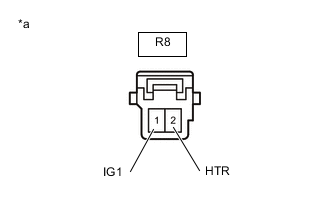
*a Front view of wire harness connector
(to Pre-collision City Heater (Forward Recognition Hood))
Disconnect the pre-collision city heater (forward recognition hood) connector.
-
Disconnect the forward recognition camera connector.
-
Measure the voltage and resistance according to the value(s) in the table below.
Standard Voltage Tester Connection Switch Condition Specified Condition R8-1 (IG1) - Body ground Ignition switch ON 11 to 14 V R8-1 (IG1) - Body ground Ignition switch off Below 1.5 V Standard Resistance Tester Connection Switch Condition Specified Condition R8-2 (HTR) - R5-1 (HTR) Ignition switch off Below 1 Ω R8-2 (HTR) or R5-1 (HTR) - Body ground Ignition switch off 10 kΩ or higher Result Proceed to OK NG
NG
REPAIR OR REPLACE HARNESS OR CONNECTOR (PRE-COLLISION CITY HEATER (FORWARD RECOGNITION HOOD))
OK
-
-
REPLACE FORWARD RECOGNITION CAMERA
-
Replace the forward recognition camera.
-
Perform Forward Recognition Camera Axis Adjustment.
Result Proceed to NEXT
NEXT
END
-