HYBRID CONTROL SYSTEM, Diagnostic DTC:P0AE2-773
| DTC Code | DTC Name |
|---|---|
| P0AE2-773 | Hybrid Battery Precharge Contactor Circuit Stuck Closed |
DESCRIPTION
Refer to the description for DTC P0AE6-225 Click here.
| DTC No. | INF Code | DTC Detection Condition | Trouble Area |
|---|---|---|---|
| P0AE2 | 773 | SMRP on the HV battery positive side stuck closed |
|
WIRING DIAGRAM
Refer to the wiring diagram for DTC P0AE6-225 Click here.
CAUTION / NOTICE / HINT
CAUTION:
-
When performing P0AE2-773 troubleshooting, use either a tool wrapped with vinyl insulation tape or an insulated tool. (It is extremely dangerous when a high-voltage charge passes through a non-insulated tool causing a short.)
-
Before inspecting the high-voltage system or disconnecting the low voltage connector of the inverter with converter assembly, take safety precautions such as wearing insulated gloves and removing the service plug grip to prevent electrical shocks. After removing the service plug grip, put it in your pocket to prevent other technicians from accidentally reconnecting it while you are working on the high-voltage system.
-
After removing the service plug grip, wait for at least 10 minutes before touching any of the high-voltage connectors or terminals. After waiting for 10 minutes, check the voltage at the terminals in the inspection point in the inverter with converter assembly. The voltage should be 0 V before beginning work Click here.
Tech Tips
Waiting for at least 10 minutes is required to discharge the high-voltage capacitor inside the inverter with converter assembly.
Note
-
After turning the power switch off, waiting time may be required before disconnecting the cable from the negative (-) auxiliary battery terminal. Therefore, make sure to read the disconnecting the cable from the negative (-) auxiliary battery terminal notices before proceeding with work Click here.
-
If the DTCs are cleared or the cable is disconnected and reconnected to the negative (-) auxiliary battery terminal before performing repairs, turning the power switch on (READY) may cause a malfunction. Do not turn the power switch on (READY).
Tech Tips
After the repair, clear the DTCs, perform the following procedure and check that the same DTC (including pending DTC) is not output.
-
Turn the power switch off and wait for 30 seconds or more.
-
Turn the power switch on (READY) and wait for 30 seconds or more.
-
Turn the power switch off and wait for 60 seconds or more.
PROCEDURE
-
CHECK DTC OUTPUT (HYBRID CONTROL)
-
Connect the GTS to the DLC3.
-
Turn the power switch on (IG).
-
Enter the following menus: Powertrain / Hybrid Control / Trouble Codes.
-
Check if DTCs are output.
Result Result Proceed to DTC P0E2-773 only is output, or DTCs other than the ones in the table below are also output. A Any of the following DTCs are also output. B DTC No. Relevant Diagnosis P06B0-163 Sensor Power Supply "A" Circuit/Open P06D6-511 Sensor Reference Voltage "F" Circuit/Open P06E6-164 Sensor Power Supply "C" Circuit/Open P0A1A-151, 658, 791 Generator Control Module P0A1B-786, 794 Drive Motor "A" Control Module P0A1D-148 Hybrid Powertrain Control Module P0A3F-243 Drive Motor "A" Position Sensor Circuit P0A40-500 Drive Motor "A" Position Sensor Circuit Range/Performance P0A41-245 Drive Motor "A" Position Sensor Circuit Low P0A4B-253 Generator Position Sensor Circuit P0A4C-513 Generator Position Sensor Circuit Range/Performance P0A4D-255 Generator Position Sensor Circuit Low P0AA4-232 Hybrid Battery Negative Contactor Circuit Stuck Closed P0AE0-228 Hybrid Battery Negative Contactor Control Circuit High P0AE7-224 Hybrid Battery Precharge Contactor Control Circuit High P0C76-523 Hybrid Battery System Discharge Time Too Long P0CA3-442 DC/DC Converter Step Up Voltage Performance P0D2E-586 Drive Motor "A" Inverter Voltage Sensor Circuit Range/Performance P0D2F-266 Drive Motor "A" Inverter Voltage Sensor Circuit Low P0D30-267 Drive Motor "A" Inverter Performance P1C2A-155 Generator A/D Converter Circuit P1C73-512 Sensor Standard Voltage "F" Circuit/Open P1CA6-156 Generator Control Module Malfunction P1CA7-193 Drive Motor Control Module Malfunction P1CAC-200 Generator Position Sensor Angle Malfunction P1CAD-168 Drive Motor "A" Position Sensor Angle Malfunction P1CAF-792 Generator Position Sensor REF Signal Cycle Malfunction P1CB0-795 Drive Motor "A" Position Sensor REF Signal Cycle Malfunction P1CB2-793 Generator Position Sensor REF Signal Stop Malfunction P1CB3-796 Drive Motor "A" Position Sensor REF Signal Stop Malfunction P2511-149 HV CPU Power Relay Sense Circuit Intermittent No Continuity P3004-132 Power Cable Malfunction P3133-659 Communication Error from Generator to Drive Motor "A" P3134-661 Communication Error from Drive Motor "A" to Generator P324E-788 MG-ECU Power Relay Intermittent Circuit U0110 (all INF codes)*1 Lost Communication with Drive Motor Control Module "A" Tech Tips
-
*1: If any INF codes are output for this DTC, refer to the corresponding diagnostic procedure.
-
P0AE2-773 may be output due to a malfunction which causes the DTCs in the table above to be output. In this case, first troubleshoot the output DTCs in the table above. Then, perform a reproduction test to check that no DTCs are output.
-
-
Turn the power switch off.
B 
GO TO DTC CHART (HYBRID CONTROL SYSTEM) Click here
A 
-
-
CHECK FREEZE FRAME DATA (HYBRID CONTROL)
-
Connect the GTS to the DLC3.
-
Turn the power switch on (IG).
-
Enter the following menus: Powertrain / Hybrid Control / Trouble Codes.
-
Read the freeze frame data of DTC P0AE2-773.
Result Result Proceed to VL-Voltage before Boosting is 60 V or more. A VL-Voltage before Boosting is below 60 V. B -
Turn the power switch off.
B
REFER TO REPLACE INVERTER WITH CONVERTER ASSEMBLY PARTS Click here
A
-
-
CHECK CONNECTOR CONNECTION CONDITION (POWER MANAGEMENT CONTROL ECU CONNECTOR)
-
Check the connector connections and contact pressure of the relevant terminals for the power management control ECU connectors Click here.
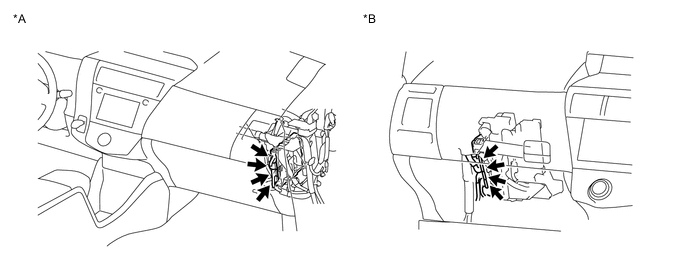
Text in Illustration *A for LHD *B for RHD OK The connectors are connected securely and there are no contact pressure problems.
OK 
CHECK CONNECTOR CONNECTION CONDITION (NO. 2 HYBRID BATTERY PACK WIRE CONNECTOR) Click here
NG
-
-
CONNECT SECURELY
NEXT
-
CHECK CONNECTOR CONNECTION CONDITION (NO. 2 HYBRID BATTERY PACK WIRE CONNECTOR)
CAUTION:
Be sure to wear insulated gloves.
-
Check that the service plug grip is not installed.
Note
After removing the service plug grip, do not turn the power switch on (READY), unless instructed by the repair manual because this may cause a malfunction.
-
Check the connection condition of the Lc1 No. 2 hybrid battery pack wire connector and the contact pressure of each terminal. Check the terminals for deformation, and check the connector for water and foreign matter.
-
The connector is connected securely.
-
The terminals are not deformed and are connected securely.
-
No water or foreign matter in the connector.
OK:
Result Result Proceed to OK A NG (The connector is not connected securely.) B NG (The terminals are not making secure contact or are deformed, or water or foreign matter exists in the connector.) C -
A
CHECK CONNECTOR CONNECTION CONDITION (HYBRID BATTERY JUNCTION BLOCK ASSEMBLY CONNECTOR) Click here
C
REPAIR OR REPLACE HARNESS OR CONNECTOR Click here
B
-
-
CONNECT SECURELY
NEXT
CHECK CONNECTOR CONNECTION CONDITION (HYBRID BATTERY JUNCTION BLOCK ASSEMBLY CONNECTOR) Click here
-
REPAIR OR REPLACE HARNESS OR CONNECTOR
NEXT
-
CHECK CONNECTOR CONNECTION CONDITION (HYBRID BATTERY JUNCTION BLOCK ASSEMBLY CONNECTOR)
CAUTION:
Be sure to wear insulated gloves.
-
Check that the service plug grip is not installed.
Note
After removing the service plug grip, do not turn the power switch on (READY), unless instructed by the repair manual because this may cause a malfunction.
-
Remove the No. 2 hybrid battery shield sub-assembly Click here.
-
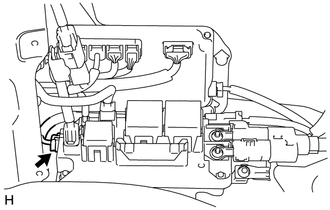
Check the connector connections and contact pressure of the relevant terminals for the hybrid battery junction block assembly connector Click here.
OK The connector is connected securely and there are no contact pressure problems. -
Install the No. 2 hybrid battery shield sub-assembly.
OK
CHECK GROUND WIRE CONNECTION CONDITION (SMR ACTIVATION LOW-VOLTAGE CIRCUIT) Click here
NG
-
-
CONNECT SECURELY
NEXT
-
CHECK GROUND WIRE CONNECTION CONDITION (SMR ACTIVATION LOW-VOLTAGE CIRCUIT)
-
Check the installation condition of the L3 ground wire.
OK The L3 ground wire is securely installed.
OK
CHECK HARNESS OR CONNECTOR (POWER MANAGEMENT CONTROL ECU - HYBRID BATTERY JUNCTION BLOCK ASSEMBLY) Click here
NG
-
-
CONNECT SECURELY
NEXT
-
CHECK HARNESS OR CONNECTOR (POWER MANAGEMENT CONTROL ECU - HYBRID BATTERY JUNCTION BLOCK ASSEMBLY)
CAUTION:
Be sure to wear insulated gloves.
-
Check that the service plug grip is not installed.
Note
After removing the service plug grip, do not turn the power switch on (READY), unless instructed by the repair manual because this may cause a malfunction.
-
Remove the No. 2 hybrid battery shield sub-assembly Click here.
-
Disconnect the c6 hybrid battery junction block assembly connector.
-
Disconnect the L5 power management control ECU connector.
-
Measure the resistance according to the value(s) in the table below.
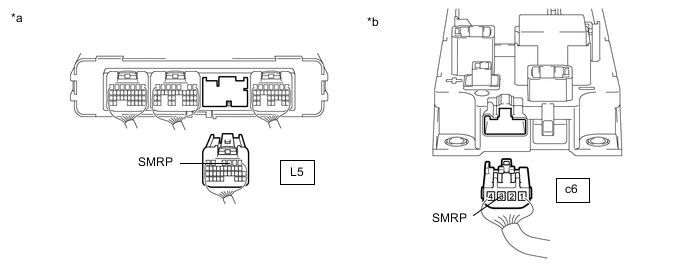
Standard Resistance (Check for Open) Tester Connection Condition Specified Condition L5-3 (SMRP) - c6-3 (SMRP) Power switch off Below 1 Ω Standard Resistance (Check for Short) Tester Connection Condition Specified Condition L5-3 (SMRP) and c6-3 (SMRP) - Body ground and other terminals Power switch off 10 kΩ or higher Text in Illustration *a Rear view of wire harness connector
(to Power Management Control ECU)
*b Rear view of wire harness connector
(to Hybrid Battery Junction Block Assembly)
-
Reconnect the L5 power management control ECU connector.
-
Reconnect the c6 hybrid battery junction block assembly connector.
-
Install the No. 2 hybrid battery shield sub-assembly.
OK
CHECK HARNESS AND CONNECTOR (HYBRID BATTERY JUNCTION BLOCK ASSEMBLY - BODY GROUND) Click here
NG
-
-
REPAIR OR REPLACE HARNESS OR CONNECTOR
NEXT
-
CHECK HARNESS AND CONNECTOR (HYBRID BATTERY JUNCTION BLOCK ASSEMBLY - BODY GROUND)
CAUTION:
Be sure to wear insulated gloves.
-
Check that the service plug grip is not installed.
Note
After removing the service plug grip, do not turn the power switch on (READY), unless instructed by the repair manual because this may cause a malfunction.
-
Remove the No. 2 hybrid battery shield sub-assembly Click here.
-
Disconnect the c6 hybrid battery junction block assembly connector.
-
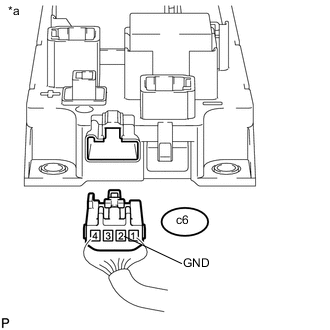
Text in Illustration *a Rear view of wire harness connector
(to Hybrid Battery Junction Block Assembly)
Measure the resistance according to the value(s) in the table below.
Standard Resistance Tester Connection Condition Specified Condition c6-2 (GND) - Body ground Power switch off Below 1 Ω -
Reconnect the c6 hybrid battery junction block assembly connector.
-
Install the No. 2 hybrid battery shield sub-assembly.
OK
INSPECT HYBRID BATTERY JUNCTION BLOCK ASSEMBLY (SMRP) Click here
NG
-
-
REPAIR OR REPLACE HARNESS OR CONNECTOR
NEXT
-
INSPECT HYBRID BATTERY JUNCTION BLOCK ASSEMBLY (SMRP)
CAUTION:
Be sure to wear insulated gloves.
-
Check that the service plug grip is not installed.
Note
After removing the service plug grip, do not turn the power switch on (READY), unless instructed by the repair manual because this may cause a malfunction.
-
Remove the No. 2 hybrid battery shield sub-assembly Click here.
-
Disconnect the c6 hybrid battery junction block assembly connector.
-
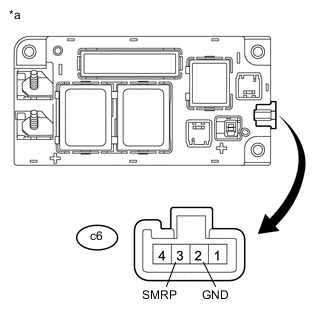
Text in Illustration *a Component without harness connected
(Hybrid Battery Junction Block Assembly)
Measure the resistance according to the value(s) in the table below.
Standard Resistance Tester Connection Condition Specified Condition c6-3 (SMRP) - c6-2 (GND) -40 to 80 °C (-40 to 176°F) 112 to 274 Ω -
Reconnect the c6 hybrid battery junction block assembly connector.
-
Install the No. 2 hybrid battery shield sub-assembly.
NG
REPLACE HYBRID BATTERY JUNCTION BLOCK ASSEMBLY Click here
OK
-
-
CHECK HYBRID BATTERY JUNCTION BLOCK ASSEMBLY
CAUTION:
Be sure to wear insulated gloves.
-
Check that the service plug grip is not installed.
Note
After removing the service plug grip, do not turn the power switch on (READY), unless instructed by the repair manual because this may cause a malfunction.
-
Remove the No. 2 hybrid battery shield sub-assembly Click here.
-
Disconnect the high voltage cable connectors from the hybrid battery junction block assembly.
-
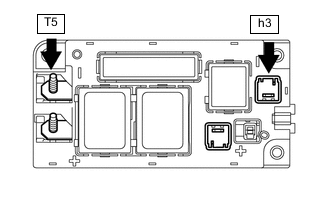
Measure the resistance according to the value(s) in the table below.
Standard Resistance Tester Connection Condition Specified Condition T5-1 (CEI) - h3-1 (-) Power switch off 10 kΩ or higher Tech Tips
-
If a system main relay is stuck closed, inspect the HV relay assembly without removing it from the vehicle, in order to keep the relay closed.
-
If the result of reading the freeze frame data is A, the hybrid battery junction block assembly must be replaced. Measuring resistance can determine that this is either a present or past malfunction.
-
-
Connect the high voltage cable connectors.
-
Install the No. 2 hybrid battery shield sub-assembly.
OK
NG
-
-
REPLACE HYBRID BATTERY JUNCTION BLOCK ASSEMBLY
NEXT
-
CHECK POWER MANAGEMENT CONTROL ECU (CHECK FOR NORMAL OPERATION)
-
Install the service plug grip.
-
Connect the GTS to the DLC3.
-
Turn the power switch on (IG).
-
Clear the DTCs Click here.
-
Turn the power switch off and wait for 30 seconds or more.
-
Turn the power switch on (READY).
-
Enter the following menus: Powertrain / Hybrid Control / Data List / Power Resource VB, VL-Voltage before Boosting.
-
According to the display on the GTS, read the Data List and monitor the values of "Power Resource VB" and "VL-Voltage before Boosting" for 3 minutes.
Result Result Proceed to Difference between "Power Resource VB" and "VL-Voltage before Boosting" is always less than 100 V. A Difference between "Power Resource VB" and "VL-Voltage before Boosting" is 100 V or more. B -
Turn the power switch off.
A
END
B
REPLACE POWER MANAGEMENT CONTROL ECU AND HYBRID BATTERY JUNCTION BLOCK ASSEMBLY
-