POWER STEERING SYSTEM CALIBRATION
ASSIST MAP WRITING (USING THE GTS)
Turn the ignition switch off.
Connect the GTS to the DLC3.
Turn the ignition switch to ON.
Turn the GTS on.
Enter the following menus: Chassis / EMPS / Utility / Signal Check.
Chassis > EMPS > Utility
Tester Display
Signal Check
Tip:Follow the instructions on the GTS to perform Signal Check.
With DTC C1581/26 output, performing Signal Check will cause the power steering ECU assembly to enter Test Mode and the assist map will be written automatically.
Wait for at least 5 seconds.
Check for DTCs (Click here).
Tip:After writing the assist map, if DTC C1581/26 is output, perform the troubleshooting procedure for DTC C1581/26 (Click hereClick here).
ASSIST MAP WRITING (USING SST CHECK WIRE)
-
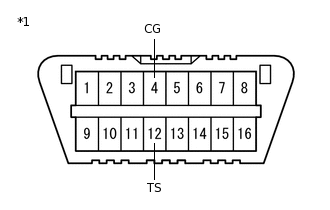
*1
DLC3
Connect the terminals correctly to avoid a malfunction.
Using SST, connect terminals 12 (TS) and 4 (CG) of the DLC3.
09843-18040
Note:Connect the terminals correctly to avoid a malfunction.
Turn the ignition switch to ON.
Wait for 5 seconds or more.
Check for DTCs (Click here).
Tip:After writing the assist map, if DTC C1581/26 is output, perform the troubleshooting procedure for DTC C1581/26 (Click hereClick here).
-