VEHICLE STABILITY CONTROL SYSTEM, Diagnostic DTC:C1403, C1273, C1274, C1404
| DTC Code | DTC Name |
|---|---|
| C1403 | Rear Speed Sensor RH Malfunction |
| C1273 | Low Output Signal of Rear Speed Sensor RH (Test Mode DTC) |
| C1274 | Low Output Signal of Rear Speed Sensor LH (Test Mode DTC) |
| C1404 | Rear Speed Sensor LH Malfunction |
DESCRIPTION
Refer to DTCs C1401 and C1402 Click here.
| DTC Code | DTC Detection Condition | Trouble Area |
|---|---|---|
| C1403 C1404 |
One of the following conditions is met:
|
|
| C1273 C1274 |
Stored during Test Mode. |
|
Tech Tips
-
DTCs C1403 and C1273 are for the rear speed sensor RH.
-
DTCs C1404 and C1274 are for the rear speed sensor LH.
INSPECTION PROCEDURE
Note
Check the speed sensor signal after cleaning or replacement Click here.
PROCEDURE
-
CHECK REAR SPEED SENSOR INSTALLATION
-
Turn the ignition switch off.
-
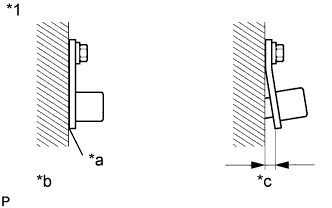
Text in Illustration *1 Rear Speed Sensor *a No clearance *b CORRECT *c INCORRECT Check the speed sensor installation Click here.
OK The installation bolt is tightened properly. There is no clearance between the sensor and rear axle housing.
NG 
INSTALL REAR SPEED SENSOR CORRECTLY
OK 
-
-
INSPECT REAR SPEED SENSOR TIP
-
Turn the ignition switch off.
-
Remove the rear speed sensor Click here.
-
Check the speed sensor tip.
OK No scratches, oil or foreign matter on the sensor tip. Note
Do not replace the speed sensor if no damage to the speed sensor tip is found.
Tech Tips
-
If the sensor is contaminated with oil or other foreign material, clean the sensor.
-
If there is iron powder sticking to the rotor, this will result in a malfunction. Therefore, confirm that the rotor is not contaminated with foreign material before replacing the sensor.
-
NG
CLEAN OR REPLACE REAR SPEED SENSOR
OK
-
-
INSPECT REAR SKID CONTROL ROTOR
-
Turn the ignition switch off.
-
Remove the rear axle shaft with backing plate Click here.
-
Check the rear skid control rotor.
OK No scratches, oil or foreign matter on the rotor.
NG
CLEAN OR REPLACE REAR SKID CONTROL ROTOR
OK
-
-
READ VALUE USING INTELLIGENT TESTER (RR/RL WHEEL SPEED)
-
Turn the ignition switch off.
-
Connect the intelligent tester to the DLC3.
-
Start the engine.
-
Turn the intelligent tester on.
-
Enter the following menus: Chassis / ABS/VSC/TRC / Data List, and then drive the vehicle.
ABS/VSC/TRC Tester Display Measurement Item/Range Normal Condition Diagnostic Note RR Wheel Speed Rear speed sensor RH reading / Min.: 0 km/h (0 mph), Max.: 326 km/h (202 mph) Actual wheel speed No large fluctuations when driving at a constant speed. RL Wheel Speed Rear speed sensor LH reading / Min.: 0 km/h (0 mph), Max.: 326 km/h (202 mph) Actual wheel speed No large fluctuations when driving at a constant speed. -
Check the speed value output from the speed sensor displayed on the intelligent tester.
Tech Tips
Factors that affect the indicated vehicle speed include tire size, tire inflation and tire wear. The speed indicated on the speedometer has an allowable margin of error. This can be tested using a speedometer tester (calibrated chassis dynamometer). For details about testing and the margin of error, refer to the reference chart Click here.
OK The speed value output from the speed sensor displayed on the intelligent tester is the same as the actual vehicle speed measured using a speedometer tester (calibrated chassis dynamometer).
NG 
REPLACE REAR SPEED SENSOR Click here
OK 
USE SIMULATION METHOD TO CHECK Click here
-
-
REPLACE REAR SPEED SENSOR
-
Turn the ignition switch off.
-
Replace the rear speed sensor Click here.
NEXT
-
-
RECONFIRM DTC
-
Clear the DTCs Click here.
-
Turn the ignition switch off.
-
Start the engine.
-
Drive the vehicle at a speed of 40 km/h (25 mph) or more for at least 60 seconds.
-
Check if the same DTC is output Click here.
Result Result Proceed to DTC is not output A DTC is output B
B
REPLACE REAR SKID CONTROL ROTOR Click here
A
END
-