ENTRY AND START SYSTEM(for Entry Function) All Door Entry Lock/Unlock Functions do not Operate, but Wireless Functions Operate
| DTC Code | DTC Name |
|---|---|
| All Door Entry Lock/Unlock Functions do not Operate, but Wireless Functions Operate |
DESCRIPTION
When the wireless operation can be used to lock and unlock the doors, communication between the door control receiver and certification ECU (smart key ECU assembly) is normal. If the entry lock and unlock functions do not operate, the entry cancel function may be set through the customize function, there may be communication problems between the electrical key transmitter sub-assembly and vehicle, or there may be wave interference.
CAUTION / NOTICE / HINT
The entry and start system (for Entry Function) uses a multiplex communication system (LIN communication system) and the CAN communication system. Inspect the communication function by following How to Proceed with Troubleshooting (Click hereClick here). Troubleshoot the entry and start system (for Entry Function) after confirming that the communication systems are functioning properly.
When using the GTS with the vehicle engine switch off, connect the GTS to the vehicle and turn a courtesy light switch on and off at intervals of 1.5 seconds or less until communication between the GTS and the vehicle begins. Then select the Model Code "KEY REGIST" under manual mode and enter the following menus: Body Electrical / Entry&Start. While using the GTS, periodically turn a courtesy light switch on and off at intervals of 1.5 seconds or less to maintain communication between the GTS and the vehicle.
Check that there are no electrical key transmitter sub-assemblies in the vehicle.
Before performing the inspection, check that DTC B1242 (wireless door lock control) is not output.
Before replacing the certification ECU (smart key ECU assembly) or electrical key transmitter sub-assembly, refer to the entry and start system (for Entry Function) precaution.
After repair, confirm that no DTCs are output by performing the "DTC Output Confirmation Operation".
PROCEDURE
CHECK FOR DTC
Check for DTCs.
Body Electrical > Entry&Start > Trouble Codes
Result
Proceed to
DTC is not output
DTC is output
READ VALUE USING GTS (AUTO ENTRY CANCEL SW)
Connect the GTS to the DLC3.
Turn the engine switch on (IG).
Turn the GTS on.
Enter the following menus: Body Electrical / Entry&Start / Data List.
Read the Data List according to the display on the GTS.
Body Electrical > Entry&Start > Data List
Tester Display
Measurement Item
Range
Normal Condition
Diagnostic Note
Auto Entry Cancel SW
Entry cancel function setting
OFF or ON
Mode status displayed
ON: Entry and start system canceled
OFF: Entry and start system not canceled
The default setting for the entry cancel function is OFF. If the customer requests that the entry and start system functions (locking and unlocking the doors while carrying the electrical key transmitter sub-assembly, etc.) be canceled, the setting can be changed through the customize function.*
Body Electrical > Entry&Start > Data List
Tester Display
Auto Entry Cancel SW
Tip:If the Data List cannot be read, check the value by performing manual operation of the customize function.
Result
Result
Proceed to
Entry door lock function cancel is OFF
A
Entry door lock function cancel is ON
B
CHECK WAVE ENVIRONMENT
Move the electrical key transmitter sub-assembly as described below and perform the operation inspection.
Tip:When the electrical key transmitter sub-assembly is brought near the front door outside handle assembly (for driver door) or electrical key antenna, the possibility of wave interference decreases, and it can be determined if wave interference is causing the problem symptom.
The transmitting wave of the wireless function and entry function are the same, but the wave logic is different. As a result, it is possible that only the wireless function or only the entry function is affected by wave interference.
-
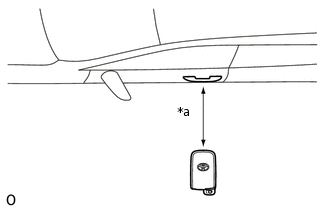
*a
Approximately 0.3 m (0.984 ft.)
Bring the electrical key transmitter sub-assembly approximately 0.3 m (0.984 ft.) from the front door outside handle assembly (for driver door) and perform a driver door entry lock and unlock operation check (for LHD).
Note:If the electrical key transmitter sub-assembly is brought within 0.2 m (0.656 ft.) of the door handle, communication may not be possible.
-
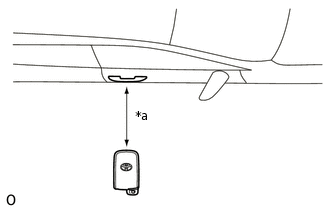
*a
Approximately 0.3 m (0.984 ft.)
Bring the electrical key transmitter sub-assembly approximately 0.3 m (0.984 ft.) from the front door outside handle assembly (for driver door) and perform a driver door entry lock and unlock operation check (for RHD).
Note:If the electrical key transmitter sub-assembly is brought within 0.2 m (0.656 ft.) of the door handle, communication may not be possible.
-
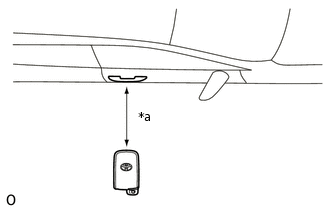
*a
Approximately 0.3 m (0.984 ft.)
Bring the electrical key transmitter sub-assembly approximately 0.3 m (0.984 ft.) from the front door outside handle assembly (for front passenger door) and perform a front passenger door entry lock and unlock operation check (for LHD).
Note:If the electrical key transmitter sub-assembly is brought within 0.2 m (0.656 ft.) of the door handle, communication may not be possible.
-
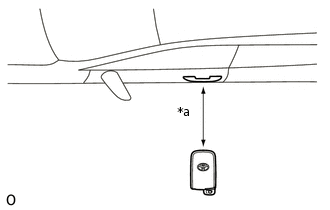
*a
Approximately 0.3 m (0.984 ft.)
Bring the electrical key transmitter sub-assembly approximately 0.3 m (0.984 ft.) from the front door outside handle assembly (for front passenger door) and perform a front passenger door entry lock and unlock operation check (for RHD).
Note:If the electrical key transmitter sub-assembly is brought within 0.2 m (0.656 ft.) of the door handle, communication may not be possible.
-
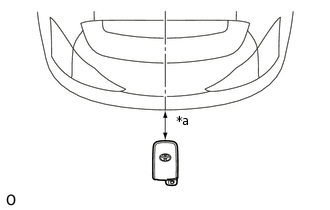
*a
Approximately 0.3 m (0.984 ft.)
Bring the electrical key transmitter sub-assembly approximately 0.3 m (0.984 ft.) from the electrical key antenna (outside luggage) and perform a back door open function check.
Note:If the electrical key transmitter sub-assembly is brought within 0.2 m (0.656 ft.) of the rear bumper, communication may not be possible.
Tip:If the inspection result is that the problem only occurs in certain locations or at certain times of day, the possibility of wave interference is high. Also, added vehicle components may cause wave interference. If installed, remove them and perform the operation check.
If wave interference seems to be the likely cause of the problem, ask the customer if the problem occurs in specific locations.
Move the vehicle to a different location, perform the following procedure and check if the symptoms can be reproduced.
If a tool for checking electric waves, such as a signal strength meter, is available, move around the area while observing both the LF band (used by the vehicle antenna to form the detection area) and RF band (used by the electrical key transmitter sub-assembly for transmission) to check for locations where there is wave interference.
Result
Proceed to
All operation checks fail
All operation checks are normal
Some operation checks are normal
All operation checks are normal AFFECTED BY WAVE INTERFERENCE
Some operation checks are normal GO TO OTHER PROBLEM (PROCEED TO PROBLEM SYMPTOMS TABLE FOR EACH DOOR)
CHECK KEY DIAGNOSTIC MODE
Check the following antennas in key diagnostic mode.
Select either channel 1 or channel 2 and perform the key diagnostic mode inspection for each channel.
Tip:If the buzzer sounds with [CH1] displayed but not with [CH2], the electrical key transmitter sub-assembly cannot be detected by channel 2 due to a malfunction, such as wave interference.
-
*a
0.7 to 1 m (2.30 to 3.28 ft.)
Check the electrical key antenna (for driver door) (for LHD):
When the electrical key transmitter sub-assembly is brought within 0.7 to 1 m (2.30 to 3.28 ft.) of the front door outside handle assembly (for driver door), check that the wireless door lock buzzer sounds.
Body Electrical > Entry&Start > Utility
Tester Display
Communication Check(Key Diag Mode)
-
*a
0.7 to 1 m (2.30 to 3.28 ft.)
Check the electrical key antenna (for driver door) (for RHD):
When the electrical key transmitter sub-assembly is brought within 0.7 to 1 m (2.30 to 3.28 ft.) of the front door outside handle assembly (for driver door), check that the wireless door lock buzzer sounds.
Body Electrical > Entry&Start > Utility
Tester Display
Communication Check(Key Diag Mode)
-
*a
0.7 to 1 m (2.30 to 3.28 ft.)
Check the electrical key antenna (for front passenger door) (for LHD):
When the electrical key transmitter sub-assembly is brought within 0.7 to 1 m (2.30 to 3.28 ft.) of the front door outside handle assembly (for front passenger door), check that the wireless door lock buzzer sounds.
Body Electrical > Entry&Start > Utility
Tester Display
Communication Check(Key Diag Mode)
-
*a
0.7 to 1 m (2.30 to 3.28 ft.)
Check the electrical key antenna (for front passenger door) (for RHD):
When the electrical key transmitter sub-assembly is brought within 0.7 to 1 m (2.30 to 3.28 ft.) of the front door outside handle assembly (for front passenger door), check that the wireless door lock buzzer sounds.
Body Electrical > Entry&Start > Utility
Tester Display
Communication Check(Key Diag Mode)
-
*a
0.7 to 1 m (2.30 to 3.28 ft.)
Check the electrical key antenna (outside luggage):
When the electrical key transmitter sub-assembly is brought within 0.7 to 1 m (2.30 to 3.28 ft.) of the electrical key antenna (outside luggage), check that the wireless door lock buzzer sounds.
Body Electrical > Entry&Start > Utility
Tester Display
Communication Check(Key Diag Mode)
-
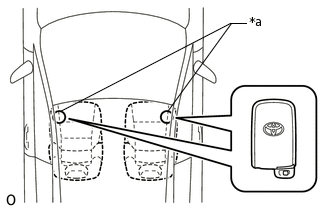
*a
Inspection Point
Check the No. 1 indoor electrical key antenna (front floor):
When the electrical key transmitter sub-assembly is at either inspection point, check that the wireless door lock buzzer sounds.
Body Electrical > Entry&Start > Utility
Tester Display
Communication Check(Key Diag Mode)
-
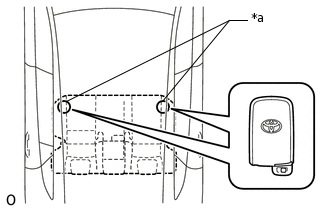
*a
Inspection Point
Check the No. 2 indoor electrical key antenna (rear floor):
When the electrical key transmitter sub-assembly is at either inspection point, check that the wireless door lock buzzer sounds.
Body Electrical > Entry&Start > Utility
Tester Display
Communication Check(Key Diag Mode)
-
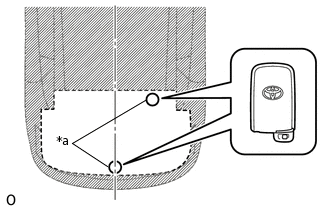
*a
Inspection Point
Check the No. 3 indoor electrical key antenna (inside luggage):
When the electrical key transmitter sub-assembly is at either inspection point, check that the wireless door lock buzzer sounds.
Body Electrical > Entry&Start > Utility
Tester Display
Communication Check(Key Diag Mode)
OK
Wireless door lock buzzer sounds.
-
Result
Proceed to
All diagnostic mode inspections fail
Some diagnostic mode inspections fail (door)
Some diagnostic mode inspections fail (interior)
Some diagnostic mode inspections fail (outside luggage)
All diagnostic mode inspections are normal
Some diagnostic mode inspections fail (door) GO TO OTHER PROBLEM (PROCEED TO PROBLEM SYMPTOM TABLE FOR EACH DOOR)
All diagnostic mode inspections are normal REPLACE CERTIFICATION ECU (SMART KEY ECU ASSEMBLY)
INSPECT ELECTRICAL KEY TRANSMITTER SUB-ASSEMBLY
Check if there is another electrical key transmitter sub-assembly available that is already registered to the vehicle.
Result
Result
Proceed to
Another registered electrical key transmitter sub-assembly is not available
A
Another registered electrical key transmitter sub-assembly is available
B
B CHECK ENTRY DOOR LOCK OPERATIONClick here
ELECTRICAL KEY TRANSMITTER SUB-ASSEMBLY REGISTRATION (NEW ELECTRICAL KEY TRANSMITTER SUB-ASSEMBLY)
Register a new electrical key transmitter sub-assembly.
Tip:Refer to Service Bulletin.
Result
Proceed to
NEXT
CHECK ENTRY DOOR LOCK OPERATION
Check the operation of the entry lock function.
OK
Entry lock function operates normally.
Result
Proceed to
OK
NG
OK END (ELECTRICAL KEY TRANSMITTER SUB-ASSEMBLY WAS DEFECTIVE)
NG REPLACE CERTIFICATION ECU (SMART KEY ECU ASSEMBLY)