AUDIO AND VISUAL SYSTEM
-
OUTLINE
-
Audio System
-
The audio systems shown below are available.
Audio System Audio Head Unit Speaker Navigation Function Multimedia System Radio and Display Receiver Assembly 6 Speakers - Multimedia System with Navigation ECU (Standard Model) ○ Multimedia System with Navigation ECU (Premium Model) 8 Speakers ○ Navigation System Navigation Receiver Assembly 8 Speakers ○
-
○: Available
-
-: Not available
-
-
-
Audio Head Unit
-
A Thin Film Transistor Liquid Crystal Display (TFT LCD) is used for the multi-display of the radio and display receiver assembly*1 or navigation receiver assembly*2. The multi-display shows the audio screen, Bluetooth hands-free screen, vehicle information screen, etc. and can be operated using touch operation, flick operation or drag operation*3.
-
*1: Models with multimedia system
-
*2: Models with navigation system
-
*3: Flick operation or drag operation may not be possible on all screens.
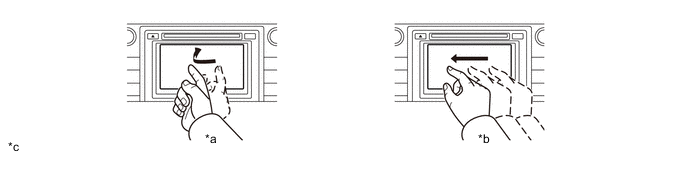
Text in Illustration *a Flick Operation *b Drag Operation *c The illustrations shown are examples only. The illustrations may differ from the actual audio head unit. - - -
-
Capacitive type touch switches are provided on both sides of the multi-display, realizing a flat and unified audio panel design. The sensitivity of the capacitive type touch switches can be adjusted. (Models for Europe)
-
The radio text broadcast by FM radio stations is displayed in the radio text area, such as program information and currently broadcasted song information.
-
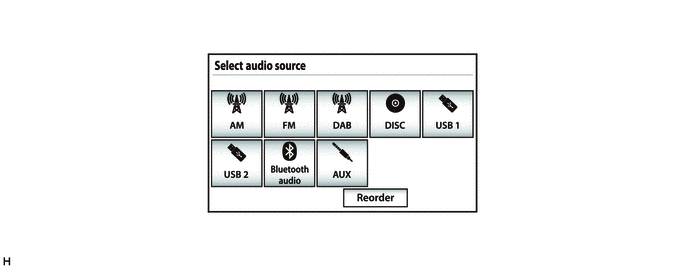
The audio source can be switched on the audio source selection screen. The arrangement of the audio sources displayed on the audio source screen can be changed according to the frequency of use. (Models for Australia)
-
Discs containing MPEG audio layer-3 (MP3) files, Windows Media Audio (WMA) files and Advanced Audio Coding (AAC) files can be played.
-
Discs with the marks shown below can be played.

-
-
Digital Audio Broadcast (DAB) (Models with Digital Audio Broadcast (DAB) Tuner)
-
Digital Audio Broadcast (DAB) reception is available. This mostly prevents broadcast interference, achieving clear reception with high quality sound.
-
The time shift operation function can be used to play back DAB programs at a later time.
Tech Tips
The amount of playback possible depends on the bit rate of the DAB station to be recorded, the amount of DAB unit memory, and the time at which reception of the broadcast began.
-
-
Application (Models for Europe)
-
By operating the applications, which are preinstalled to the radio and display receiver assembly, with on-screen commands on the multi-display, functions such as the e-mail function and MirrorLink function can be used.
-
-
TOYOTA Link Service (Models for Australia)
-
This service makes it possible to operate specified applications on the navigation system by using Bluetooth to connect the navigation system to a cellular phone with the TOYOTA Link application installed.
-
-
USB/AUX Port
-
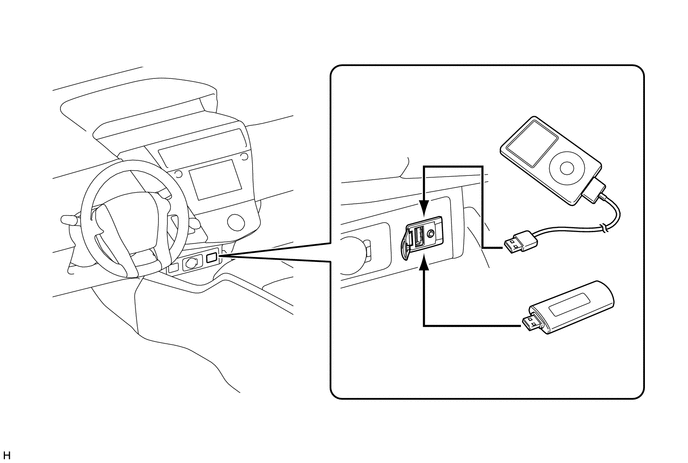
A single USB port is provided that enables operation of a USB memory device, portable audio player (USB type), iPhone, iPod classic, iPod, iPod nano or iPod touch.
-
By plugging a USB hub into the USB port, up to 2 of the following items can be used at once: USB memory device, portable audio player (USB type) or Apple product.
-
Videos stored on a video capable device, such as an iPod or VTR, can be displayed on the multi-display by connecting the video capable device to the AUX port using a dedicated 4-pole AUX cable.
Tech Tips
-
Even if 3 or more USB devices are connected using a USB hub, only the first 2 connected USB devices will be recognized.
-
Depending on the specifications of the 4-pole AUX cable used for connecting a video capable device such as an iPod or VTR, the video function may not operate correctly. Use a dedicated 4-pole AUX cable when using the video function.
-
iPhone, iPod, iPod classic, iPod nano and iPod touch are trademarks of Apple Inc., registered in the U.S. and other countries.
-
The following iPod, iPod nano, iPod classic, iPod touch and iPhone devices can be used with this system.
- Made for
-
iPod touch (5th generation)*
-
iPod touch (4th generation)
-
iPod touch (3rd generation)
-
iPod touch (2nd generation)
-
iPod touch (1st generation)
-
iPod classic
-
iPod with video
-
iPod nano (7th generation)*
-
iPod nano (6th generation)
-
iPod nano (5th generation)
-
iPod nano (4th generation)
-
iPod nano (3rd generation)
-
iPod nano (2nd generation)
-
iPod nano (1st generation)
-
iPhone 5*
-
iPhone 4S
-
iPhone 4
-
iPhone 3GS
-
iPhone 3G
-
iPhone
-
*: iPod video not supported
-
-
Depending on differences between models, software versions, etc., some models may be incompatible with this system.
-
USB memory devices that meet the following specifications are supported:
USB Communication Speed
-
USB 2.0, Full Speed (12 Mbps)
-
USB 2.0, High Speed (480 Mbps)
File System FAT 16/32 (Windows) Correspondence Class Mass Storage Class File Format MP3, WMA, AAC -
-
-
Bluetooth Audio System
-
The Bluetooth audio system enables users to enjoy music stored on a portable audio player from the vehicle speakers via Bluetooth communication.
-
The Bluetooth specifications and profiles required for operation are as follows:
Specification / Profile Version Requirements Recommendations Bluetooth Specification Version 2.0 Version 3.0 + EDR Profile Advanced Audio Distribution Profile (A2DP) Version 1.0 Version 1.2 Audio/Video Remote Control Profile (AVRCP) Version 1.0 Version 1.4
-
-
Bluetooth Hands-free System
-
The Bluetooth hands-free system allows the user to make or receive a call without taking their hands off the steering wheel when the system is linked with a Bluetooth-compatible cellular phone.
-
The Bluetooth specifications and profiles required for operation are as follows:
Specification / Profile Version Requirements Recommendations Bluetooth Specification Version 2.0 Version 3.0 + EDR Profile Hands Free Profile (HFP) Version 1.0 Version 1.6 Object Push Profile (OPP)*1 Version 1.1 Version 1.2 Phone Book Access Profile (PBAP) Version 1.0 Version 1.1 Message Access Profile (MAP) Version 1.0 Version 1.0 Serial Port Profile (SPP)*2 - Version 1.1 Dial-up Networking Profile (DUN)*3 Version 1.1 - Personal Area Networking (PAN)*3 Version 1.0 -
-
*1: Except models for Europe
-
*2: Models for Australia
-
*3: Models with multimedia system with navigation ECU
Tech Tips
-
The operation of the interrupt call function of the Bluetooth hands-free system may vary with the Bluetooth phone or the telephone company that is used.

"Bluetooth" is a trademark owned by Bluetooth SIG, Inc. -
Some profiles described above may not be supported by the system depending on the audio head unit equipped.
-
If the specification of the connected Bluetooth phone is lower than the recommended or does not support the functions required, the available functions may be limited.
-
-
When a Bluetooth phone is connected to the audio head unit, e-mails and Short Message Service (SMS) messages received on the phone can be displayed or read out. In addition, it is possible to reply to the received e-mails and Short Message Service (SMS) messages. (Messages may not be displayed depending on the message service or profile that the connected Bluetooth phone supports.)
-
-
Voice Recognition Search System (Models with Multimedia System with Navigation ECU (Premium Model))
-
Due to the Grapheme to Phoneme (G2P) function of converting sounds into text, a song in the USB audio system can be searched for by saying an artist name, album name, title or playlist name.
-
-
Status Display (Models for Australia)
-
The user can confirm the Bluetooth connection status, signal strength and remaining battery level of a cellular phone which is connected by Bluetooth, using the status bar displayed on the screen. The status bar is displayed in all mode.
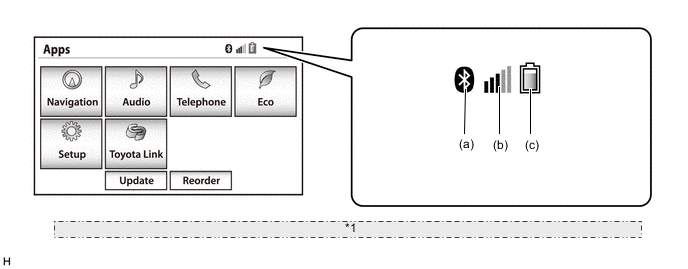
*1 The illustration shown is an example only. The illustration may differ from the actual vehicle screen. Item Outline (a) Bluetooth connection status Displays the Bluetooth connection status between the audio head unit and cellular phone. (b) Cellular phone signal strength* Displays the signal strength of the cellular phone connected by Bluetooth. (c) Cellular phone battery level* Displays the battery level of the cellular phone connected by Bluetooth. Tech Tips
*: May not be displayed depending on the Bluetooth specifications and profiles of the cellular phone.
-
-
Wi-Fi Communication (Models with Multimedia System with Navigation ECU (Premium Model))
-
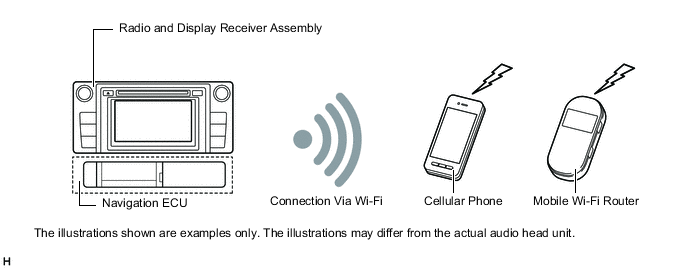
A wireless LAN antenna is integrated into the radio and display receiver assembly, enabling Wi-Fi communication to a user's tethering-compatible cellular phone or mobile Wi-Fi router.
Tech Tips
Wi-Fi communication may be unavailable depending on the vehicle conditions, condition of the surroundings such as radio wave conditions around the radio and display receiver assembly, the distance to the device or device conditions. Additionally, during Wi-Fi communication, communication may be cut or become unstable due to the conditions described above.
-
-
Siri/Google Now Function (Models with Multimedia System (with Navigation ECU))
-
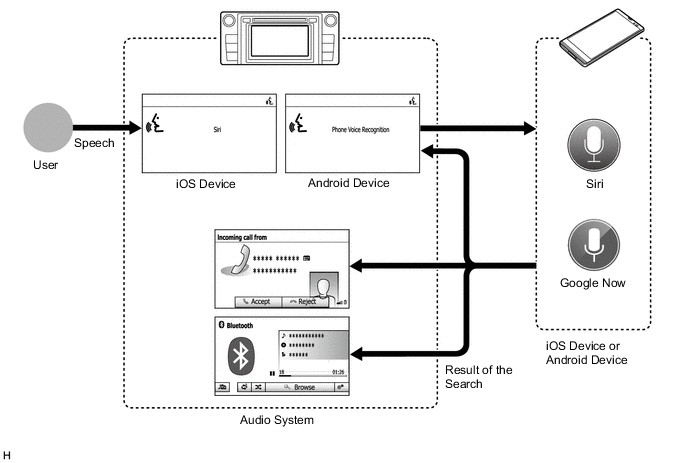
The voice input assist function is available when an iOS device or Android device is connected via "Bluetooth".
-
The Siri/Google Now function will be available after the voice switch on the steering pad is pressed and held causing the buzzer to sound and the respective display to be shown. Functions such as call contacts, select and play music, etc. will be available when the telephone microphone assembly recognizes the user's voice.
-
The system responds with search results screen display and synthesized voice.
-
When the Siri/Google Now function is used to call a contact or listen to music stored on the user's device, the system will automatically transition to the phone call or audio screen.
Tech Tips
-
If the user uses the Siri play song feature and the iPhone is not selected as the current audio source, the song will start playing only on the iPhone.
-
The available features and functions may vary based on the iOS/Android version installed on the connected device.
-
While a phone call is active, Siri/Google Now cannot be used.
-
-
-
Automatic Sound Levelizer (ASL)
-
The Automatic Sound Levelizer (ASL) function automatically adjusts the sound volume in order to enable clear audio quality even when vehicle noise increases (as vehicle noise increases, the volume is turned up, etc.).
-
Vehicle speed signals are received from the combination meter assembly and used for ASL control.
-
-
Steering Pad Switch
-
Switches that the driver often uses are provided on the steering wheel for convenience.
-
-
Multi-information Display (Models with Multi-information Display)
-
Switching the audio source mode, selecting radio stations or audio tracks, etc. can be performed by operating the multi-information display on the combination meter assembly.
-
-
"GreenEdge" Speakers (Models with 8-speaker System)
-
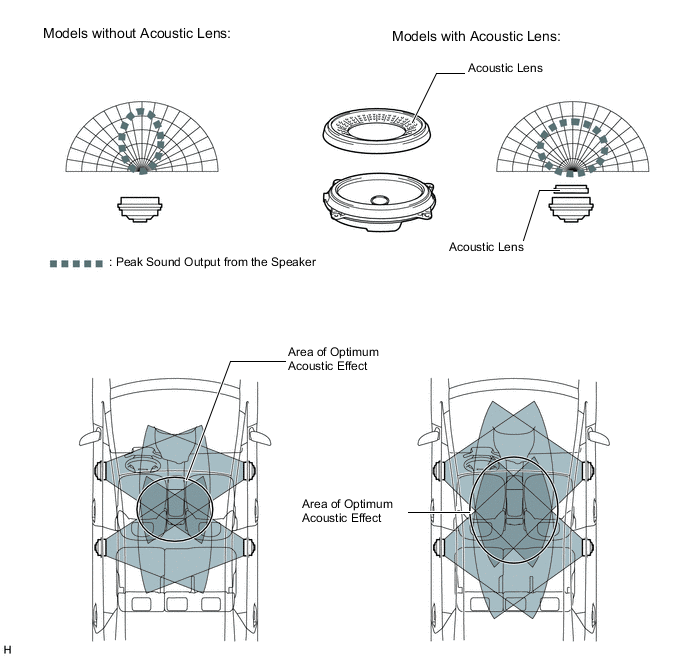
"GreenEdge" speakers that efficiently convert electricity to sound with less sound corruption have been adopted. These speakers realize high sound pressure levels with low power consumption while still maintaining superb sound quality.
-
Due to the adoption of acoustic lenses, the directionality of the speaker output is improved, enhancing the area where the acoustics are effective.
-
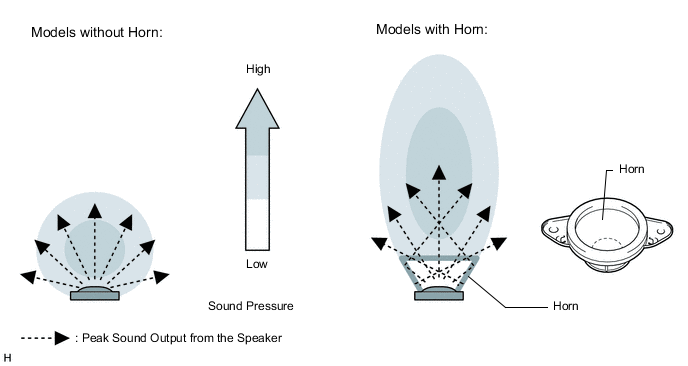
The cloth diaphragm horns of the horn tweeters control the directionality of the peak sound output from the speakers, enabling a high sound pressure level that is superior in the mid range.
-
-
Class H Amplifier (Models with 8-speaker System)
-
The amplifier controls the power supplied to the amplifier circuit in the most efficient way according to the received audio signals.
-
The power consumption and heat generation of the Class H amplifier is small, minimizing the size of the heatsink and related parts. This realizes a compact and lightweight amplifier.
-
-
-
MAJOR DIFFERENCE
-
The new models have been modified from the previous models as shown below:
-
A new navigation ECU has been provided on models for Europe.
-
-
-
SPECIFICATION
-
Audio Head Unit
-
for LHD Models:
Audio Head Unit Design Specification Destination Radio and Display Receiver Assembly 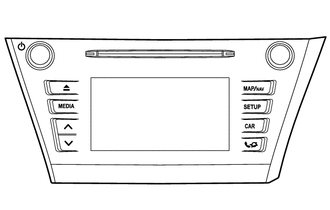
Multimedia System:
-
6.1-inch Wide Liquid Crystal Display (WVGA Type)
-
Display Language Supported: English, German, French, Spanish, Italian, Portuguese, Dutch, Swedish, Norwegian, Danish, Russian, Finnish, Greek, Polish, Ukrainian, Turkish, Hungarian, Czech, Slovak, Romanian and Flemish
-
AM/FM Tuner
-
Digital Audio Broadcast (DAB) Tuner
-
Radio Data System Traffic Message Channel (RDS-TMC) Tuner
-
Application Function
-
Automatic Sound Levelizer (ASL)
-
CD Player: Compatible with MP3, Windows Media Audio (WMA) and Advanced Audio Coding (AAC) files
-
CD-TEXT Display Function
-
Bluetooth Audio System
-
Bluetooth Hands-free System
-
Portable Audio Player (USB type) Interface
-
iPod / iPhone Interface
-
USB Memory Device Interface
-
Stereo Jack Adapter (Video input supported)
-
Customizable vehicle settings can be changed
-
6-speaker System
-
Unit: Panasonic
Europe Radio and Display Receiver Assembly Multimedia System with Navigation ECU (Standard Model):
-
6.1-inch Wide Liquid Crystal Display (WVGA Type)
-
Display Language Supported: English, German, French, Spanish, Italian, Portuguese, Dutch, Swedish, Norwegian, Danish, Russian, Finnish, Greek, Polish, Ukrainian, Turkish, Hungarian, Czech, Slovak, Romanian and Flemish
-
AM/FM Tuner
-
Digital Audio Broadcast (DAB) Tuner
-
Radio Data System Traffic Message Channel (RDS-TMC) Tuner
-
Application Function
-
Siri/Google Now Function
-
Automatic Sound Levelizer (ASL)
-
CD Player: Compatible with MP3, Windows Media Audio (WMA) and Advanced Audio Coding (AAC) files
-
CD-TEXT Display Function
-
Bluetooth Audio System
-
Bluetooth Hands-free System
-
Portable Audio Player (USB type) Interface
-
iPod / iPhone Interface
-
Media Transfer Protocol (MTP) Device
-
USB Memory Device Interface
-
Stereo Jack Adapter (Video input supported)
-
Customizable vehicle settings can be changed
-
6-speaker System
-
Unit: Panasonic
Europe Radio and Display Receiver Assembly 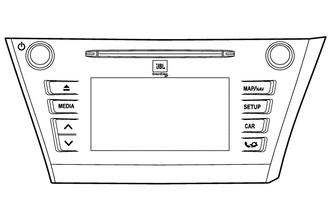
Multimedia System with Navigation ECU (Premium Model):
-
6.1-inch Wide Liquid Crystal Display (WVGA Type)
-
Display Language Supported: English, German, French, Spanish, Italian, Portuguese, Dutch, Swedish, Norwegian, Danish, Russian, Finnish, Greek, Polish, Ukrainian, Turkish, Hungarian, Czech, Slovak, Romanian and Flemish
-
AM/FM Tuner
-
Digital Audio Broadcast (DAB) Tuner
-
Radio Data System Traffic Message Channel (RDS-TMC) Tuner
-
Digital Sound Processor (DSP)
-
Application Function
-
Siri/Google Now Function
-
Automatic Sound Levelizer (ASL)
-
CD Player: Compatible with MP3, Windows Media Audio (WMA) and Advanced Audio Coding (AAC) files
-
CD-TEXT Display Function
-
Bluetooth Audio System
-
Bluetooth Hands-free System
-
Wi-Fi Communication
-
Portable Audio Player (USB type) Interface
-
iPod / iPhone Interface
-
Media Transfer Protocol (MTP) Device
-
USB Memory Device Interface
-
Voice Recognition Search (USB Audio System)
-
Stereo Jack Adapter (Video input supported)
-
Customizable vehicle settings can be changed
-
8-speaker System
-
Unit: Panasonic
-
Stereo Amplifier: JBL
Europe -
-
for RHD Models:
Audio Head Unit Design Specification Destination Radio and Display Receiver Assembly 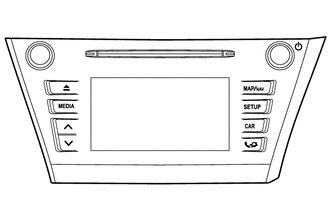
Multimedia System:
-
6.1-inch Wide Liquid Crystal Display (WVGA Type)
-
Display Language Supported: English, German, French, Spanish, Italian, Portuguese, Dutch, Swedish, Norwegian, Danish, Russian, Finnish, Greek, Polish, Ukrainian, Turkish, Hungarian, Czech, Slovak, Romanian and Flemish
-
AM/FM Tuner
-
Digital Audio Broadcast (DAB) Tuner
-
Radio Data System Traffic Message Channel (RDS-TMC) Tuner
-
Application Function
-
Automatic Sound Levelizer (ASL)
-
CD Player: Compatible with MP3, Windows Media Audio (WMA) and Advanced Audio Coding (AAC) files
-
CD-TEXT Display Function
-
Bluetooth Audio System
-
Bluetooth Hands-free System
-
Portable Audio Player (USB type) Interface
-
iPod / iPhone Interface
-
USB Memory Device Interface
-
Stereo Jack Adapter (Video input supported)
-
Customizable vehicle settings can be changed
-
6-speaker System
-
Unit: Panasonic
Europe Radio and Display Receiver Assembly Multimedia System with Navigation ECU (Standard Model):
-
6.1-inch Wide Liquid Crystal Display (WVGA Type)
-
Display Language Supported: English, German, French, Spanish, Italian, Portuguese, Dutch, Swedish, Norwegian, Danish, Russian, Finnish, Greek, Polish, Ukrainian, Turkish, Hungarian, Czech, Slovak, Romanian and Flemish
-
AM/FM Tuner
-
Digital Audio Broadcast (DAB) Tuner
-
Radio Data System Traffic Message Channel (RDS-TMC) Tuner
-
Application Function
-
Automatic Sound Levelizer (ASL)
-
CD Player: Compatible with MP3, Windows Media Audio (WMA) and Advanced Audio Coding (AAC) files
-
CD-TEXT Display Function
-
Bluetooth Audio System
-
Bluetooth Hands-free System
-
Portable Audio Player (USB type) Interface
-
iPod / iPhone Interface
-
Media Transfer Protocol (MTP) Device
-
USB Memory Device Interface
-
Stereo Jack Adapter (Video input supported)
-
Customizable vehicle settings can be changed
-
6-speaker System
-
Unit: Panasonic
Europe Radio and Display Receiver Assembly 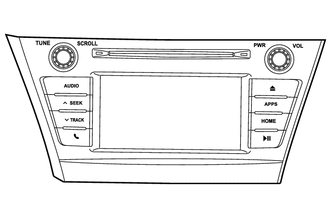
Multimedia System:
-
6.1-inch Wide Liquid Crystal Display (WVGA Type)
-
Display Language Supported: English
-
AM/FM Tuner
-
TOYOTA Link Service Function
-
Digital Sound Processor (DSP)
-
Automatic Sound Levelizer (ASL)
-
CD Player: Compatible with MP3, Windows Media Audio (WMA) and Advanced Audio Coding (AAC) files
-
CD-TEXT Display Function
-
Bluetooth Audio System
-
Bluetooth Hands-free System
-
Portable Audio Player (USB type) Interface
-
iPod / iPhone Interface
-
USB Memory Device Interface
-
Stereo Jack Adapter (Video input supported)
-
Customizable vehicle settings can be changed
-
6-speaker System
-
Unit: Fujitsu Ten
Australia Navigation Receiver Assembly 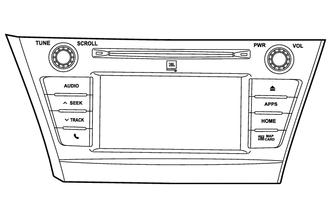
Navigation System:
-
6.1-inch Wide Liquid Crystal Display (WVGA Type)
-
Display Language Supported: English
-
AM/FM Tuner
-
Digital Audio Broadcast (DAB) Tuner
-
Radio Data System Traffic Message Channel (RDS-TMC) Tuner
-
TOYOTA Link Service Function
-
Automatic Sound Levelizer (ASL)
-
CD Player: Compatible with MP3, Windows Media Audio (WMA) and Advanced Audio Coding (AAC) files
-
CD-TEXT Display Function
-
Bluetooth Audio System
-
Bluetooth Hands-free System
-
Portable Audio Player (USB type) Interface
-
iPod / iPhone Interface
-
USB Memory Device Interface
-
Voice Recognition Search (USB Audio System)
-
Stereo Jack Adapter (Video input supported)
-
Customizable vehicle settings can be changed
-
8-speaker System
-
Unit: Fujitsu Ten
-
microSD Card (Disc Player Disc): Fujitsu Ten
-
Stereo Amplifier: JBL
Australia -
-
-
6-speaker System
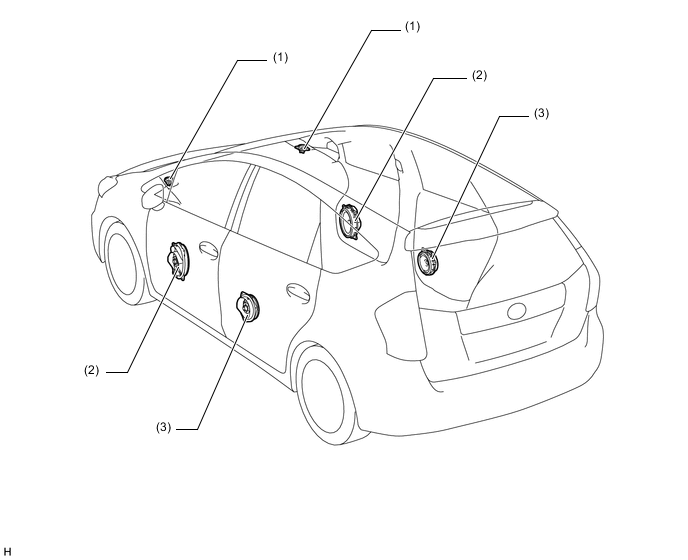
Location Speaker Name Quantity Size Impedance Rated Input Power (1) Front No. 2 Speaker Assembly 2 5.5 cm (2.2 in.) 4 Ω 17.5 W (2) Front No. 1 Speaker Assembly 2 15 x 23 cm (7 x 10 in.) 4 Ω 20 W (3) Rear Speaker Assembly 2 16 cm (6.3 in.) 4 Ω 20 W -
8-speaker System
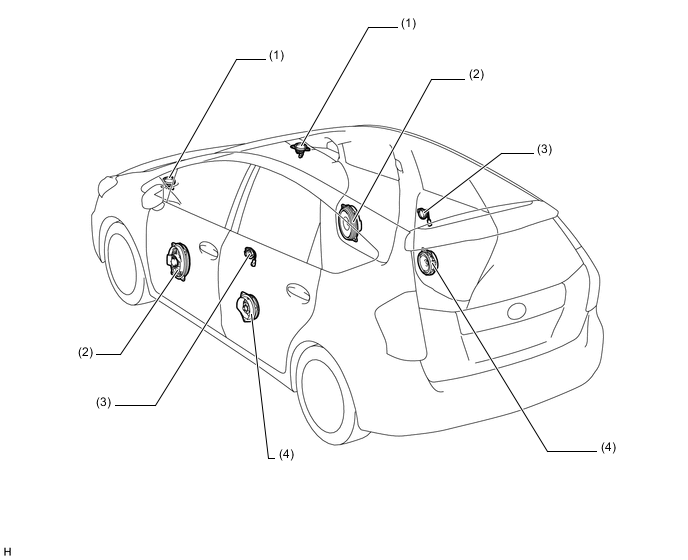
Location Speaker Name Quantity Size Impedance Rated Input Power (1) Front No. 2 Speaker Assembly 2 2.5 cm (1 in.) 4 Ω 2 W (2) Front No. 1 Speaker Assembly 2 15 x 23 cm (7 x 10 in.) 5.6 Ω 3 W (3) Rear No. 2 Speaker Assembly 2 2.5 cm (1 in.) 4 Ω 2 W (4) Rear Speaker Assembly 2 17 cm (7 in.) 4.2 Ω 5 W -
Steering Pad Switch Assembly
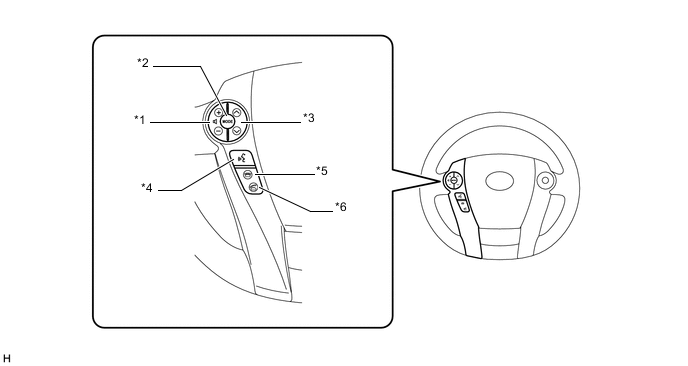
Text in Illustration *1 Volume Switch *2 MODE Switch *3 Seek Switch *4 Voice Switch *5 On Hook Switch *6 Off Hook Switch
-
-
MAIN FEATURES
-
Application
-
Available applications are listed in the following table:
Application Outline Preinstalled Application Weather*1 Weather information for the selected areas, such as present vehicle position, destination or a searched areas, for the next 5 days can be displayed on the multi-display. Fuel*1
-
The location and fuel price information of gas stations near the vehicle are displayed as a list on the multi-display.
-
These gas stations can also be set as a destination.
Parking*1
-
The location and available spaces of parking lots near the vehicle are displayed as a list on the multi-display.
-
These parking lots can also be set as a destination.
Toyota Assistance*1
-
With a Bluetooth phone connected to the radio and display receiver assembly, a call*4 to Toyota assistance service can be made.
-
Upon receiving the information from the GPS satellite, the vehicle's current location is displayed on the Toyota assistance service call screen so that the user will be able to promptly tell the operator the current location of the vehicle.
Street View*1
-
Google street view, which shows panoramic images along streets, is available. The street view of the desired location can be displayed on the multi-display.*5
-
A location searched for using street view can be set as a destination.
Pictures*1 When a USB memory device is connected to the radio and display receiver assembly, pictures stored on the USB memory device can be displayed on the multi-display as well as played as a slide show.*6 E-mail When a Bluetooth phone is connected to the radio and display receiver assembly, e-mails and Short Message Service (SMS) messages received on the phone can be displayed or read out. In addition, it is possible to reply to the received e-mails and send Short Message Service (SMS) messages.*7 Calendar*2 When a Bluetooth phone is connected to the radio and display receiver assembly, calendar entries, tasks and notes stored in the phone can be downloaded and displayed on the multi-display.*8 MirrorLink*3
-
To utilize the MirrorLink function, it is necessary to connect a compatible smartphone*9 to the radio and display receiver assembly using a USB cable.
-
After a connection is established, the screen of the smartphone is displayed on the multi-display. Using this screen, the user can operate applications installed on the smartphone and listen to the audio of the smartphone via the vehicles speakers.
-
*1: Models with multimedia system (with navigation ECU)
-
*2: Models with multimedia system (with navigation ECU (premium model))
-
*3: MirrorLink is a registered trademark of Car Connectivity Consortium LLC.
-
*4: Calls are only available when the user is in a Toyota Assistance supported country and the country in which the vehicle is currently located has been selected using the multi-display.
-
*5: Up to 6 pictures per location can be displayed.
-
*6: Available image data formats: JPEG, PNG and BMP
-
*7: Messages may not be displayed depending on the message service or profile that the connected Bluetooth phone supports.
-
*8: This function may not be available depending on the model of the cellular phone connected via Bluetooth.
-
*9: To use this function, a compatible device with a compatible application must be connected to the system. Furthermore, compatible devices and applications may differ depending on which version of MirrorLink is installed to the audio head unit. (The version of MirrorLink installed to the vehicle cannot be directly confirmed. See the following table for details.)
Compatible devices and applications MirrorLink Version Manufacturer Device Application Ver.1.0 Nokia 701, N8 or N9 Car Mode Samsung Galaxy S3 DriveLink Ver.1.1 or later For details, refer to http://carconnectivity.org/ and http://www.mirrorlink.com/
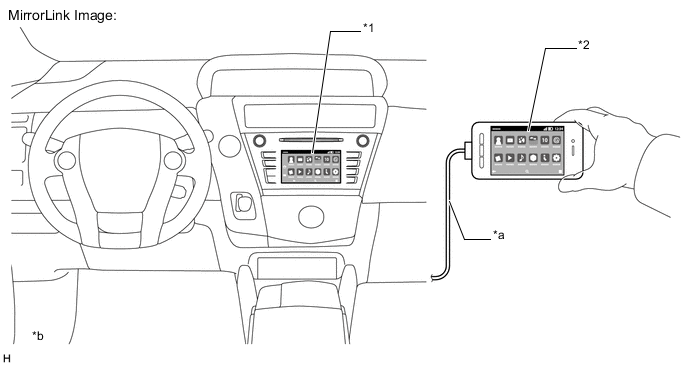
Text in Illustration *1 MirrorLink Screen *2 Smartphone *a Connection via USB cable *b The illustrations shown are examples only. The illustrations may differ from the actual screens. 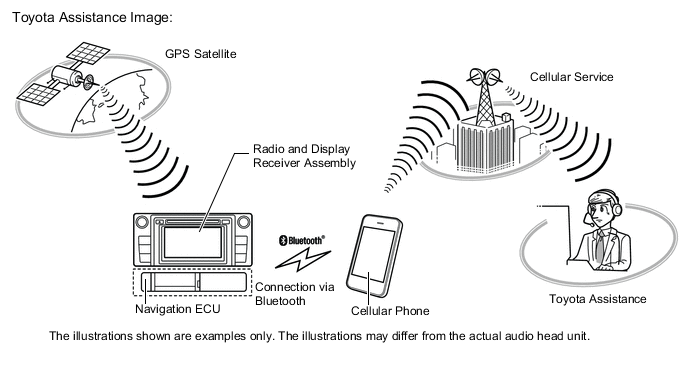
-
-
-
TOYOTA Link Service
-
The TOYOTA Link service makes it possible to operate specified applications on the multi-display by using Bluetooth to connect the multimedia system or navigation system to a cellular phone with the TOYOTA Link application installed.
-
The TOYOTA Link service enables communication between the multimedia system or navigation system, application server and content provider utilizing the TOYOTA Link application installed on a cellular phone.
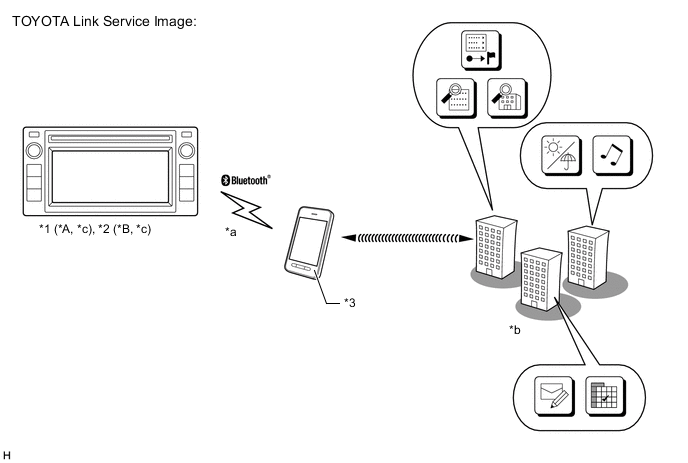
Text in Illustration *A Models with Multimedia System *B Models with Navigation System *1 Radio and Display Receiver Assembly *2 Navigation Receiver Assembly *3 Cellular Phone - - *a Connection via Bluetooth *b Content Providers *c Timely update of "Apps" can be performed. - -
-
-